Answered
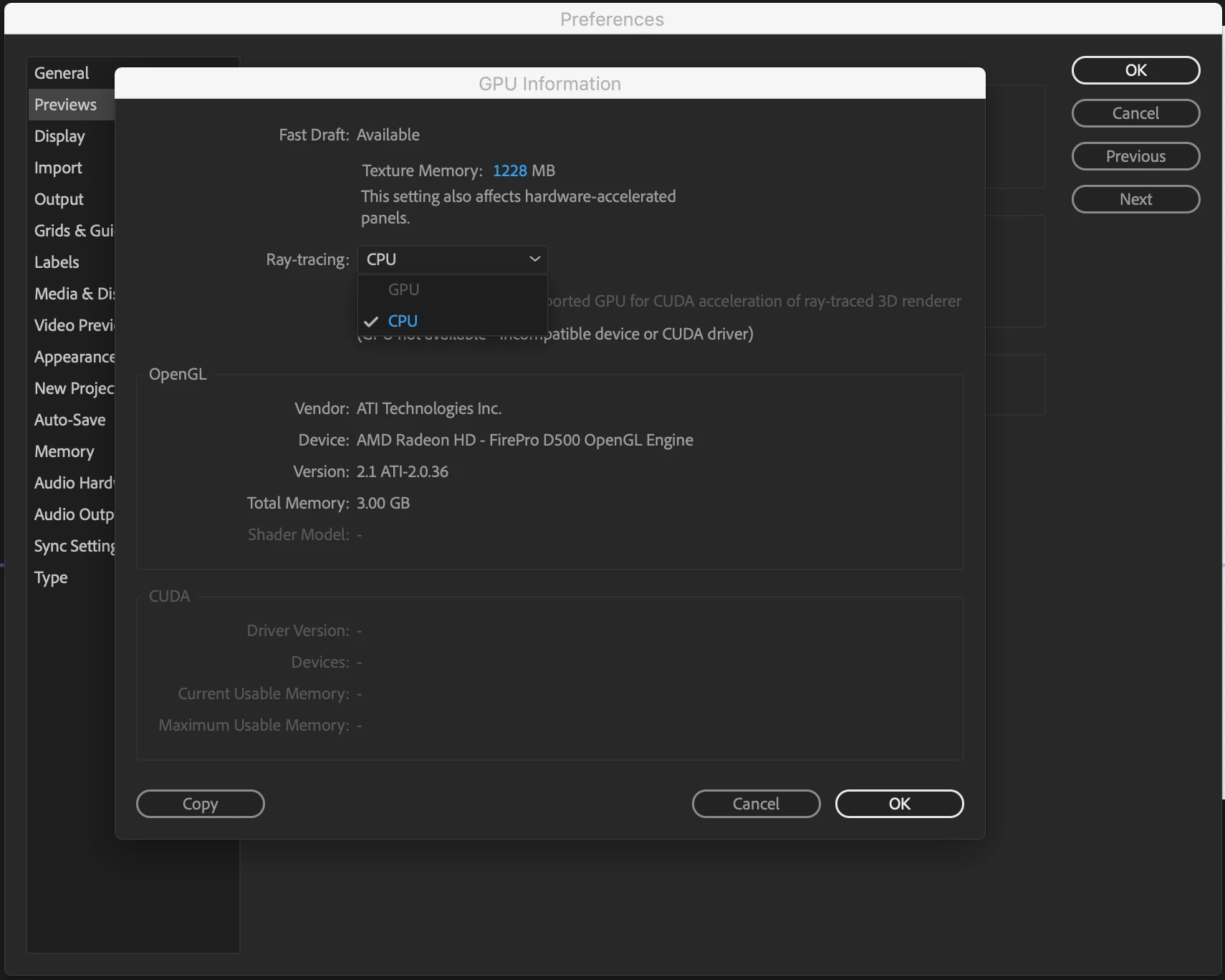
After Effect CC 2018 GPU is can't be select on Mac OS
Hi,
may know After Effect CC 2018 GPU is can't be select on Mac OS Mojave?
how I can enable it?
thanks.

Hi,
may know After Effect CC 2018 GPU is can't be select on Mac OS Mojave?
how I can enable it?
thanks.
I am using Mac Pro APP-MD878ZP/A , and is with AMD Graphics.
the Nvidia is not working on that machine.
If you do not have an NVIDIA GPU then you cannot install the drivers or use Ray-traced acceleration. It only works with a compatible GPU made by NVIDIA. The "2016 15" MacBook Pro" has a compatible card, I have one, and GPU acceleration works just fine on that machine but I still never use Ray-traced rendering for paying work because it is slow, undependable, and there are much better solutions including using C4D Lite to extrude or bend layers. There is no bug, there is no hardware problem, your machine just is not compatible with a feature that Adobe has stopped development on because of changes NVIDIA made in their development and implementation of their proprietary CUDA technology. It was never really a widely used feature by most production companies because of problems and limitations in the technology. If you want to use it just prepare for very long render times.
Already have an account? Login
Enter your E-mail address. We'll send you an e-mail with instructions to reset your password.
 AdChoices