
samstewart
Participant
May 12, 2017
Answered

After Effects 14.2 upgrade removed Lens Blur plugin

  • May 12, 2017
  • 9 replies
  • 92635 views

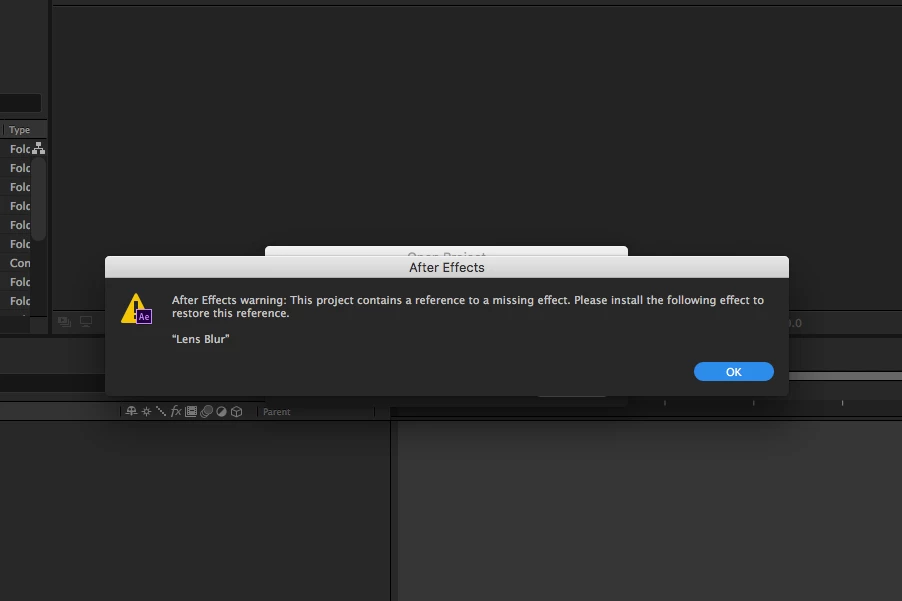
So I tried to copy from my 14.1 backup and it will not see it.

I have a purchased theme that uses it a lot and I don't know

the right plugin to select so I can copy and paste the settings.

This worked great in 14.1.. any tips?

Thanks,

Sam
Correct answer Yaelkimhi

Ran into the same problem. I opened my mac's time machine and went back to when I had the previous version installed. In the AE plugins folder i found the lens blur plugin and copied the file. pasted it into my current plugins folder and reloaded after effects. The effect no longer appears as missing.

9 replies

Participant
April 26, 2021

I don't have the previous version. Can somone please put the older lens blur effect here to downlowd it?

mukatakulima
Participant
November 24, 2018

On a Mac Install Adobe After Effects CC 2015. (Please note this can be done by going to the Adobe Creative Cloud app and click on the down arrow next to the after effects app and click on manage and then other versions) . Then go to the Plug-ins folder found in Applications/Adobe After Effects CC 2015/Plug-ins Find the plugin called lens blur copy it to the same location on the Adobe After Effects CC 2018. This is the easiest way.

Participant
February 1, 2019

This doesn't appear to work with AE2019. When I try it I get an error about being unable to find the entry point for the Lens Blur plugin

YaelkimhiCorrect answer
Participant
May 9, 2018

Ran into the same problem. I opened my mac's time machine and went back to when I had the previous version installed. In the AE plugins folder i found the lens blur plugin and copied the file. pasted it into my current plugins folder and reloaded after effects. The effect no longer appears as missing.

Sai-Fon
Participant
September 6, 2018

Can somone put the older lens blur effect here to downlowd it? I've AE 2017 and 2018 (Cloud) and have no idea, how to get the effect.

Participant
November 22, 2017

Any update about this?

Any workaround for users of CC 2017 ?

dj.summitt
Inspiring
November 22, 2017

I would not expect for effects that have been EOL'ed to be returned. It was listed as Obsolete for 7 years prior to being removed. I'd say that's quite a bit of warning. Jon mentioned above that users of 2017 can copy the AEX from an older version into their plugins directory. That may work but it is not supported.

Participant
November 22, 2017

Yes, but the whole point of CS 5.5 was that once you'd "Save a file as CS5 (rather than .5)"

It would rename the Camera Lens Blur to Lens blur instead. (But you'd still be able to open it in CS6 or CS5.5)

There was never any mentioning of CC 2017 version NOT being able to handle CS5 Files.

Participant
July 13, 2017

We use this plugin in our entire news package and it was also stripped out of CC17 for us on Mac...
I copied it from an older versions plugin folder into our new plugin folder and it worked fine... no clue why it was removed if it still is functional.

However, as an alternative, I've discovered that Camera Lens Blur operates essentially the same way if you tweak the settings around to sort of match... just remember to 1)repeat pixel edges 2) change placement to stretch to fit

Hope this helps solve others problems!

--jon

Participant
July 13, 2017

One more thing... The new "Camera Lens Blur" Plugin that replaced "Lens Blur".... I have no clue what it is actually called in the plugins folder because it is NOT in there under the name "Camera Lens Blur" So unless its a hidden file or stashed away in some other random location... I have no clue how it even loads in... but it works... soooooo, thats a plus? haha

--jon

Kevin-Monahan
Community Manager
Community Manager
June 10, 2017

Hi,

Ever find out what's going on with this obsolete effect? Were you able to output your project? Let us know!

Thanks,

Kevin

Kevin Monahan - Sr. Community and Engagement Strategist – Adobe Pro Video and Audio
Participant
July 3, 2017

No I'm still having issues with getting the warning and this just happened since I got the new version

Participant
May 12, 2017

Sam,

I have encountered the same problem and it is very frustrating.  It was working perfectly this morning...after I updated from 14.1 it became an issue. 

Thanks to Roei for the suggestion...I shall give it a try.

Thanks

Roei Tzoref
Legend
May 12, 2017

interesting. to make sure I opened a 2015.3 version to see maybe it was only moved to the obsolete category. it's not anywhere. in fact I even remember a heated debate here in the forums about the Camera Lens Blur effect not on par with the old one. if you are really curious, you can uninstall AE 14.2 and it will remove the current build too. when you re-install, it will reinstall the very first build (which was buggy) for this release...

samstewart
Participant
May 13, 2017

I am a CC student so if I uninstall AE 14.2 from within CC and then go back to the CC app to install, it installs 14.2.

I have a copy of 14.1 so I installed that. Lens Blur.plugin is in /Applications/Adobe After Effects CC 2017/Plugins.

I then run CC to upgrade and it removed the Lens Blur.plugin. This time I thought I would be tricky and copied a version of the plugin

to my desktop and then put it back after the upgrade. AE 14.2 does not list it as a option in effects and I still get the error

if I open the theme in AE 14.2

Just interesting to see the changes and I am sure this has to be bugging more than one person.

I will figure out how to fix this theme (which I got from Voxyde on VideoHive), but it uses the effect

15 times.

I like that I can search in the project area for Missing Effects and it lists each and every time it is used, so I can go through those one by one and correct. Just feel bad for the content providers out there when things go missing without warning.

Roei Tzoref
Legend
May 12, 2017

lens blur has been removed in CS5.5 Camera Lens Blur effect and camera depth of field properties in After Effects CS5.5 | Creative Cloud blog by Adobe  it was replaced with Camera Lens blur. find the missing effect and instead apply a Camera lens blur effect with manually dialing the same settings. hopefully the result matches.

samstewart
Participant
May 12, 2017

People keep telling me that, but I installed a fresh copy of AE CC 2017 14.1 and Lens Blur is in the Plugins folder.

When upgraded to 14.2 it is removed, so this is a new issue for some of us.

Thank you for the info, I will try it using camera lens blur.