Known Participant
October 13, 2015
Answered

After Effects 2015 won't preview in real time after El Capitan update.

  • October 13, 2015
  • 58 replies
  • 118879 views

Hello,

Has anyone experienced the following issue and found a solution for it?

Right after Update to El Capitan 10.11 the After Effects 2015 stopped ram previewing in real time.

No matter what i do it won’t work.

I have a latest MAC Pro 2.7 GHz 12-Core with 64GB ram.

The AE 2014 still works though.

    This topic has been closed for replies.
    Correct answer Roei Tzoref

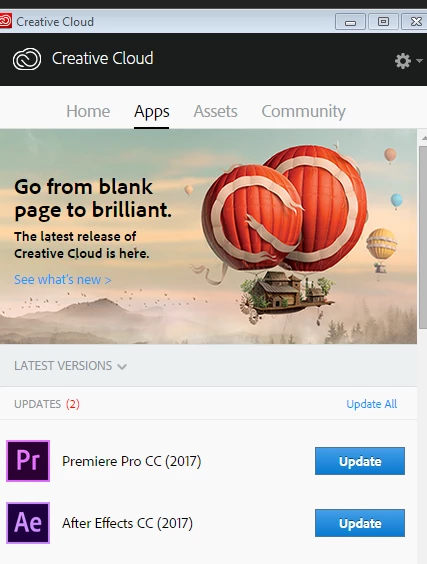
    Everybody who is having this issue please install the latest update: After Effects CC (November 2017) Bug-Fix Update Is Now Available that is supposed to finally close this thread for good! please report if this issue has been resolved.

    if you can't see the update yet, wait a while until you see it. try relaunching Creative Cloud app by typing Ctrl+Alt+R. I see it.

    this update is 14.0.1 and is a bug fix for many disturbing issues especially for Mac users. it does not fix all the bugs that are new with this release - look here for bug#2 and #3 that are still not fixed (bug #1 is fixed I believe): Known issues in After Effects CC 2017 and hopefully a bug fix for those will come pretty soon.

    58 replies

    Participant
    December 2, 2015

    Same problem, last Imac 5k with El Capitan, how can you let out a version of After Effects like this ? How can you ask money for that ? I can't believe that honest people who paid for a software can't use it properly whereas hackers can.

    At least i'm asking in the name of all the honest payers a reduction or something for our patience. Come on guys, playback is the basic feature of any software who works on animated video, we don't care about all your paying options, or stock footage or whatever fancy options if we can't use the software normally.

    We're loosing time on our projects for our clients because of that. Do something quickly or honestly i'll invite people to hack your softwares and use it freely.

    Please

    Participating Frequently
    December 2, 2015

    I agree! Adobe Subscription is a joke! I canceled the subscription because of the this bug and overall poor software quality and no substantial updates and no new tools! Now I'm back working on CS6 and the playback and rendering times are smooth and 3x times faster than the newest version! You should give back money to people that paid you for your services full of bugs! It's simply not worth it! And on the end when you cancel you end with no software! At least we should have access to the previous version!

    Participating Frequently
    October 16, 2015

    Hi, I just wanted to tell you Adobe that I'm very disappointed and angry, there is not so much features to pay monthly for subscriptions and now this! You had ONE year with OS X beta program to test everything and be ready but you didn't even try! Today I canceled my subscription and switched back to CS6 with actually better functioning preview!

    Inspiring
    October 16, 2015

    Same issue here. Followed the steps and can confirm the playhead trick works. Its pretty fundamental workflow bug. I'll have to rollback to CC14 in the meantime (it would have been nice for Creative Cloud not to have deleted my old version by default by the way!)

    Looking forward to the fix – I love the idea of the new preview. You're all doing a great job.

    Participating Frequently
    October 15, 2015

    I haven't been game to go to El Capitan yet, but i just wanted to pipe in and express my utter distain for this woefully painful new Preview feature. Anything remotely complicated and it's slower than waiting for a traditional RAM preview. Playback never stops properly, and if it does it's easily 10+ frames AFTER i hit stop...

    It's just not good enough Adobe.

    Participating Frequently
    October 15, 2015

    I unplugged my Thunderbolt/HDMI output and it's working fine. So, no external monitor until patch.

    Participating Frequently
    October 14, 2015

    I can report the same problem.

    Tried all kinds of fixes, included the ones above, but to no avail. It seems really apparent when working with audio within comps. I've also noticed it's worse when you have keyframes and audio waveform data visible on the timeline. It seems as though the UI is hampering RAM preview performance.

    Be great to have a fix to this asap.

    Thanks,

    Participating Frequently
    October 15, 2015

    I've actually found this to be working on the latest version of Yosemite too, so the problem doesn't appear to be isolated to El Capitan. Perhaps it's a new bug introduced with the latest update of Ae?

    Thanks,

    Participating Frequently
    October 15, 2015

    I've pinpointed the issue for me. It would seem that having the playhead slider visible whilst previewing makes everything slow down. If I pick a place to preview from, move across the timeline so the slider isn't visible, ram preview works fine.

    Participant
    October 13, 2015

    I want to report that I'm having the same problems. I'm operating in 720p and I'm using low res comp footage. I have an audio track. About the only thing I've done beyond fade up and fade down is for part of my piece I have use a "screen" blending mode on a layer...but the choking happens all throughout....and even if I've cached the frames....

    I tried all the renaming...I also purged everything before and previewed from scratch...I cached the frames and still can't get it to run smooth at full rez.

    I can get it 99% there at half rez but thats pretty ridiculous...I've done far more complex work, pre-El Capitan at full res with no problem....

    What's specifically troubling is the inability to simply play back cached frames....

    Vinay Dwivedi
    Adobe Employee
    Adobe Employee
    October 13, 2015

    Hi,

    Is this happens with the simple text or solid layers or is specific to any project(s)?

    Have you tried renaming Adobe folders? if not, please do and check.

    Make sure all the Adobe apps are closed.

    Go to Documents and rename Adobe folder as old_Adobe (Do not delete folder as they contains your customized settings)

    Go to User>Username>Library>Application Support and rename Adobe folder (User LIbrary is hidden so Click on Go menu in finder and hold opt key)

    Go to User>Username>Library>Prefernces and do the same.


    //Vinay

    AMAXAuthor
    Known Participant
    October 13, 2015

    One other thing to add. I noticed that the rendered (green) section would play fine after i restart the AE but as soon as I try to render more of it or something else the issue persists.

    AMAXAuthor
    Known Participant
    October 13, 2015

    Hi Dennis,

    No it is not related to Metal.

    Also, do you have any third party plugins installed on your machine.

    Go to MAC HD or startup drive>Library>Application Support>Adobe>common>Plugins>7.0>MediaCore.

    If yes, move all of them to desktop and make MediaCore empty.

    //Vinay


    Ok, That seems like it fixed the issue.. i think.

    So now i guess i have to reinstall all the third party plugins?