
Participating Frequently
November 11, 2024
Question

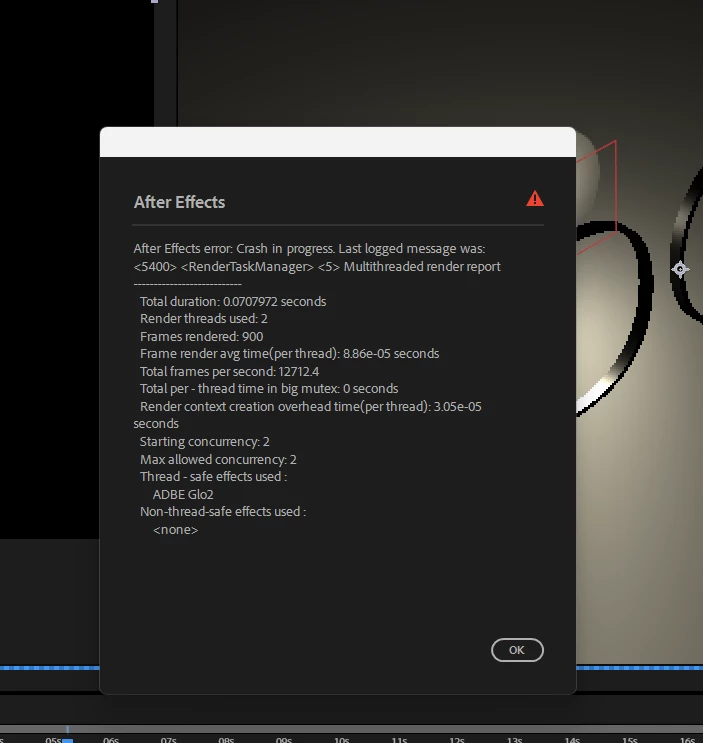
After Effects 2025 Crashing when Rendering Timeline

  • November 11, 2024
  • 3 replies
  • 513 views

I am trying to create a 3D scene with light leaks, and some CC effects. Any time I add a few effects to the timeline, it crashes on me. I've done the usual things like clearing cache, making sure everything is updated, restarting the PC, etc. Nothing is helping. 
The machine I am working on was built last year and contains an Intel® Core™ i9-13900KS Processor, 128gb DDR5 ram, and an NVIDIA GeForce RTX 4090. 

Please give me any help. I have a deadline I'm missing because of this. 
 

This topic has been closed for replies.

3 replies

Participant
November 20, 2024

I had the same problem. I lowered the color from 32 to 16 bpc and it went smooth.

Field Kuang
Community Manager
Community Manager
November 12, 2024

Could you please provide the effects you applied that crashed AE as you mentioned above? It would be even more helpful if you could share a crashing project. It would greatly increase the likelyhood of us finding the exact cause if we could reproduce the crash on our end. Feel free to DM me on those assets.


A log file would be helpful too. Here are the steps to create one:

  1. Start AE
  2. Help Menu => Enable Logging
  3. Restart AE
  4. Reproduce the crashing behavior
  5. Help Menu => Reveal Logging Files...
  6. Find the "After Effects Log.txt" file and copy/paste the content back to this forum thread.
nishu_kush
Legend
November 12, 2024

Sorry to hear about the crash. We're here to help.

Does it crash only when working with 3D objects or any project? Do you see a crash report? If so, please provide your email ID to it and submit it. We'll be able to find the crash report on our system.

In the meantime, try running After Effects in Safe Mode.

Let us know how it goes.


Thanks,

Nishu