
After Effects 22.3 - Real-Time 3D Draft Preview greyed out
Hello,
I have a problem with Real-Time 3D Draft Preview on my computer. In my project, the button for Real-Time 3D Draft Preview shows up (my layers are all 3D) but is greyed out. When I hover over it, I get a message telling me to enable Accelerate Panels in Preferences-->Display - which I already have enabled. Is this a hardware issue? Are there any specific requirements to use this feature?
The lack of Real-Time 3D Draft Preview also disables other related features, like the ( new as of AE 22.3 ) extended viewer. There is no information anywhere on the Adobe page that you need to have a specific configuration or graphic card to use the new features of AE...
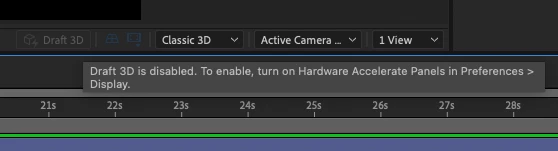
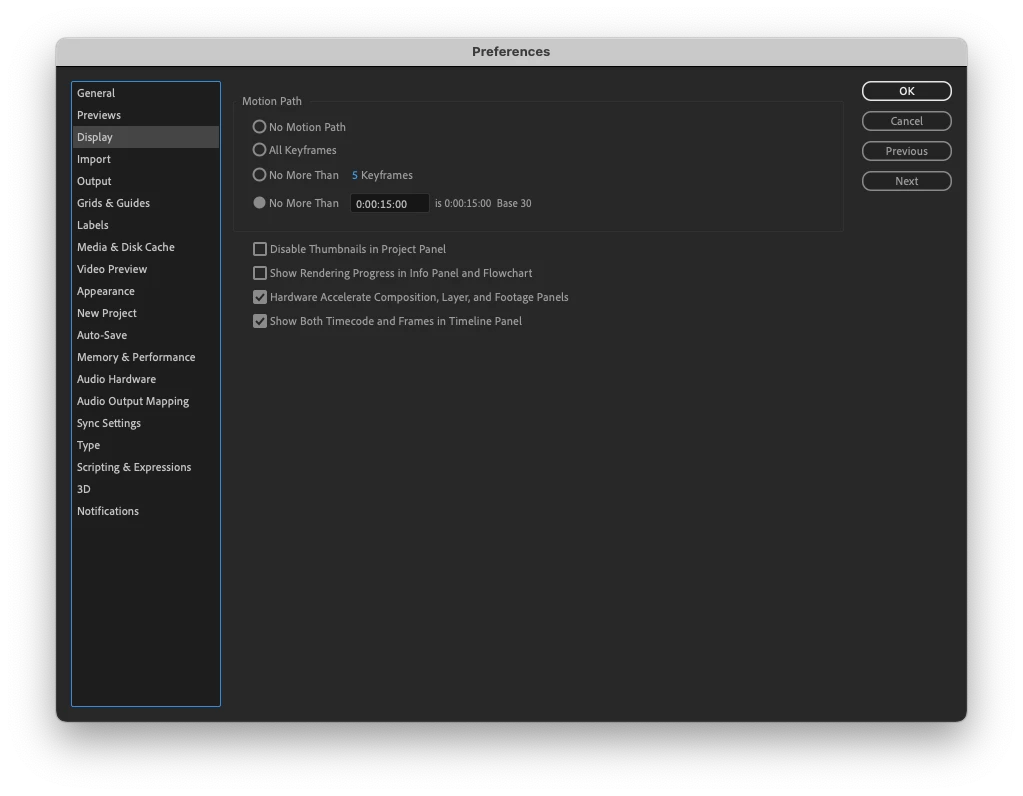
I have found a suggestion elsewhere on this forum that a "fresh reinstall" of AE might be the solution. So I uninstalled AE via Creative Cloud and re-installed it. Upon startup, I chose not to keep the settings from the earlier versions. It didn't work - but perhaps it wasn't a real clean re-install? Is there a specific way to do it? I would be grateful for an answer...
My configuration: MacBookPro 2015, 2,2 GHz Quad-Core Intel Core i7, 16GB RAM, Intel Iris Pro, Mac OS Monterey ( 12.3 )
Thanks in advance for any help,
Mikołaj
 AdChoices