

Rameez_Khan
Legend
May 10, 2022
Question

After Effects 22.4 is now available!

  • May 10, 2022
  • 15 replies
  • 5609 views

After Effects 22.4 is now available for download from the Creative Cloud desktop application. This release is recommended for all users.


What's new?

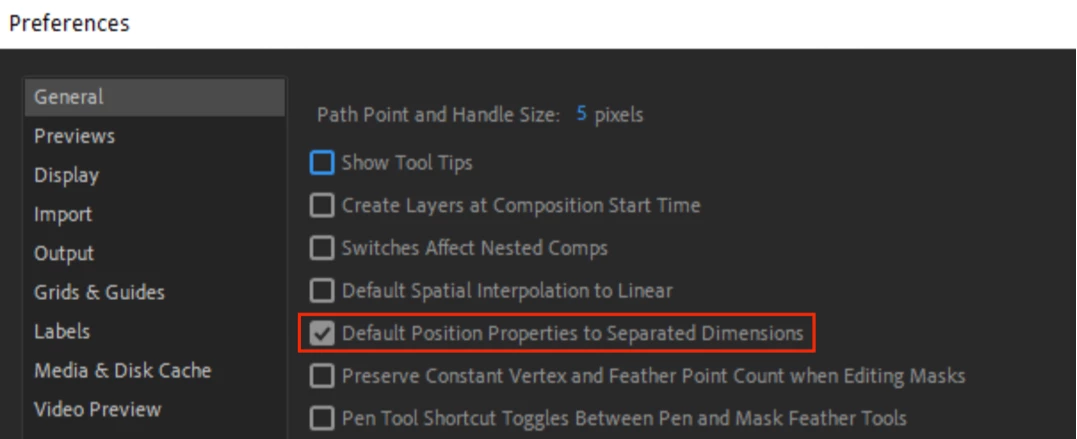
There is a new preference to separate the Position property dimensions in the Timeline by default. When enabled, the Default Position Properties to Separated Dimensions preference (available in Preferences > General) automatically separates the Position property into X, Y, and Z when a layer is created. 
 

What's fixed?

  • Fixed an issue where setFontName() would appear in an error message for setFont()
  • Fixed an issue where Motion Graphic Templates that use the Mocha Shape Importer on Apple Silicon hardware would show an unsupported error in Premiere Pro
  • Fixed an issue that caused projects with Lumetri parameters not to be backward- or forward-compatible in After Effects 22.3
  • Fixed an issue that prevented certain .png files from importing properly
  • Fixed an issue that caused prevented workspaces from reverting to saved layouts via Reset Workspace to Saved Layout option
  • Fixed an issue that caused slow playback of video footage when Multi-Frame Rendering was enabled
  • Fixed an issue that resulted in errors when refreshing the contents of the Effects and Presets panel
  • Fixed an issue that caused text animators and highlight/text selection to not work correctly for right-to-left-aligned languages
  • Fixed an issue that resulted in After Effects becoming unresponsive while using the Mocha plugin


How to update After Effects to version 22.4?

Open the Creative Cloud desktop application and click the Updates tab on the top-left. Find After Effects in the list and click Update.

I don't see the update in my Creative Cloud desktop application. What should I do?

Click Help > Check for Updates from the Creative Cloud desktop application to refresh it.

This topic has been closed for replies.

15 replies

Participant
May 16, 2022

I have facing so many issues with this 22.4 version, that I uninstall it and install the 22.2.1 which the last steady one.


My problems (I am on WIN10, PC) :


- the first start popin when the app is opened is impossible to close, the click is deactivated, the soft is blocked, the only solution is to open After Fx via a project, then to go in the preference and to prevent this start popin to appear.

- It's impossible to close the app, when a project is loaded. Even with CTRL + ALT + SUPP, so I can try to force via the task manager, it doesn't work, I have to restart the computer.


Rameez_Khan
Legend
May 30, 2022

Hi @gingersylar


Sorry for your issues! The behavior that you're describing is unexpected. 

If you would like to troubleshoot these issues, let me know so that I can suggest some troubleshooting steps. 


Thanks,

Rameez

Participant
May 12, 2022

I now can't get past the splash screen. How do I roll back?

Rameez_Khan
Legend
May 13, 2022

Hi @Kazek Lokuciewski


What kind of computer do you have? 

After Effects would freeze on the splash screen mostly due to third-party plugins. If you have any third-party plugins, remove them temporarily and see if it works. 


If you want to roll back to the previous version, here are the instructions: https://community.adobe.com/t5/after-effects-discussions/faq-how-do-i-reinstall-a-previous-version-of-after-effects/td-p/9393726


Thanks,

Rameez

Participant
June 6, 2022

It sorted itself out a few days later. Not sure if there was a tweak at Adobe.

VideoRobb
Participating Frequently
May 11, 2022

I just updated and now my dropdown windows don't correctly.  They open and then when I go to select they disappear.  Also, the don't lock open so I can select.  This is driving me crazy.  Any one else have this problem?

VideoRobb
Participating Frequently
May 11, 2022

don't work correctly

VideoRobb
Participating Frequently
May 11, 2022

I closed After Effects and re-opend it, and it seems to be working now.

Known Participant
May 11, 2022

I'm having issues with the 3D tracking.

After 3D camera tracking and adding a NULL, the controls are warped and trying to choose a selection of tracking points always has the red circle (selection) sideways. In this instance I only picked 1 tracking point.

I do this all the time, and this is the first time I'm having this kind of result and I just updated today.

Rameez_Khan
Legend
May 13, 2022

Hi @JamieWoods,


Sorry to hear that the 3D camera tracker isn't working correctly for you. 

  • Can you test this behavior in a new project? 
  • Are you on Windows or macOS? 


If all the projects exhibit the same behavior, can you roll back to the previous version and let me know if that is working correctly? 

Here is how you can reinstall the previous version: https://community.adobe.com/t5/after-effects-discussions/faq-how-do-i-reinstall-a-previous-version-of-after-effects/td-p/9393726 


Thanks,

Rameez

mihimaruGT
Inspiring
May 10, 2022

Hi. I hope AE can increase the infinite zoom in and out, and the mouse wheel can zoom in and out smoothly

Rameez_Khan
Legend
May 13, 2022

Hi @mihimaruGT


For enhancements and feature requests, please create a post on UserVoice so that it will be received by the After Effects team directly: https://adobe-video.uservoice.com/forums/911311-after-effects


Thanks,

Rameez