



Rameez_Khan
Legend
October 18, 2022
Question

After Effects 23.0 and MAX 2022: H.264 export, selectable Track Matte layers, and more...

  • October 18, 2022
  • 8 replies
  • 9184 views


Welcome to Adobe MAX 2022!
October 18-20


Register Here. Attend virtually, or join us in Los Angeles for the live conference!

MAX FAQ: Find out more. See what you can learn. 
MAX Sessions: Pick from a huge variety of digital video & audio courses.


Welcome to After Effects 23.0!

The October 2022 release of Adobe After Effects (v 23.0), is now available for download from the Creative Cloud desktop application. This update includes numerous bug fixes, new features, and performance improvements.

  • The product team recommends the update for all users. 
  • If you are experiencing any issues, please create a new post explaining your problem so we can help.
  • If you have a bug to report or any complaint, please do that on our community here.


System Requirements

The system requirements for After Effects 23.0 have changed. Please visit the System Requirements page for details.


What's New in After Effects 23.0?

Native H.264 Rendering:  

Our community asked, and we listened. H.264 can now be rendered natively in After Effects 23.0 from the After Effects Render Queue. Yay!! You can choose from three output module presets based on your desired target bit rate. If you want more customization, you can change the resolution, frame rate, and color management settings. For more in-depth control or specific settings, you can still use Media Encoder to render your files. Oh! And H.264 export supports both hardware and software encoding modes.
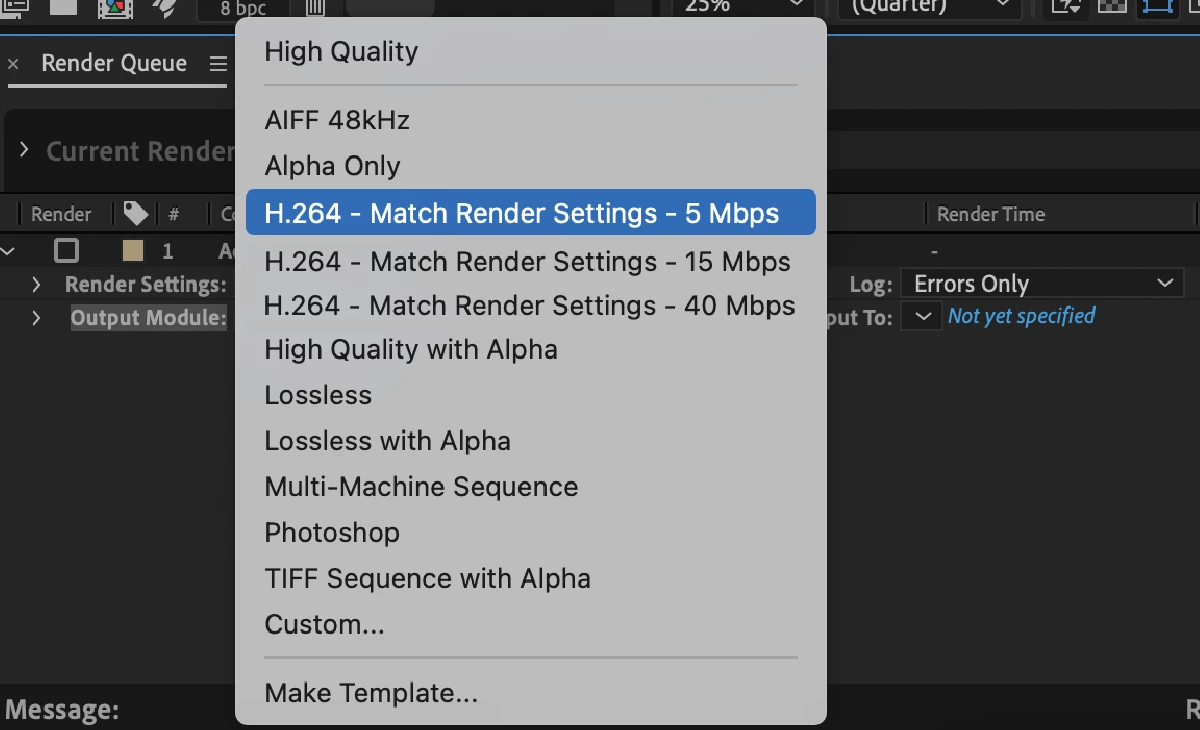
For more details on the H.264 Output Module Presets, visit the Exporting H.264 page in the User Guide.

Select Track Matte Layers: 

After Effects 23.0 makes it incredibly simple to use track mattes, especially in a complex project that has multiple track matte layers. Any layer in your composition can now serve as a Track Matte, regardless of its position in the layer stack. You are no longer required to place the matte above the target layer. As a result, it is easier to navigate through the layers, make adjustments, and accelerate your workflow.
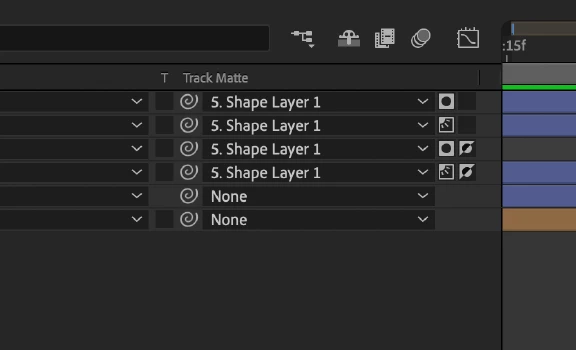
For more details on how to toggle between Alpha/Luma Matte, and preserve transparency, see the Track Mattes and Traveling Mattes page in the User Guide.

Composition Presets: 

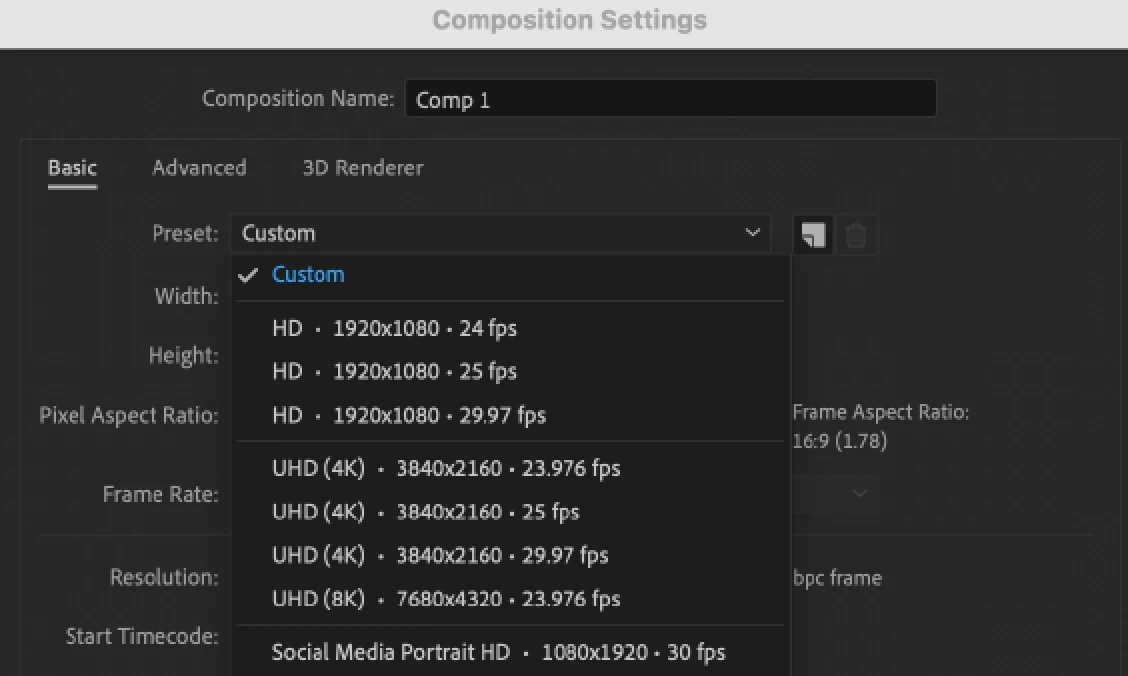
In recent years, 4K and vertical video have emerged as the most preferred choices. In order to make it simpler to find the presets that are used most commonly, the After Effects Composition Presets list has been revamped. The presets also include sizes for social media output.
New Animation Presets:

After Effects now offers 50 new Animation Presets created by our After Effects community. These presets, designed for modern motion design workflows, save you time on the techniques you use the most, allowing you to create quick animations without having to start from scratch.

Faster Timeline Navigation: 

The J and K keys allowed you to easily move between the previous and next keyframes across all layers in the timeline in earlier versions of After Effects. Now you can select keyframes on selected layers and properties by holding the Shift key while using the J and K hotkeys. Holding the Shift key limits the movement of the Current Time Indicator (CTI) to keyframes on the selected layers.

Installing Cinematic4D is now optional: 

Another one where the community, especially our Enterprise users, asked and we delivered! Use the Add-ons option during After Effects installation to download or skip Cinema 4D. If you want to install Cinema4D later, you can always install it through the Creative Cloud application.


What's New in Beta?

Properties Panel: 

Use the Properties Panel to quickly access the important properties of selected layers in the timeline without the need to twirl open multiple layer hierarchies or a different panel. It improves the accessibility of layer and object properties that speed up your workflows. The latest Beta brings the Properties Panel feature for Shape layers.

For more details on how to use the Properties panel, visit the Properties Panel (Beta) page.

3D Model Import:

You can import a 3D model into After Effects and add it to your compositions to edit and animate its transformation, such as position, scale, rotation, etc. While importing 3D models you can specify how the model should be interpreted, like units, scale, etc.

OpenColorIO and ACES Color Management:

This release of After Effects Beta includes support for OpenColorIO and ACES. For detailed information on color management settings in the project and during export, see the OpenColorIO and ACES color management page of the user guide.


Adobe After Effects Beta Program Information

How does one download Adobe Premiere Pro Beta and provide feedback? See the following video. 


What's fixed?

After Effects 23.0 includes several bug fixes. See the Fixed Issues page for more details.


How to update After Effects to version 23.0?

Open the Creative Cloud desktop application and click the Updates tab on the top left. Find After Effects in the list and click Update.

I don't see the update in my Creative Cloud desktop application. What should I do?

Click Help > Check for Updates from the Creative Cloud desktop application to refresh it.


Adobe MAX 2022

This topic has been closed for replies.

8 replies

Known Participant
December 8, 2022

It seems like a lot of options are missing for the reintroduced native MP4 rendering. A very important one is any kind of "Fast Start" option that puts the MOOV atom at the front of the file to assist with progressive download / pseudo-streaming. (We have Enterprise Support, which is basically garbage, and they told me to come make comments on the Community Forum.)


Is there any chance we could see a fast-follow-up patch to expand the MP4 muxing options to include Fast Start?

Participant
December 2, 2022

Hi,

could you please help me?


I'm not able to use 3D camera tracker in After Effects, neither Warp stabilizer. It only stuck on initializing and thats all. After that I recieve message "timed out obtaining dynamiclink server connection", but there is no dynymiclink between anything. I'm looking on every forum from Adobe, but there are not any usefull advices. I use Macbook M1 Max 32gb. Do you know, what can I do? Thank you for your advice. 🙂 M.

Tdigitalguru
Participant
December 2, 2022

It is really a great tool and we have use it most of our project. Thanks for the information.

Participating Frequently
October 27, 2022

Anyone has any idea if the memory leak issue is fixed in AE 23? Or does it still guzzle all the memory.


This is the issue I'm talking about.


Thanks

Rameez_Khan
Legend
November 21, 2022

Hi @Azeez A,


After Effects 23.0 contains several memory improvements. It also includes a fix for the memory leak where only five frames would render on machines with shared system/GPU memory, such as Apple silicon M1 machines. 


In other cases, the memory leak was caused by some third-party plugins, which have also rolled out fixes. If you haven't updated to After Effects 2023, I recommend installing it parallelly with your current AE version.

nubnubbud
Inspiring
October 20, 2022

When are you guys planning on fixing the bug where tracking points more than 25 frames disables the UI interactibility?

At the same time, Playback is still unusable. I have both CS6 and CC22 on my computer, and only CS6 can actually play an entire 4k video clip without failing at more than 50% speed. CC22 barely gets 3 seconds in before it stutters to 2-6 FPS, uneven, and 11 seconds into a clip before it stops playing the video altogether. I know this is because of RAM limits... but wouldn't CS6's implementation be an improvement, if it uses less RAM and has smoother playback at high resolutions?

Participant
October 24, 2022

As a designer, do you also pay attention to the optimization of the designs that you upload on the website? Because sometimes, this can increase awareness and is good for backlinks. Here is an example of a klinik kecantikan website that I'm working on.

nubnubbud
Inspiring
October 24, 2022

I'm a visual designer in VFX, so I'm not sure what you want to know about optimization besides visibility and visual/conceptual flow, but in general, but if you often need references for your use case, I would advise making a reference section below every article, and one that's clear if there are no references, or it's an opinion piece.

raymondcraig
Participating Frequently
October 19, 2022

I still get the “Two frame preview error” in the comp preview even though it says it's been fixed. This has been an issue ever since version 22.5. Doesn't matter if it's the only app running and I've purged memory/cache and even deleted the preferences. Yet if I install older version 22.4 the same timeline will instantly show green and playback without issue, even with other apps open. If I create a new project it seems to work fine, but the problem is I neeed to be able to edit my older projects and those are the ones that appear to have this issue.

Participant
October 19, 2022

I get an expression error when using the slide in from comp edge animation text effect. Any thoughts?

Participant
October 19, 2022

Solved it by changing the project settings expressions from Legacy to Java

Rameez_Khan
Legend
October 27, 2022

Thanks for letting us know. 


Best,

Rameez

mihimaruGT
Inspiring
October 19, 2022

thanks. I really hope that the view window can zoom smoothly like Ps, and I found that 2023 is lower than 22.5 in terms of fluency. I am M1 Ultra

Rameez_Khan
Legend
October 27, 2022

Hi @mihimaruGT,


As I suggested to you earlier, you can upvote the feature request here: https://community.adobe.com/t5/after-effects-ideas/smooth-zooming-via-mouse/idi-p/13229577 


I'll also discuss this with the After Effects team and see where the feature request stacks in the product backlog. 

Thanks,

Rameez 

Matt Boardman
Participating Frequently
October 19, 2022

Unfortunately, I'm still not seeing a fix here for the way AVID codecs are processed that changed with version 22.3.  With that change, I've been stuck on 22.2.1 because none of the productions I've worked on are able to import AVID rendered Quicktimes that I render from later AE versions.  It would be really nice to be able to enjoy the latest updates to AE and still be able to use it for production work.  Is it possible to have this fixed?Thank you in advance!

Rameez_Khan
Legend
October 19, 2022
Matt Boardman
Participating Frequently
October 19, 2022

Hi @Rameez_Khan,


That would be the change.  Ever since the v22.3 update, myself and other VFX artists that I work with have been unable to update AE to anything beyond 22.2.1.  If I do update to anything beyond that version, rendered shots in AVID formats that the editorial department asks us to render in come in as a black, blank frame.  This has happened now on 2 separate projects that use AVID as the editing software.  It is especially frustrating as the Nuke compositors on these projects do not have the same issue rendering out AVID encoded Quicktimes.  Any help here would be greatly appreciated.