
Multipasser
Inspiring
March 4, 2024
Question

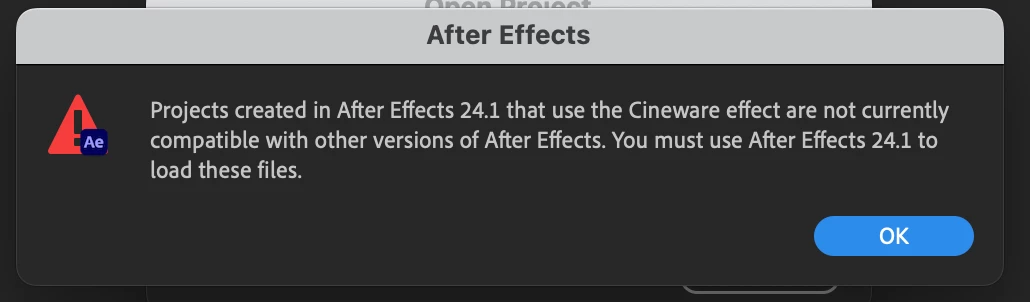
After effects 24.2.1 not opening 24.1 file because of cineware?

  • March 4, 2024
  • 7 replies
  • 3467 views

Honestly, sometimes I think it is done on purpose. 

Why in gods name would this be the case after a minor update?
I'm in full deadline mode now, my pc/mac updated and can't open my projectfile now!!!

this is sick!
 

7 replies

Participant
August 27, 2024

Encountering the same issue. It's inconcievable that the "industry standard motion graphics package" is this fickle with regards to the upgrades they so constantly push. A project which was working perfectly fine is now unable to be opened, and the suggested solution essentially amounts to "good luck".  Brilliant. 

Inspiring
July 29, 2024

Incredible- just ran into the same issue today, four months later. HOW ON EARTH ADOBE???

Participant
June 25, 2024

This wouldn't be as much of an issue, except that you can't keep two versions of AE 24 on your system.  So if you have done all the updates and then run into this problem, you have to replace the newest version with 24.1.  That's so stupid.  I can deal with just opening another version of AE, but now this stops me from being able to update.  Until what?–I open and save all my files that I can remember have been using Cineware?? That's ludacris.  If this is the solve, then either change the newest update so you can keep multiple AE's to open projects, or create an option to open but disabling the plugin.  This is so unprofessional.

Participant
June 5, 2024

Same issue here. Just replying to tell you Adobe, that this is ridiculous. That's pretty much it.

Participant
June 10, 2024

to be honnest it's shame Adobe is less and less stable.... incompetent to respond to its customers' problems, all because they have a monopoly... when will there be a serious competitor???

EYEIDEA
Inspiring
May 25, 2024

Yeah, this is reeeeaaally lame. Adobe, you know a lot of us are on deadlines. When stuff like this happens we lose trust in Adobe. Sort it out. Now I have to install 24.1 to get a project open, in fact, I have to also UN-install any newer verisons of Ae v.24 – yay.

Participant
May 24, 2024

I am having the same issue, have tried 4 versions of AE and it still not working, should have an option to just open the project file with the plugin disabled or something, its such a bad practice the error is just basically a: "yeah we did this, figure it out yourself" 

Multipasser
Inspiring
May 24, 2024

Only 24.1 works with that project! no other version so install that one.

Multipasser
Inspiring
March 4, 2024

February 2024 Release (Version 24.2) Issue: After Effects 24.1 included an upgrade of the Cineware plugin that broke the compatibility of projects utilizing .c4d files, the Cineware effect, or the Cinema 4D Renderer. After Effects 24.2 includes an update that restores compatibility with projects created in After Effects 24.0 or earlier. However, those created in 24.2 or later will not open in version 24.1. Conversely, those created in 24.1 will not open in other versions. Workaround: This is a known issue, and we recommend you upgrade to After Effects 24.2.1 to use files from 24.0 and earlier. For ones created in 24.1, use After Effects 24.1.


for real :((

nishu_kush
Community Manager
Community Manager
March 4, 2024

Sorry for the inconvenience, Multipasser.

Please install the 24.1 for the project you're working on. You can install it using the Creative Cloud desktop app. Here's how: https://helpx.adobe.com/in/download-install/using/install-previous-version.html

Let us know if there are any other questions.


Thanks,

Nishu

Michael M. Kadrie
Participating Frequently
March 19, 2024

So what, we are just supposed to now have 2 different versions of After Effects on our system becasue the geeks at Adobe aren't smart enough to figure out how to make this work? This has to be a laziness issue. I have many files that are using C4d files and Cineware. And if I continue moving forward with the newer versions of AE, I'll never be able to open them again. You wrote this article saying this issue was fixed (https://community.adobe.com/t5/after-effects-discussions/after-effects-24-2-1-is-now-available-for-download/m-p/14464311). So are you the "brains" behind this operation? Good job! 🤨 When Maxon has a plugin that is no longer compatible with the version of AE, do you know what they do? They enable you to migrate the old version to the new version with one click of a button. And most times it works like a charm. So maybe you should contact Maxon to brainstorm on how to allow the newer versions of AE to migrate the older versions of Cineware (since that is their software). 

You guys at Adobe do this all the time. You change something that didn't need to be changed, or you can't figure out how to do something right, and rather than WAIT until you can figure it out, you go ahead and do what you want to do and then tell everyone else to deal with it. And you do it knowing that there is nowhere else for people to go. You're unbelievable! I have an idea and I'm pretty sure that most of the Adobe Community will get behind me on this one - how about rolling back to 24.1, get your issues with Cineware figured out first and THEN roll out the new version. Why is that so hard? What is the HUGE rush to put out a 24.2?
Figure it out!!