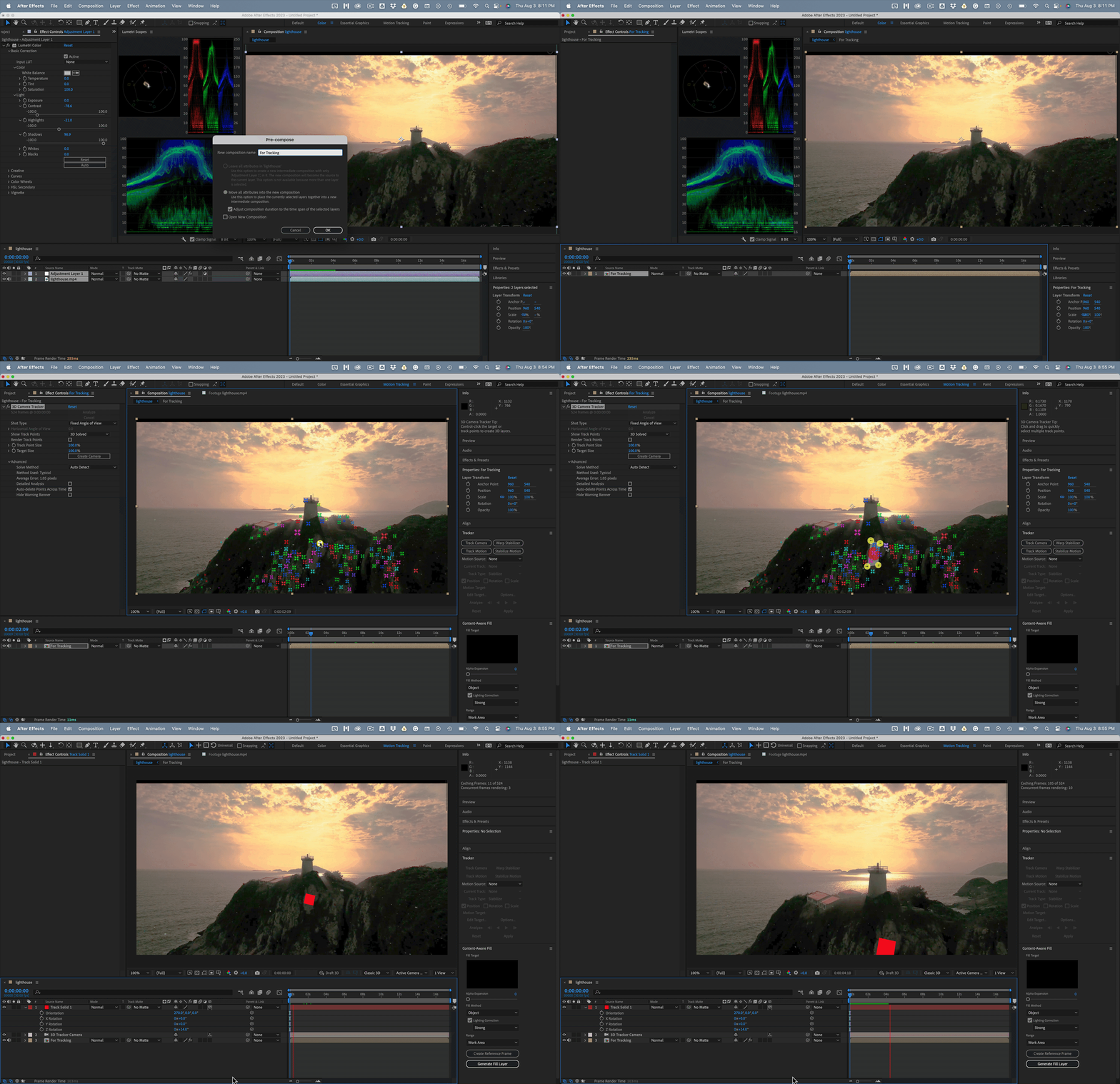
The normal procedure for camera tracking should go something like this:
- Analyze the shot to see if it is suitable
- If it lacks contrast or detail, add an adjustment layer and color correct to bring out as much detail as possible
- Precompose the Adjustment layer and the Footage trimming of the new comp to the layer size
- Run motion tracker
- Verify that you have a good track by setting an origin and ground plane and adding a camera and solid using the same target
- Add other solids to surfaces to confirm the track is good
- Make all of the solids guide layers to prevent them from rendering
- Add the elements that you need to add to complete the composition and Shift + parent them to the solids t keep them attached to their reference layers
It is a good idea to use the Color workspace to do the color correction so that you can see the waveform and know when you have filled it up as much as possible. Using the Motion Tracking workspace to do the Camera Tracking is also a good idea. When you have verified that the camera track is good and you have added the other 3D elements to the scene, you can return to the Pre-comp and return the color correction to normal and complete your shot.
Something like this worked for that shot:



 AdChoices