
Participating Frequently
January 16, 2018
Answered

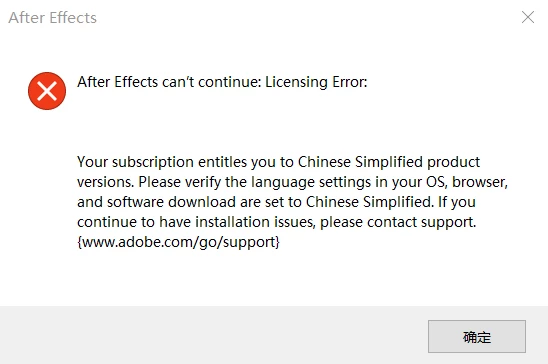
After Effects can't continue: Licensing error.

  • January 16, 2018
  • 4 replies
  • 11395 views

There are some issues about it

and I have tried the solution on the https://helpx.adobe.com/after-effects/kb/known-issues-after-effects-cc-2017.html

which I switch my win10 from English to Simplified Chinese

however it still no working

I try to uninstall and install it again in Simplified Chinese and English version with OS.

but still no working.

OS Version: Microsoft Windows 10 Pro (Microsoft Windows NT 10.0.16299.0)

CPU Info: Intel(R) Core(TM) i7-7700HQ CPU @ 2.80GHz

Default Culture: en-GB/zh-CH

Default UI Culture: en-GB/zh-CH

Ram: 32GB

GPU: GTX 1070 with Max-Q Design
This topic has been closed for replies.
Correct answer ToolfarmJP

Hello,

This thread may help you. You get access to it.

After effects CC 2017 licensing error

4 replies

ToolfarmJP
Community Expert
ToolfarmJPCommunity ExpertCorrect answer
Community Expert
January 16, 2018

Hello,

This thread may help you. You get access to it.

After effects CC 2017 licensing error

AndyLonlyAuthor
Participating Frequently
January 17, 2018

I install English(US) and it work, thank you.

however the English(international) and Simplified Chinese still not working.

ToolfarmJP
Community Expert
Community Expert
January 16, 2018

Hello,

What language did you choose here?

AndyLonlyAuthor
Participating Frequently
January 16, 2018

Additional Details

The following section contains the additional details that were recorded.

These details help accurately identify the programs and UI you used in this recording.

This section may contain text that is internal to programs that only very advanced users or programmers may understand.

Please review these details to ensure that they do not contain any information that you would not like others to see.

记录会话: ‎2018/‎1/‎16 11:19:24 - 11:20:04

记录的步骤: 12, 丢失的步骤: 0, 其他错误: 0

操作系统: 16299.15.amd64fre.rs3_release.170928-1534 10.0.0.0.2.48

步骤 1: 用户在"通知 V 形 (按钮)"上左键单击
程序: Windows 资源管理器, 10.0.16299.15 (WinBuild.160101.0800), Microsoft Corporation, EXPLORER.EXE, EXPLORER.EXE
用户界面元素: 通知 V 形, Button, TrayNotifyWnd, Shell_TrayWnd

步骤 2: 用户在"Creative Cloud (按钮)"上左键双击
程序: Windows 资源管理器, 10.0.16299.15 (WinBuild.160101.0800), Microsoft Corporation, EXPLORER.EXE, EXPLORER.EXE
用户界面元素: Creative Cloud, 溢出通知区域, ToolbarWindow32, 通知溢出, NotifyIconOverflowWindow

步骤 3: 用户在"Chrome Legacy Window (窗格)"上左键单击(在"Creative Cloud"中)
程序: Adobe Creative Cloud, 4.3.0.256, Adobe Systems Incorporated, CREATIVE CLOUD.EXE --SHOWWINDOW=FALSE --ONOSSTARTUP=TRUE, CREATIVE CLOUD.EXE
用户界面元素: Chrome Legacy Window, Chrome_RenderWidgetHostHWND, Chrome_WidgetWin_0, CefBrowserWindow, HEXPanel Dialog, #32770, Creative Cloud, #32770

步骤 4: 用户在"首选项... (菜单项目)"上左键单击
程序: Adobe Creative Cloud, 4.3.0.256, Adobe Systems Incorporated, CREATIVE CLOUD.EXE --SHOWWINDOW=FALSE --ONOSSTARTUP=TRUE, CREATIVE CLOUD.EXE
用户界面元素: 首选项..., 上下文, #32768

步骤 5: 用户在"Chrome Legacy Window (窗格)"上左键单击(在"Creative Cloud"中)
程序: Adobe Creative Cloud, 4.3.0.256, Adobe Systems Incorporated, CREATIVE CLOUD.EXE --SHOWWINDOW=FALSE --ONOSSTARTUP=TRUE, CREATIVE CLOUD.EXE
用户界面元素: Chrome Legacy Window, Chrome_RenderWidgetHostHWND, Chrome_WidgetWin_0, CefBrowserWindow, HEXPanel Dialog, #32770, Creative Cloud, #32770

步骤 6: 用户在"Chrome Legacy Window (窗格)"上左键单击(在"Creative Cloud"中)
程序: Adobe Creative Cloud, 4.3.0.256, Adobe Systems Incorporated, CREATIVE CLOUD.EXE --SHOWWINDOW=FALSE --ONOSSTARTUP=TRUE, CREATIVE CLOUD.EXE
用户界面元素: Chrome Legacy Window, Chrome_RenderWidgetHostHWND, Chrome_WidgetWin_0, CefBrowserWindow, HEXPanel Dialog, #32770, Creative Cloud, #32770

步骤 7: 用户在"Chrome Legacy Window (窗格)"上鼠标滚轮向下滚动(在"Creative Cloud"中)
程序: Adobe Creative Cloud, 4.3.0.256, Adobe Systems Incorporated, CREATIVE CLOUD.EXE --SHOWWINDOW=FALSE --ONOSSTARTUP=TRUE, CREATIVE CLOUD.EXE
用户界面元素: Chrome Legacy Window, Chrome_RenderWidgetHostHWND, Chrome_WidgetWin_0, CefBrowserWindow, HEXPanel Dialog, #32770, Creative Cloud, #32770

步骤 8: 用户在"Chrome Legacy Window (窗格)"上左键单击(在"Creative Cloud"中)
程序: Adobe Creative Cloud, 4.3.0.256, Adobe Systems Incorporated, CREATIVE CLOUD.EXE --SHOWWINDOW=FALSE --ONOSSTARTUP=TRUE, CREATIVE CLOUD.EXE
用户界面元素: Chrome Legacy Window, Chrome_RenderWidgetHostHWND, Chrome_WidgetWin_0, CefBrowserWindow, HEXPanel Dialog, #32770, Creative Cloud, #32770

步骤 9: 用户在"Chrome Legacy Window (窗格)"上左键单击(在"Creative Cloud"中)
程序: Adobe Creative Cloud, 4.3.0.256, Adobe Systems Incorporated, CREATIVE CLOUD.EXE --SHOWWINDOW=FALSE --ONOSSTARTUP=TRUE, CREATIVE CLOUD.EXE
用户界面元素: Chrome Legacy Window, Chrome_RenderWidgetHostHWND, Chrome_WidgetWin_0, CefBrowserWindow, HEXPanel Dialog, #32770, Creative Cloud, #32770

步骤 10: 用户在"Chrome Legacy Window (窗格)"上左键单击(在"Creative Cloud"中)
程序: Adobe Creative Cloud, 4.3.0.256, Adobe Systems Incorporated, CREATIVE CLOUD.EXE --SHOWWINDOW=FALSE --ONOSSTARTUP=TRUE, CREATIVE CLOUD.EXE
用户界面元素: Chrome Legacy Window, Chrome_RenderWidgetHostHWND, Chrome_WidgetWin_0, CefBrowserWindow, HEXPanel Dialog, #32770, Creative Cloud, #32770

步骤 11: 用户在"After Effects can’t continue: Licensing Error: Your subscription entitles you to Chinese Simplified product versions. Please verify the language settings in your OS, browser, and software download are set to Chinese Simplified. If you continue to have installation issues, please contact support. {www.adobe.com/go/support} (文本)"上左键单击(在"After Effects"中)
程序: Adobe After Effects CC 2018.0, 15.0, Adobe Systems Incorporated, AFTERFX.EXE, AFTERFX.EXE
用户界面元素: After Effects can’t continue: Licensing Error: Your subscription entitles you to Chinese Simplified product versions. Please verify the language settings in your OS, browser, and software download are set to Chinese Simplified. If you continue to have installation issues, please contact support. {www.adobe.com/go/support} , Static, After Effects, #32770

步骤 12: 用户在"确定 (按钮)"上左键单击(在"After Effects"中)
程序: Adobe After Effects CC 2018.0, 15.0, Adobe Systems Incorporated, AFTERFX.EXE, AFTERFX.EXE
用户界面元素: 确定, Button, After Effects, #32770

ToolfarmJP
Community Expert
Community Expert
January 16, 2018

Hello,

What does the error message say? Do you get the specific error code?

AndyLonlyAuthor
Participating Frequently
January 16, 2018

After Effects can’t continue: Licensing Error: Your subscription entitles you to Chinese Simplified product versions. Please verify the language settings in your OS, browser, and software download are set to Chinese Simplified. If you continue to have installation issues, please contact support. {www.adobe.com/go/support}

ToolfarmJP
Community Expert
Community Expert
January 16, 2018

Hello,

You try it like this.

1. You open the tool of Adobe Creative Cloud.

2. You click three dot lines on the top right to open Preferences.

3. You choose Creative Cloud tab and Apps.

4. You choose your language you would like to set in App Language menu.

AndyLonlyAuthor
Participating Frequently
January 16, 2018

I sorry, it still not working