
master_shake91
Participating Frequently
December 28, 2018
Answered

After Effects CC 2019 RAM preview skips frames on RAM Preview every time.

  • December 28, 2018
  • 7 replies
  • 9124 views

Hey all,

The problem I'm having is every single time I hit 0 on the right keypad of my keyboard, the ram preview starts, the playhead moves, but it is always skipping the first 5-15 frames. Upon which I have to wait for the entire composition to finish in RAM preview before I can see the preview of those previously skipped frames. It doesn't matter how larger or how small (in terms of workload, layers, etc.) the composition is, this always happens. Can anyone help me out?

I also just want to say, absolutely everything on my PC from OS, to GPU Drivers, to Adobe CC apps are completely and %100 updated. There are no other updates I can possibly get as of writing this.

Thanks!

______________________________________________

PC Specs:

OS: Windows 10 Update 1809

AE CC 2019 16

2x Intel Xeon E5-2637 V3 (3.5GHz - 3.7Ghz)

64GB 2133MhZ ECC RAM

500GB SSD C:/ Drive

256GB SSD AE Cache Drive

2x 1080Ti

2x 4K Dell Monitors
This topic has been closed for replies.
Correct answer la23055646

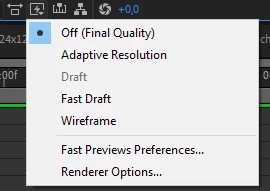
Hello! I had the same problem.Try to turn off "Adaptive resolution" function. It helped me!

7 replies

Participant
July 24, 2019

Just had the same problem and here's the fix:

Firstly, turning off "Adaptive Resolution" didn't work for me. For some reason, it previews every 5 frames).

You just need to reset your Preview Options. In the Preview Window, hit the little "cycle" button next to "Shortcut" bar. It automatically resets all the preview options. That should fix almost any preview issues.

And if you change the settings on the Preview Window in the future, try to find what causes that jump. I have no idea how I did that.

Participant
September 16, 2023

Thank you! This worked for me! So frustrating!

prestong12357314
Participant
July 18, 2019

I had this same problem and I fixed it by going to Window > Preview. In the options there's a "skip" option that has a dropdown for the number of frames to skip at a time during the preview. Set it to 0 and that fixed my problem.

lukak74259913
Participant
September 17, 2019
This solves the issue , Thanks!!!
la23055646Correct answer
Participant
February 8, 2019

Hello! I had the same problem.Try to turn off "Adaptive resolution" function. It helped me!

Le Pewp
Inspiring
February 2, 2019

I'm experiencing this issue as well.

(AE v.16.0.0, i7-3930K, 48GB memory, project files, assets, cache assigned to separate SSDs, nvidia driver 417.71, Windows 10 v.1809)

My workaround has been to add 20-ish frames to the head of the work area so that by the time the playhead reaches the work area I want to preview the frame skipping has ceased. When previewing shorter animations (e.g. lower thirds) I wait for it to run once then watch the second loop. All previews after the initial preview (loops) do not exhibit frame skipping.

Dave_LaRonde
Inspiring
February 2, 2019

I heartily recommend a thorough study of the Views and Previews section of AE help.  AE has many strategies to speed up previews depending on your needs & circumstances.

In short, don't expect miracles when you hit the zero numeric key.  And keep them fingers off the space bar!

Kevin-Monahan
Community Manager
Community Manager
January 14, 2019

Solve this yet, master_shake91? Tell us how it's going.

Thanks,

Kevin

Kevin Monahan - Sr. Community and Engagement Strategist – Adobe Pro Video and Audio
master_shake91
Participating Frequently
February 2, 2019

Hey Kevin,

No I have not solved this yet, and at this point I'm not sure I will. I'm chalking it up to the slightly aged hardware as well as After Effects preference to core speed and, ostensibly, it's ability to operate on a 4K monitor. Of course I know it can operate on a 4K monitor but I'm not convinced AE is utilizing all of my PCs hardware. I suspect if I went back to say a 1440p monitor it would be a lot smoother but I can't.

I've read all the other suggestions before and after your post and none of them have worked. I even attempted to downgrade to AE CC 15, but that wasn't feasible as it's not compatible with my GPUs.

After Effects is still usable it's just laggy here and there with more layers per comp, UI is choppy, and the preview still skips at the beginning of a RAM preview. I also want to say I'm not looking for a real-time render like I've seen some user's state in other forum posts, because it's not howsoftware like AE is designed in the first place. Just want that smoothness I had, on like, a Retina iMac two years ago.

Regardless, thank you for the acknowledgement. I know you and the AE team are working hard on this software. I also hope development for Linux flavors happens some day 

LW0121
Inspiring
December 14, 2020

Have you found the solution? It's 2020

Thank you!

OussK
Community Expert
Community Expert
December 29, 2018

Did you try to set the work area to the area you want to preview? so no need to wait the RAM preview for the entire composition.

Inspiring
December 29, 2018

Already open the preview panel in Window > Preview, and change the settings?