
BGPictures
Known Participant
July 15, 2013
Question

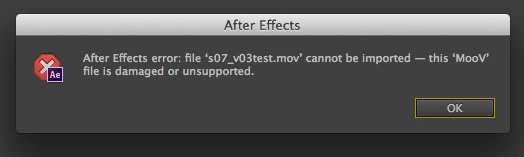
After Effects CC stopped working with QuickTime files
  • July 15, 2013
  • 3 replies
  • 25225 views

I can not reliably use QuickTime (Animation or ProRes codec) in my timeline. I also can't export to QuickTime. I believe accepting the latest update to CC or my system software initiated this problem. I did not have this problem last week. I have converted all of my source QTs to .PNG sequences and .AIFs as a work-around.

System Details:

CS 6 CC | Mac OS 10.8.4 | MacPro5,1 | 96 GB Ram | PROJECT & MEDIA drive: Mercury Accelsior > 500 MB/s read/write | CACHE drive: Mercury Accelsior > 500 MB/s read/write | Nvidia Quadro 4000 Mac | CUDA Driver: latest update.

Troubleshooting Info:

• I've read this article: http://blogs.adobe.com/aftereffects/2011/02/troubleshooting-quicktime-errors-with-after-effects.html

• I don't have Blackmagic or Aja, but I do have Nvidia Quadro 4000 Mac with the latest Nvidia and Cuda drivers. I'll try uninstalling... but I may want to raytrace in the coming days.

• I've trashed the 12.0 folder and rebooted many times

• repaired permissions

• Multi-threding on/off doesn't matter

update

• "QT32Server process" appears then disappears Activity Monitor when I try to render ProRes (output module fails...)

• No firewall

• Uninstaled Nvidia driver. Restarted. Same problems.

and then

• Created a fresh admin user. This seems to work for now: I can read and write QTs through AE again. I'll update if there are any changes.

update again

Once again, I  can not import ProRes QTs into AE CC. Making a new user only worked for 2 launches. The only software I used with this system/new user was Adobe AE CC, PS CC, and Safari.

Any suggestions?

Best,

Benjamin

    This topic has been closed for replies.

    3 replies

    Participant
    August 2, 2013

    I've had this same error off and on. It all had to do with ProResLT media. Today it didn't "fix itself" so I tried reinstalling the quicktime proapps codecs: http://support.apple.com/kb/DL1396   This FIXED IT! Hopefully it stays working.

    Participant
    August 3, 2013

    Yes reinstalling the quicktime proapps codecs seemed to help me.  Just make sure you verify that it actually installed the new codecs.  I ran the installer but it wouldn't actually overwrite the codecs i had( from 2011).  Once i deleted them from the library folder and then ran the codecs installer again, then i had fresh new 2013 codecs and CC was happy. fingers crossed at this point.

    Inspiring
    August 5, 2013

    I'm adding my name to the list of victims of this heinous shortcoming in Ae CC.

    I can open some projects with ProRes footage, and see and hear it for about five minutes before I start getting that error message for each footage item in the project.  Other projects won't even let me get that far.  I get the errors as soon as Ae starts scanning the footage.

    I can Save As CS6, and work with the same footage with abandon there. 

    MacPro3,1 - 10.8.4 (10.7.5 before I upgraded, too) - 32G RAM - Quadro 4000 for Mac with fresh drivers reinstall - Ae 12.0

    Here's what I've tried:

    Remove AJA Adobe driver

    Reinstall ProAppsQTCodecs1.0.2

    Deleted DVCProHD component

    ran a suite of disk utilities, rebooted, etc.

    toggled audio hardware states: system default, and MOTU Traveler

    I just ran the Drive Genius 3 Repair Tool > Verify Preferences.  It found 4 corrupt prefs, that I deleted without making note of them.   Ae CC is working again, but I've now been trained not to signal an all clear.  I expect it will stop working again, as soon as I click the Post button here.  If it's still working tomorrow, I'll post back.

    Participating Frequently
    July 31, 2013

    Hello,

    My team and I have been following this thread - we've been having very similar issues. Namely the 86::2 error and "MooV file is damaged or unsupported."

    We had these issues on two machines from the first time we ran Ae CC and Pr CC early last week and were on OS 10.7.5. So we did a clean install and upgraged to Mountain Lion.

    System Info: CS 6 | FCP 7 | 2x2.93 GHz 6-Core Intel Xeon | 64 GB 1333 MHz DDR3 ECC | NVIDIA Quadro 4000 2048 MB | OS X 10.8.4 | Latest CUDA drivers | AJA KonaLHi drivers 10.4.4 (we have moved back from 10.4.5 upon reccomendation from AJA tech support.)

    The second machine is the same as above, but with 20 GB of ram.

    (Red Giant plugins were installed after the crashes on the clean install)

    We are networked with an XSAN.

    On my machine, the first listed above, I seem to have stemmed the issue in Ae by uninstalling Premiere. Without Premiere none of the problems in AE occur.

    On my clean install the timeline of app installation went: first FCP, then Ae, then Pr. When I installed Premiere the problems arose again, 86::2 error and MooV error and the issue still arrises on the 20 GB machine when switching between Ae and Pr.

    I hope that makes sense.

    We will troubleshoot the Quicktime files tomorrow. I hope this can be helpful!

    Thanks.

    Adobe Crash Report Links:

    https://dl.dropboxusercontent.com/u/8857265/Adobe%20Troubleshooting%20-%20Reports/Adobe%20QT32%20Server_2013-07-31-150909_Edit-TWO.crash

    https://dl.dropboxusercontent.com/u/8857265/Adobe%20Troubleshooting%20-%20Reports/After%20Effects_2013-07-31-154601_Edit-TWO.crash

    https://dl.dropboxusercontent.com/u/8857265/Adobe%20Troubleshooting%20-%20Reports/After%20Effects_2013-07-31-155938_Edit-TWO.crash

    Tim Kurkoski
    Adobe Employee
    Adobe Employee
    July 15, 2013

    Benjamin,

    Assuming you've updated the OS and all drivers on your system and done all of the following:

    http://helpx.adobe.com/x-productkb/multi/startup-screen-hangs-premiere-after.html

    It's probably best to look at the crash logs for QT32Server. Look at recent logs here:

    /Users/<username>/Library/Logs/DiagnosticReports

    *The user Library folder is hidden by default on 10.8: http://helpx.adobe.com/x-productkb/global/access-hidden-user-library-files.html

    BGPictures
    Known Participant
    July 15, 2013

    Thanks Tim. I don't have my firewall turned on, and don't have any 3rd party QT stuff that I know of. But here's a link to my crash report:

    https://dl.dropboxusercontent.com/u/5076108/Adobe%20QT32%20Server_2013-07-15-123137_Benjamins-Mac-Pro-2.crash

    Tim Kurkoski
    Adobe Employee
    Adobe Employee
    August 1, 2013

    Hi Tim,

    • removed DVCPROHDVideoOutput.component (Dated 2009)

    • Launched AE

    • Imported a bunch of random QuickTime movies of different codecs into a new project successfully.

    • Put them all into the same time-line

    • Successfully rendered a ProRes 422 Movie!

    • Opened a deep and heavy project and rendered to ProRes 422!

    Looks good so far. Thank you. Will keep testing and report back.

    Strangly, in The Activity Monitor, Adove QT32 Server shot up to 99% CPU usage when the first render started, then tapered off to 3% and now sits at 0.2%. Is this normal?

    Thanks again,

    Benjamin


    Benjamin Goldman wrote:

    Strangly, in The Activity Monitor, Adove QT32 Server shot up to 99% CPU usage when the first render started, then tapered off to 3% and now sits at 0.2%. Is this normal?

    Normal? Probably. Chatted about it with one of the developers here, and our assumption is that it's normal for any process to consume a few extra cycles on startup and then cool back down. In this case, it's very likely that QT32 Server is simply a conduit between AE and whatever thread QuickTime has spun up to handle the compression, thus it doesn't consume much processing power by itself.

    Also, good suggestion for JayEmZee about making sure the component file actually gets removed. The Library/QuickTime folder is a protected location, so you can copy out freely but writing and removing files requires an admin password. I've been typing my password a lot today...