
donbarrum
Inspiring
October 20, 2017
Answered

After Effects cc2018 4K screen problem with UI

  • October 20, 2017
  • 3 replies
  • 4752 views

In after effects CC 2018 a lof of the text is overlapping in the UI on 4K screens. It only happens in the HiDPI version of the UI, this is on a PC with Windows 10. Any suggestions on how to fix this, or is this just another new release bug?
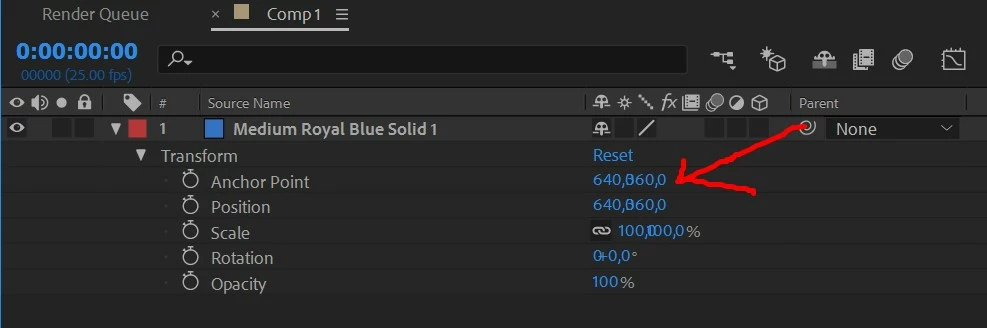
 

This topic has been closed for replies.
Correct answer Szalam

The update that came out last night (might take up to 24 hours to propagate to Adobe's servers around the world) fixes this issue.

3 replies

donbarrum
donbarrumAuthor
Inspiring
January 17, 2018

This problem is still happening to me. I have to use the program with System scale instead of using the HiDPI UI.
Is Adobe even reading their bug reports??? After Effects CC 2018 came out many months ago and not a single bug fix update has been released since then...

Szalam
Community Expert
SzalamCommunity ExpertCorrect answer
Community Expert
January 23, 2018

The update that came out last night (might take up to 24 hours to propagate to Adobe's servers around the world) fixes this issue.

donbarrum
donbarrumAuthor
Inspiring
January 23, 2018

thanks! yes it does   finally I can go back to HiDPI UI

Participant
November 1, 2017

I had the same issue, tried removing custom scale from the display settings as I had it at 150% and it worked.

However the text was too small, so I tried to use a 200% scaling and it also worked.

No the best solution but I hope it helps.

donbarrum
donbarrumAuthor
Inspiring
November 2, 2017

Chaning the display settings in windows is unfortunately something Im willing to do just for after effects I just changes in the app settings to use non-HiDpi, so now I'm wotking with blurry UI which at least works.

Participant
October 27, 2017

After trying a number of things (reinstalling, updating graphics driver, playing about with display settings, etc) what eventually worked was when updating the graphics driver, selecting custom installation and checking the box to perform a clean install. Now I have no overlap on any text in the UI.

Participant
October 27, 2017

imax182​ It worked for me also. GJ.