adamt18510785
Inspiring
January 28, 2019
Answered

After Effects colors are off

  • January 28, 2019
  • 1 reply
  • 33792 views

I have a RGB 8 bit photoshop b2a067 which is a deepish brown.

In AE the color looks milky and comes in on the picker at photoshop at dad0aa

Does anyone have a suggestion about what's happening?

    Correct answer Dave Merchant

    What are your project color settings in After Effects? (click the bottom of the project panel where it says "8 bpc")

    If you have a working space other than sRGB/none, or you're using Linearize, then color numbers in imported files will simply not match. After Effects assigns a profile automatically to every imported file then does forward/reverse math between the screen (as sampled by the picker) and the project.

    Examples of exactly the same PSD file, sampled exactly the same way, but giving different RGB values:
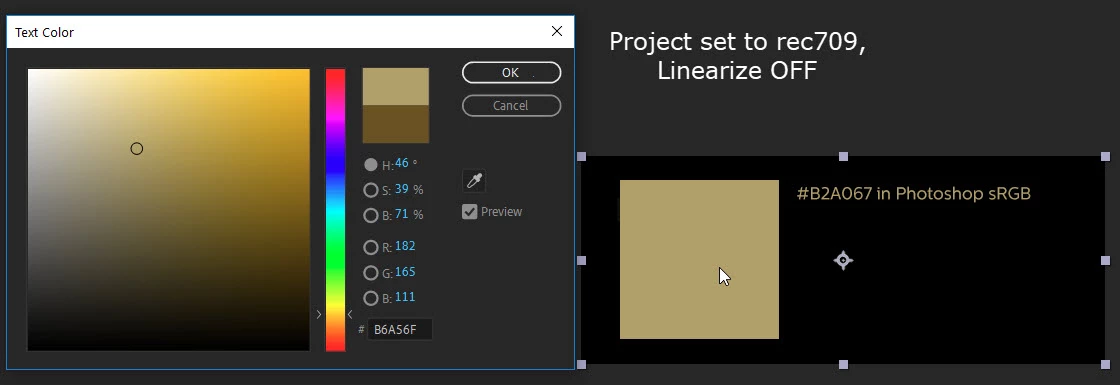
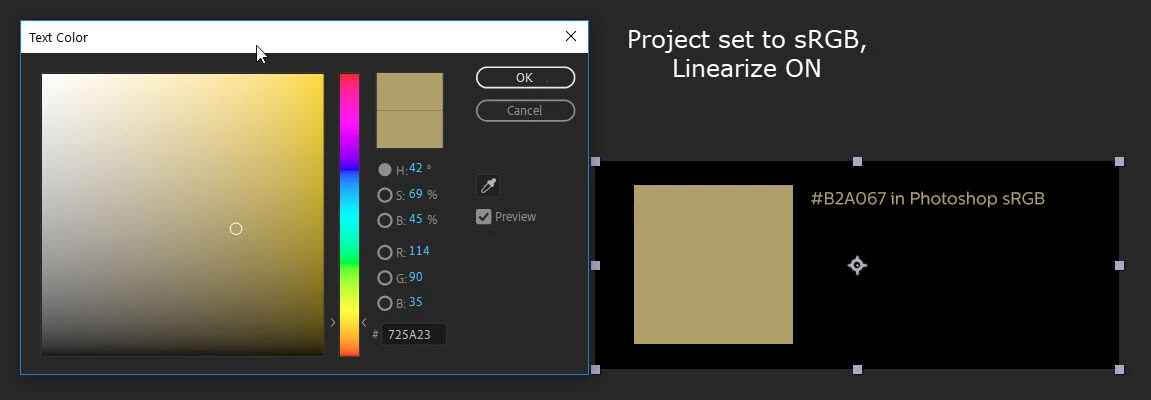
    As you can see the only time the picker is "right" is when the settings agree with Photoshop.

    If you want to force a particular source file to bypass the color conversions (so the picker will be accurate but the visual representation of the color in the video will be wrong!) then right-click the item in the project panel, choose Interpret Footage > Main, then Color Management > Preserve RGB.

    1 reply

    Mylenium
    Legend
    January 28, 2019

    There's nothing happening. You just have a complete misunderstanding how colors work across programs and your system is apparently not color managed to boot. Start by not getting worked up on web hex colors and use the native RGB values instead and also read up on how to consistently use color management or work fully uncalibrated. The full deal - color management in PS, AE project and comp settings, resetting mistweaked system color profiles, un-mistweaking your monitor and graphics card settings. No simple answers here. Even if you just reset to factory defaults and turn of CM everywhere there may still be discrepancies. That aside, of course those same differences just as well affect output, so even if you get things right inside the programs, specific output formats will introduce color deviations due to how their compression etc. works. Again, lots to read and learn on that...

    Mylenium

    adamt18510785
    Inspiring
    January 28, 2019

    Both are srgb, color calibrated from spider color monitor calibration. Gtx 1080ti graphics hardware.

    I understand color management, where would I go in AE to give me the same colors of both are saying the same color profile?

    I'm not worried about export I fully understand export codex and profiles.

    Dave MerchantCorrect answer
    Legend
    January 28, 2019

    What are your project color settings in After Effects? (click the bottom of the project panel where it says "8 bpc")

    If you have a working space other than sRGB/none, or you're using Linearize, then color numbers in imported files will simply not match. After Effects assigns a profile automatically to every imported file then does forward/reverse math between the screen (as sampled by the picker) and the project.

    Examples of exactly the same PSD file, sampled exactly the same way, but giving different RGB values:
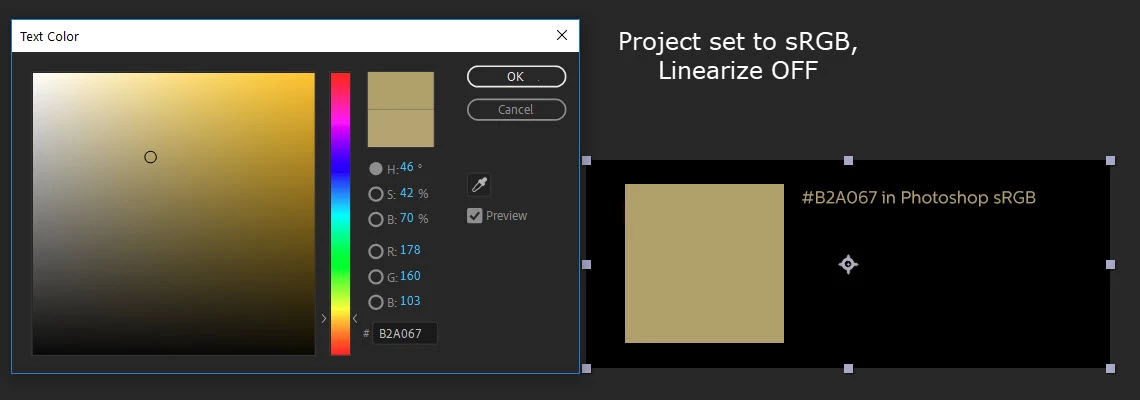
    As you can see the only time the picker is "right" is when the settings agree with Photoshop.

    If you want to force a particular source file to bypass the color conversions (so the picker will be accurate but the visual representation of the color in the video will be wrong!) then right-click the item in the project panel, choose Interpret Footage > Main, then Color Management > Preserve RGB.