
Legend
July 26, 2017
Question

After Effects crashes while rendering a preview (focus related?)

  • July 26, 2017
  • 2 replies
  • 2191 views

After Effects (CS5.5) crashes while rending a RAM preview (the composition is a 30 second, 24 fps flag waving using the card dance effect and only 800x400 pixels. 5 compositions in the project).

It renders fine when After Effects is always the tab in focus in Windows 10, but it seems that the crashes occur at some point when you switch to other Windows tabs and then back to After Effects.

An example of the crash message is below:
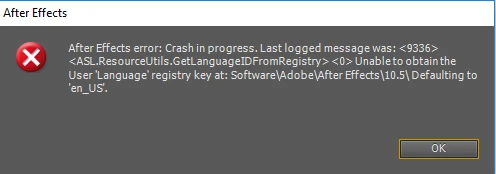
Below is another example of a crash with the same project, when switching back to the After Effects windows tab from another windows tab (causing I think After Effects to no longer be minimized).
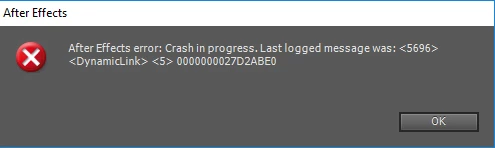
So the error seems to be related to switching to other Windows tabs and then back to the "After Effects" Windows tab (so it then becomes the focus again), since just rendering the RAM preview with this project with After Effects being the the in-focus tab throughout (ie. no switching to other tabs) renders the RAM preview successfully and doesn't crash.

    This topic has been closed for replies.

    2 replies

    Kevin-Monahan
    Community Manager
    Community Manager
    August 16, 2017

    Hi A.I.1,

    Sorry for this issue. Did you ever find a solution? Please let us know if you have or if you still need help.

    Thanks,

    Kevin

    Kevin Monahan - Sr. Community and Engagement Strategist – Adobe Pro Video and Audio
    A.I.1Author
    Legend
    August 17, 2017

    Hello. I never found a fix for the crashing issue AE CS5.5 when switching Windows tabs while previewing, and was told Adobe wouldn't fit it. I'd still like it fixed if possible.

    I've also since got (rented) the new AE but that has also crashed but for other reasons, and while I like it, there are other issues (eg. effects I used before removed, rendering taking a lot more hassle (could easily render with H264 from within AE before now it takes more work and needs doing with AME, and "duplicate with filename" etc. is a bit unusable since it doesn't (when I tried it) take the updated version of the project from AE.

    So if possible, I'd like the original issue fixing so I can use the program when I need to without it crashing with that issue. I could create other threads for the crashes/issues with the new AE.

    Dave_LaRonde
    Inspiring
    July 26, 2017

    I suspect an application - operating mismatch is the culprit.  AE CS 5.5 is damn near ten years old!  That's forever in software terms, and you're trying to run it on an OS that came out months ago.  Who know what kind of weird things will happen, or when they'll rear their ugly heads?

    The fix: partition your system drive, then install Win7 and AE on the new partition.

    A.I.1Author
    Legend
    July 26, 2017

    When I was installing it on Windows 10 the Adobe support people knew and helped me install it on that operating system. If it was incompatible with Win 10 surely they would have told me not to even install it because of the incompatibilities.

    Most of the time I don't have issues with it. And like I said it renders fine with that project if it is kept in-focus all the time (without switching to other Windows tabs). I don't want to have to install Windows 7 on the machine as that is outdated etc. If there is a bug in this version of AE I'd like it to be fixed if possible. Most of the time After Effects works fine - or has seemed to be (though I did get a Windows message concerning "Memory Management" some time ago (probably a couple of weeks ago) after closing After Effects - I don't know whether that is also a bug in After Effects or not - or maybe something related to the Windows pagefile (I currently have it set to system managed pagefile on my C drive (SSD) and none on my other hard drives - I don't know if that should be changed?). Note in another thread an Adobe Community Professional says "I have a classroom has 12 computers "offline" has windows 10 64x with Adobe CS5 Master Collection installed and working perfectly".

    So if possible I'd like the bug (if it is a bug in After Effects) to be fixed.

    Or if it's something I've got set up incorrectly (in After Effects or Windows 10 that is causing the issue with AE) I'd appreciate some help to get that fixed.

    Roei Tzoref
    Legend
    July 26, 2017

    Dave is right. your OS is not supported for any version under 2015.3.

    After Effects System Requirements

    trying to force an installation on an unsupported OS is unpredictable. by definition it is not a bug since it's clear there is not support for it. it might work, might not. only a hardcore developer knows exactly why it's not supported for your OS. the person that helped you install this version on your OS wasn't doing you any favors.