
tobiasz98993516
Participant
December 27, 2018
Question

After Effects crashing on Startup (GPUSniffer)

  • December 27, 2018
  • 5 replies
  • 8581 views

Hi,

i do experience an issue for a while, where i am unable to start Adobe After Effects CC 2017. I get the following message:
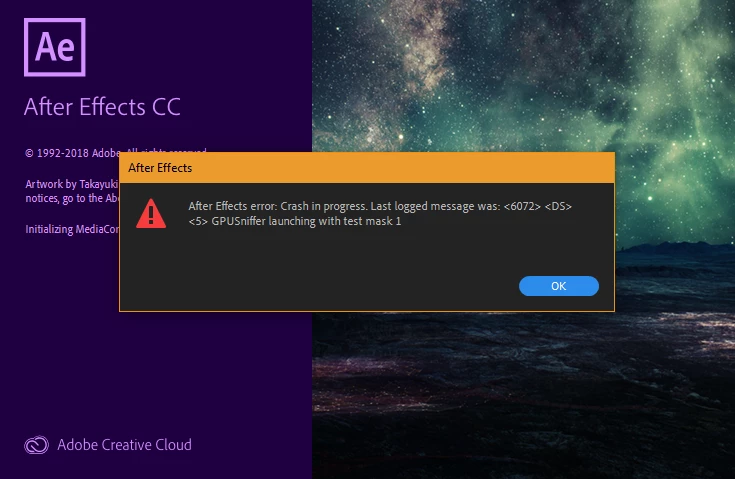
I get this message on AE CC 2019, 2018 and 2017 (all these versions became unusable). When launching the GPUSniffer it detects my GPU (Nvidia GeForce GTX 960), but notices me with "not choosen because of a initalization failure".

I updated my Nvidia drivers, rolled back older ones, updated anything that could affect this. I uninstalled/reinstalled AE multiple times using the Adobe Cleaner. I started my PC in Safe-mode and still got this error message. I sent a Crash Report to Adobe quite a while ago but never got reply. I dont use any Plug-Ins and i already rolled-back any preferences and settings - no luck.

My System:

Adobe Creative Cloud

Windows 10 64-Bit

Intel I7 3.4Ghz

Nvidia GeForce GTX 980

16 GB RAM

I would appreciate any help, since i am basically out of solutions and pretty close to just uninstall and cancel my Adobe-Account.

Thanx!

    This topic has been closed for replies.

    5 replies

    Participating Frequently
    June 16, 2019

    I am having the same problems (on Mac). The "support" at Adobe had me reset the preferences., make sure there were no third party plug-ins, and then spent an hour sharing my computer redoing what they already asked me to do. They finally gave up and said they would get back to me. It's four days later, my business in in jeopardy and I have heard nothing from Adobe.

    Participant
    March 10, 2020

    Yeah it's BS. Means you can have 10 thousand dollar setup but After Effects won't work because they can't figure out a simple bug in Adobe. I had this happpen so much that I gave up After Effects all toegther beacuase its highly unprofessional. So I use Da Vinci Resolve and its great...no crashes.

    Inspiring
    December 29, 2018

    Hummm, you have a desktop? Already try open without your GPU? You can open another adobe applications like Photoshop, Premiere?

    tobiasz98993516
    Participant
    December 29, 2018

    Thank you for all your help. Yes, i use a Dell Alienware Desktop and he usually handles Adobe and other graphic applications easily.

    Photoshop is working just perfect and so are other GPU heavy apps like ZBrush, Maya, Blender, Unreal etc. However, Premiere Pro CC 2019 has stopped working aswell and giving me the same message.

    I tested After Effects CC 2015 and this version is working without problems. Any other versions above that fail on start. I am still clueless about this.

    Community Expert
    December 28, 2018

    Unninstall and install de GPU Driver, not only update. 

    Byron.
    tobiasz98993516
    Participant
    December 29, 2018

    I unistalled my Graphic Card and GPU drivers completely and then reinstalled the Nvidia drivers. After Effects still wont run. The error also occurs while in Windows--Safe mode.

    ToolfarmJP
    Community Expert
    Community Expert
    December 28, 2018

    Hello,

    You delete the third party plugins if you use them. Would you try it?

    tobiasz98993516
    Participant
    December 28, 2018

    I dont use any Plug-ins and never installed any. I just use the basic After Effects CC19 with nothing else

    .

    ToolfarmJP
    Community Expert
    Community Expert
    December 27, 2018

    Hello,

    Have you already tried to reset the preferences to default?

    Reset preferences


    To restore the default preference settings, press and hold the following keys while the application is starting.

    • Ctrl+Alt+Shift (Windows)
    • Command+Option+Shift (Mac OS)

    Setting preferences in After Effects

    tobiasz98993516
    Participant
    December 27, 2018

    Yes, setting back the preferences was one of the first things i tried (along with updating/rollback the drivers). Unfortunatly the crash still remains.