

Jonah Lee Walker
Inspiring
May 2, 2010
Question

After Effects CS5 Mac says "Quicktime is not installed on this system, some components...

  • May 2, 2010
  • 4 replies
  • 71102 views

the error message is "QuickTime is not installed on this system, some components will not work correctly."
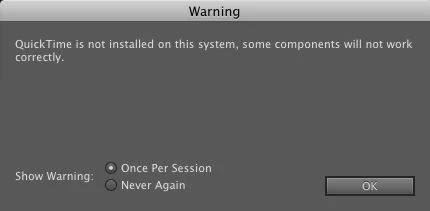
And when I open After Effects CS5 on MacPro 2 x 2.26 GHz Quad-Core Intel Xeon with 16GB of 1066 MHz DDR3 running 10.6.3, it is basically not functionaly, because it will not open any quicktime movies without an error message.

Quicktime is installed on this mac.

I have run permissions and run diskwarrior, and it has not solved this problem.

Any ideas?

    This topic has been closed for replies.

    4 replies

    Known Participant
    November 10, 2012

    For others out there:

    I just fixed this problem by installing an earlier version of QuickTime.  I downloaded 7.7.3 from Apple's website, and that threw the error.  Then I tried 7.7.1 from a backup HDD and no more errors!

    cmarabate
    Participant
    December 13, 2013

    Thanks a bunch Stone_Swan, this worked for me as well!

    Participant
    May 10, 2012

    I've been bashing my head against this issue for a while as well: OSX 10.6.8 - Xeon Quad - 10Gb RAM - Kernal booting 32-bit. I had tried all solutions I could find on all Adobe forum threads includuing, delete prefs, disable firewall, new user account, permission, re-install CS5, re-install OSX (which worked for a short period - before I set everything up again).

    I've tracked the issue down on my box to a conflict with a 3rd party application "Advanced Web Ranking" - Verison 8.9 at time of writing. This has 3 processes running for scheduled tasks - awrserver, awsscheduler and awswork I killed all 3 before loading After Effects CS5 and it worked instantly both Adobe QT32 Server and dynamiclinkmanager started without issue. 

    EDIT: Further investigation shows its only awrserver that causes the isssue, the other two can run without a problem.

    EDIT2: There is a server config for AWR which lets you change port it uses, default is 7777 - once my scheduled tasks are back to normal tomorrow I will try experimenting see if changing to 7778 fixes the conflict.

    My symtoms where QuickTime not installed and You have at least one output module template that refeers to a missing output plug-in error. Neither Adobe QT32 Server nor dynamiclinkmanager processes were running which will be the reson for the errors.

    I've also contacted the people who make the software to let them know of the conflict (I'm going to be running on a different box for now).

    Message was edited by: patrick@m4

    Todd_Kopriva
    Inspiring
    May 10, 2012

    Thanks, Patrick. I saw a similar problem with FileMaker's web services blocking the TCP port.

    Note that this has gotten better with later versions of our software, in that the assignment of ports is more dynamic and therefore it's less likely that the needed communication channel will get blocked by other software.

    Participant
    February 9, 2011

    I solve this problem. In my case the problem was OPEN FIRE SERVER connected to that I use MSN in ICHAT.  Simply disable OPEN FIRE SERVER and try again open AE.

    Bye

    Todd_Kopriva
    Inspiring
    May 2, 2010

    When you say "QuickTime is  installed", what do you mean? QuickTime X, QuickTime 7.4? QuickTime 7.6?  Details lilke this are helpful for troubleshooting.

    I recommend  installing QuickTime 7, which is an optional installation for Snow  Leopard (Mac OSX v10.6.x). QuickTime X doesn't provide a lot of features  that video professionals need and rely on; QuickTime 7 does.

    Jonah Lee Walker
    Inspiring
    May 2, 2010

    I mean both Quicktime X and Quicktime Player 7.6.6 are installed.

    And when I created a new user account and start up in that it works fine, but that is not an acceptable solution. And this user account is on a new machine and was started fresh not 6 months ago.

    - Jonah Lee WalkerVideo Editor, Colorist, Motion Graphics Artist
    Jonah Lee Walker
    Inspiring
    May 3, 2010

    It was strange, I got the message about a file in the preferences, but there were no files there, even when I used the terminal to look, the files did not exist, so I am wondering if their was some strange preference issue going on.

    I also went through, and tried cleaning out my user library a bit, and tried unistalling all the user preference panes, which did not help at all, so I assume that is not the problem, nor was it perian or even Application Enhancer, which are all installed for all users, so then the new user would not work without them.


    It's a conflict with some Adobe Preference files.

    This morning I decided to try pulling out the entire Adobe Preferences folder, User:Preferences:Adobe and just put back Adobe:After Effects, and After Effects CS5 booted perfectly. It boots quickly and I don't even get the dynamiclinkmanager crash that I have been getting.

    And I it seems to have created a new folder in my new Adobe folder, the Adobe QT32server:1.0:TraceDatabase.txt and the dynamiclinkmananger:2.0:memorybalancers5.xml was created this time as well. I then quit after effects, and put back all the other preference files into that folder, though not replacing any of the new versions that were created, and once again After Effect boots and works.

    So that was the issue.

    - Jonah Lee WalkerVideo Editor, Colorist, Motion Graphics Artist