raghavg6463409
Known Participant
January 4, 2020
Question

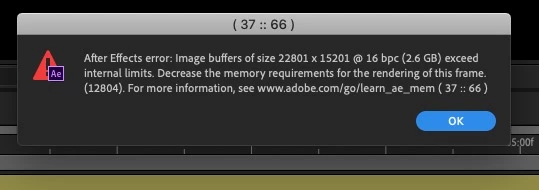
After Effects error 37:66

  • January 4, 2020
  • 7 replies
  • 12852 views

Anyone Help Me Out from this 

Trying to edit template in after effect but showing this everytime


7 replies

Participant
February 4, 2025

Hola, a mí me pasó lo mismo, y tuve que bajar la profundidad de color de 32 bpc a 16 bpc y ya no me salía ese error. Espero le ayude a alguien por aquí. Saludos.


Participant
November 5, 2024

Please decrease the output width and output height numbers of the "Motion Tile" effect

Participant
August 18, 2023

Check whether you have used the effect ' motion title ' . Decrease it may solve this issue.

Mylenium
Legend
January 4, 2023

Without any info about your system we can't realyl tell you much. If it works with one resolution, but not the other the most likely cause simply is that your GPU acceleration does not have enough resources, so switch to software-only encoding. anything more will require better info.


Mylenium

marcobrun24
Participant
January 4, 2023

Hola que tal, algo de ayuda les puede servir: El proyecto que hacia estaba en 4k y me salía este error, por lo cual lo tuve que bajar a 2k o 1080 y asi pude solucionar este error, al momento de renderizar y guardar el video con el Encoder a 4k, 2k o la misma resolución de origen en mp4 H.264, espero les haya servido de algo, saludos a todos...

Participant
September 29, 2021

Hi I actually have the same problem... you know how can I fix it? 

Mylenium
Legend
January 4, 2020

Without any idea about what the project actually contains, nobody can tell you much. Start by opening the project with capslock enabled and disabling the effects selectively until you find the culprit.


Mylenium

Participant
August 24, 2020

Hi. I managed to find the culprit layer. Any suggestions on what to do next?  

Community Expert
August 24, 2020

Specific recommendations are impossible if we don't know what is going on in the comp. The layer is too big, you have applied an effect that has caused a problem with the size of the layer, you have customized a comp setting or about 40 other things I can think of right of the top of my head. No details, no screenshot, showing the modified properties of the problem layer = nothing but a wild guess.
