
tardigrade01
Inspiring
March 8, 2016
Question

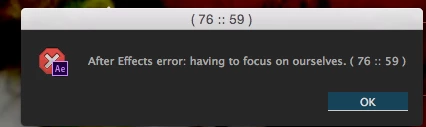
After Effects error: having to focus on ourselves??

  • March 8, 2016
  • 4 replies
  • 7346 views

I am working on an extension for AE that uses Angular. I have a lot of things watching assets, and I suspect that might have something to do with this, but was curious if anyone else has ever encountered this error?

"After Effects error: having to focus on ourselves (76 :: 59 ). I can find nothing about it online or any relevant error codes.

Screenshot below
4 replies

alex_fantastic-agency
Participant
February 9, 2026

It is an Animation Composer issue, you may have an update to do on it or reinstall the plugin, i had the same :)

Demand Marketing
Known Participant
July 10, 2025

I have started receiving the life advice. Same wording. Same numbers. I have no idea of the reason. I have had it happen with completely different projects open! @tardigrade01  did you get any further with it? I'm not After Effects code savvy whatsoever. Cheers!

nishu_kush
Legend
July 10, 2025

Hi Demand Marketing,


Is there a specific action/command that triggers the issue? Are you using any third-party plug-in or script? Try removing them and see if that helps.

Let me know how it goes.


Thanks,
Nishu

Demand Marketing
Known Participant
November 17, 2025

Hello Nishu, sorry I missed your reply. I have narrowed this down to the Mister Horse Animation Composer plugin. Their support member Peter has let me know that this is an issue that they are experiencing with the last two versions of AE - something that cannot be fixed from MH side.


The specific behaviour is when editing text for example double clicking to edit the text, double clicking to select the text while editing, pressing the 'End' or 'Home' keys to navigate within the text. These actions all bring up the error message.


The issue goes away if I simply close any panels to do with Animation Composer - it doesn't require uninstalling.


Any more updates from your side? Hopefully a patch coming 🤞


Cheers, Ben

Alexander Rott
Known Participant
December 4, 2024

I have recieved this error twice today. It seems to prompt when switching to a different program, then coming back, when having a text field selected. 

Running macOS Sequoia on an M3 Max. AE v24.6.3

Alexander Rott
Known Participant
October 28, 2025

I have been getting this error quite frequently again for a current project that I'm working on and able to finally reproduce it with ease. Apparently when you are changing a text field, then immediately click into another comp tab (without clicking to exit said text field), THEN click to edit some text in the new comp you clicked into, it immediately comes up with that error. That seems like a lot of steps to produce, but when you have a TON of different comps all with text that needs to be edited, having that error constantly come up is frustrating. I now have to remember to un-select the text i'm working on BEFORE I go to another comp. Using Ae 25.5.0 on the same M3 Max.

nishu_kush
Legend
October 29, 2025

I tried the steps on an M2 Max machine. I didn't see the error. Check if removing the plug-ins helps, as suggested by @knowledgeable_Haven3755 


Thanks,
Nishu

tardigrade01
Inspiring
March 8, 2016

it indeed seems to be tied to a custom filter I made in angular. I can't say why, but it could have to do with the fact that the filter is using the digest cycle continuously. Anyway, what an odd error; I thought it was sharing life advice.

stib
Inspiring
March 9, 2016

I've just though of a great new AE plugin: one that generates error messages that give you wise advice for living.

tardigrade01
Inspiring
March 9, 2016

Ha. Well, it has reared its ugly head again; I thought I had caused it by including some conditional matching loops in a custom angular filter, which could cause an infinite digest cycle, but even after changing the filter to a watch function and removing any loops, the "life advice" persists. Curiously, if I stringify a certain asset, the error goes away, and I can create new layers to my heart's content. The only other place I have seen any mention of this error is from a Creative Cow Post in 2011.

The mystery continues...