


- Home
- After Effects
- Discussions
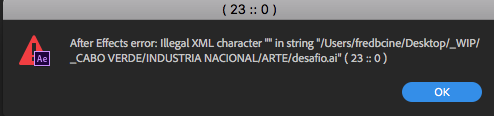
- After Effects Error: Illegal XML character "”in st...
- After Effects Error: Illegal XML character "”in st...
After Effects Error: Illegal XML character "”in string

Copy link to clipboard
Copied
Im having this problem when i import any image (png, ai, psd, anything). AE is interpreting the image as offline.
But when i close and open the after effects, the image is there.
Anyone having this same problem and found a solution?
thks !
After Effects Error: Illegal XML character "”in string....


 12
Replies
12
12
Replies
12


Copy link to clipboard
Copied
Start by not storing your stuff on your desktop. Typical Mac nonsense.
Mylenium
Copy link to clipboard
Copied
thanks for the tip, but didnt work =/


Copy link to clipboard
Copied
Still struggling with this, fredbelchior? Let us know so we can assist.
Thanks,
Kevin
Copy link to clipboard
Copied
Yep, still having the same problem =/
Copy link to clipboard
Copied
Hi FredBelchior,
Our agents can likely assist you. Go here to reach them: Contact Customer Care Let us know how it goes.
Thanks,
Kevin

Copy link to clipboard
Copied
I'm having this exact same problem. Can't import anything into AE, and receive the same 23:0 message display.
Did you find a solution?
Copy link to clipboard
Copied
Turns out the error only occurred when trying to import files that existed in the same folder as the project.
Seem to have found a fix though.
Simply renamed the folder the project (and the files) lived in to something else.
I don't know what caused AE to hate that particular folder and it's name.
There was nothing unusual about the characters in it's name. Was working perfectly for weeks until the error suddenly began appearing.

Copy link to clipboard
Copied
Thanks, this worked for me. Just had to create a new folder, cut everthing out of the old one, put it in the new one and everything worked again... totally random error
Copy link to clipboard
Copied
Just keep hitting return, eventually the error disappears

Copy link to clipboard
Copied
This worked for me. By far the quickest solution. I hit "enter" 5 times and it disappeared and my changes immediately propagated.

Copy link to clipboard
Copied
Hi. Does anyone have a solve for this? I am getting a similiar error. When I place the .mov into a different folder it will then add the file to after effects without colorbars (offline). Very frusterating.
After Effects 24.4.1
Mac OS 14.3 (23D56)
3.2 GHz 16-Core Intel Xeon W
AMD Radeon PRO W6800X 32 GB
192 GB 2933 MHz DDR4
Any help would be great. Thanks!

Copy link to clipboard
Copied
I was having the same problem and I exported the problem file and stripped all the color profile data from it and was able to import the file without issues.


Find more inspiration, events, and resources on the new Adobe Community
Explore Now
 AdChoices
