
Inspiring
April 27, 2017
Answered

After Effects error: plug-in "PremiereProImport.aex" could not be loaded(127)?

  • April 27, 2017
  • 2 replies
  • 6080 views

I just upgraded my AE to the latest version, which is CC 2017.2(14.2.0). However, everytime I launch After Effects, this note shows.
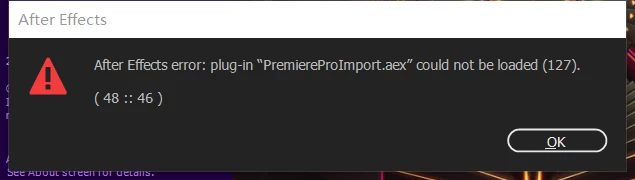
It is so annoying. How could this be fixed?

My PC specs:

CPU: I7 6800K

GPU: GTX 1070

RAM: 32G

OS: Windows 10 1607

Help me,guys!

This is a frustrating upgrade, really!

This topic has been closed for replies.
Correct answer Aaron Ecthelion

Actually,I can still import Premiere Pro sequence with this problem. It seems like doing nothing here.

But I've already fix this. You just uninstall After Effects, then reinstall it. Sometimes uninstalling and reinstalling can fix many things.

Cheers,

Aaron

2 replies

Participant
May 28, 2017

Delete "PremiereProImport" plugin file from C:\Program Files\Adobe\Adobe After Effects CC 2017\Support Files\Plug-ins\Format\PremiereProImport folder.

Inspiring
April 29, 2017

Dude I have the same problem. It doesn't seem to affect anything in the composition though thankfully.

Edit : I think it may be screen tearing my composition :/

Aaron EcthelionAuthorCorrect answer
Inspiring
April 30, 2017

Actually,I can still import Premiere Pro sequence with this problem. It seems like doing nothing here.

But I've already fix this. You just uninstall After Effects, then reinstall it. Sometimes uninstalling and reinstalling can fix many things.

Cheers,

Aaron

Inspiring
May 10, 2017

Your issue is likely to be unrelated. Please start a new thread and give us a lot more information (screenshots would be really helpful too).


I've reported it as a bug already.