
Exit
  • Global community
    • Language:
      • Deutsch
      • English
      • Español
      • Français
      • Português
  • 日本語コミュニティ
  • 한국 커뮤니티
0

After Effects export error through Media Encoder: Render Error, Error Compiling Movie

New Here ,
Nov 21, 2019 Nov 21, 2019

Hello! 

I just recently upgraded to After Effects v17 as well as the latest Media Encoder v14 and now I am not able to render .mp4 videos.

I tried re-installing both apps. I also tried to install the previous versions that worked for me, but they no longer work to render the mp4 like before.

This is the error that I'm getting :
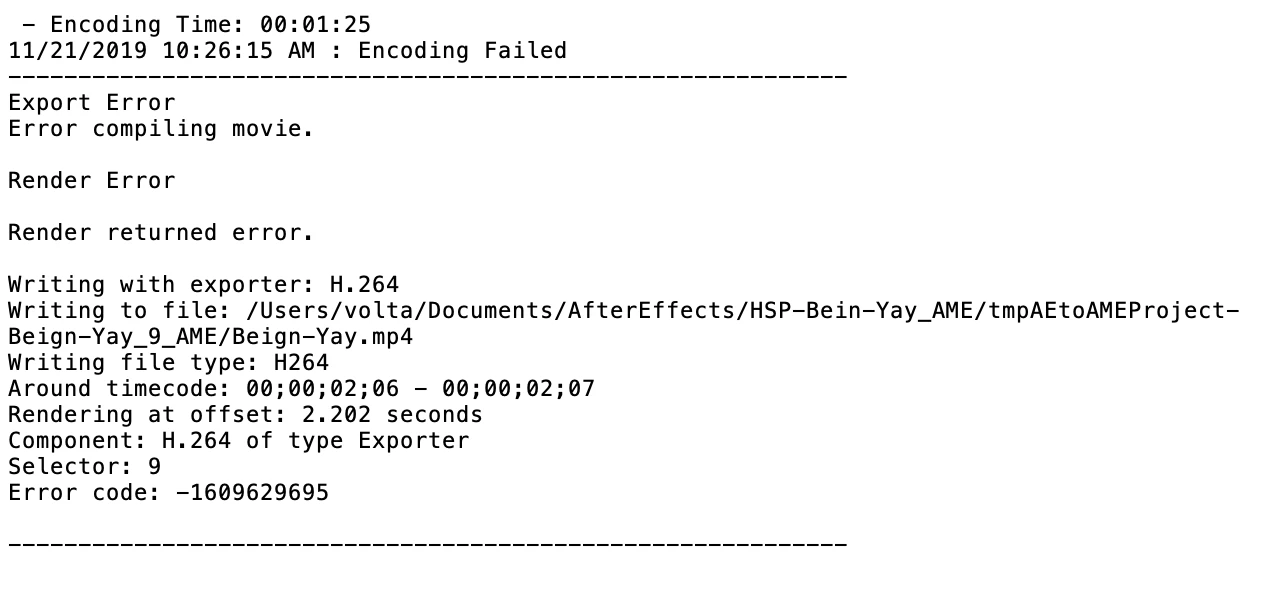
 

image (1).png

TOPICS
Error or problem , Import and export
325
Translate
Report
Community guidelines
Be kind and respectful, give credit to the original source of content, and search for duplicates before posting. Learn more
community guidelines
Community Expert ,
Nov 21, 2019 Nov 21, 2019

is this a new project? and did you test a old project that you already rendered before?

so just to be sure that this issue from AE or somthing wrong woth your project

Translate
Report
Community guidelines
Be kind and respectful, give credit to the original source of content, and search for duplicates before posting. Learn more
community guidelines
Adobe Employee ,
Nov 21, 2019 Nov 21, 2019
LATEST

Hi there,


Thanks for reaching out. I understand your are getting an export error for an After Effects composition in AME. We're here to help.

In addition to the questions asked by @OussK, I'd like to know more details.


  • Could you share your system details(OS version, RAM, GPU, CPU, etc)?
  • What happens when you export the project directly from After Effects?


Additionally check out this article: https://helpx.adobe.com/in/premiere-pro/kb/error-compiling-movie-rendering-or.html

It is usually applicable to Premiere Pro export errors, however, in our case it can be helpful for troubleshooting the render error with AME.


Looking forward to the response.


Thanks,

Shivangi

Translate
Report
Community guidelines
Be kind and respectful, give credit to the original source of content, and search for duplicates before posting. Learn more
community guidelines