
Known Participant
September 19, 2019
Question

After Effects Expression Trouble - Disabling itself, but it works, kind of…
  • September 19, 2019
  • 5 replies
  • 2310 views

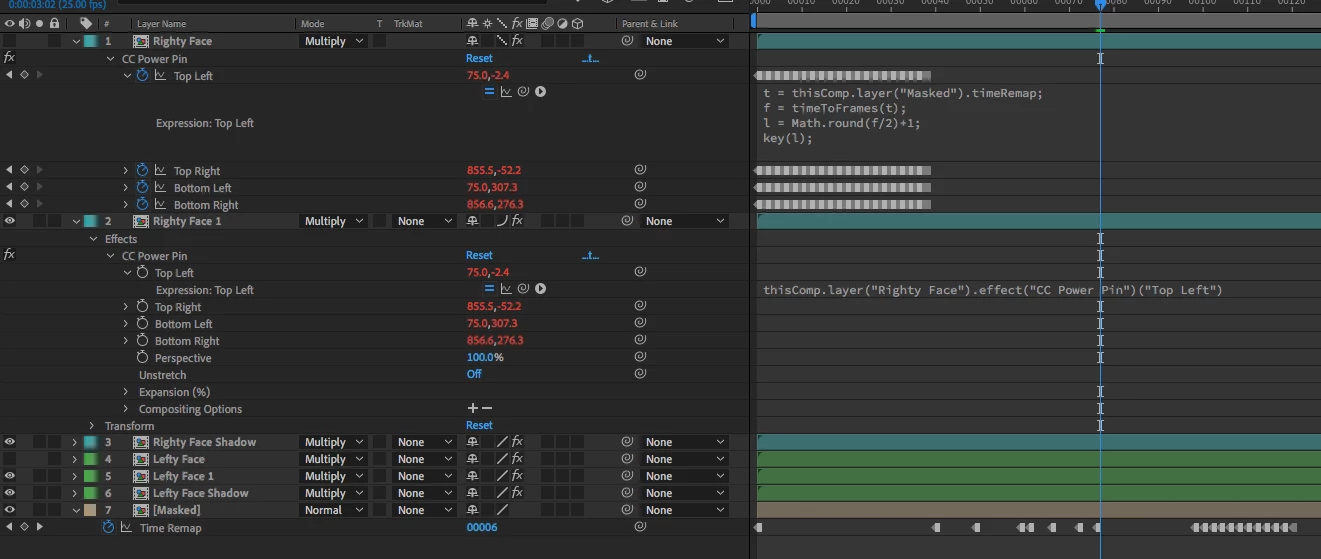
I've got an expression on a layer's CC Power Pins, that selects the value at a keyframe depending on the Time Remap of a different layer.

The code works, except for certain points where it disables itself and tells me that there is no keyframe 21.
It should never be referencing 21, and if I just put the output to [l,l] it always shows me the number it should.


t = thisComp.layer("Masked").timeRemap;
f = timeToFrames(t);
l = Math.round(f/2)+1;
key(l);


The weird thing is that when it disables itself it still gives the right result in the values, but it doesn't display correctly in the comp. I have a duplicate layer beneath it for a shadow, and the CC Power Pin for that layer just references the 1st layer for its values. That displays fine throughout.


 Where is it getting 21 from? What am I doing wrong? Any ideas?

This topic has been closed for replies.

5 replies

Community Expert
September 20, 2019

下記のエクスプレッションは、どうでしょうか。


var t=thisComp.layer("Masked").timeRemap.nearestKey(time);
var l=0;
if (time >= t.time){
	l=t.index
} else {
	l=t.index-1;
}
key(l)
Mylenium
Legend
September 19, 2019

You are introducing a cyclic redundancy by manipulating the time twice - in the time reampping and the expression itself. This is bound to go belly up as one of the values returned by time remap may actually already exceed a limit and exceed AE's temporal sub-sampling steps. Or in other words: You may get some odd value there and AE can't slice it up into its 9999 sub-samples or whatever. I would suggest you straighten out your logic and don't use both methods at the same time. This is only bound to get even messier when you use more comps and start nesting things. You'll never know what the actual time used in the evaluation is.


Mylenium

Known Participant
September 19, 2019
I have absolutely no idea what that means. How do I only do it once?
stib
Inspiring
September 19, 2019

Does time remap ever go abvoe 40, even outside the comp? I've had weird trouble like this before, where the expressions error banner would appear, and disappear without me actually changing any expressions. I think there are a few bugs in the new JS engine.


As a workaround ou could add a try to the script, and catch any errrors by returning a default value.

Known Participant
September 19, 2019
No the map never goes over. It's working atm, and I'm editing another section right now. If it flares up again when I start properly remapping that scene then I'll investigate further. I wanted to use that method on three comps (to save copying all the keyframes and matching them manually), but not convinced it's robust enough - especially if I have to pass the project onto someone else… Normally by now I've realised a glaring error on my part.
stib
Inspiring
September 19, 2019
The good thing about try..catch is that it makes the expression bomb proof. As long as it returns a sane default when it catches and error. My go-to is just to return value
Martin_Ritter
Legend
September 19, 2019

Would you mind to post a screenshot of your comp with all altered props and the issue and/or a video?


It's a bit hard to understand what is going on on your side.


*Martin

Known Participant
September 19, 2019

I've been working on another part and just went back to get screengrabs and it's all working as it should. Obviously, cos that's what After Effects does. I've added an image to the original post as I didn't realise I could do it here. This is the level of idiot you're dealing with.

stib
Inspiring
September 19, 2019

"Your code looks good, the comp looks good" - I'm getting that printed and framed on the wall.


There are exactly 20 which is interesting.

I might delete one and see if the error throws up 20...


You could also do: l = Math.min(Math.round(f/2)+1) , t.numKeys);
Martin_Ritter
Legend
September 19, 2019

What's going on with the timeRemap?

It seems to return 40 at some point, thus calculates to key(21).


You can put the first line on a text layer -> sourcetext for better debugging.


*Martin

Known Participant
September 19, 2019
Thanks, I'll do that and see if I spot where the error is. For now I've duplicated the working "shadow layer" and edited it so it does the job of the main layer. I saved it, reopened it and that went out, until I changed the sampling to bicubic... I don't really see how it can be getting 40, as the expression always gives the correct output to the property's values. It just occasionally disables itself.