Participating Frequently
April 25, 2017
Answered

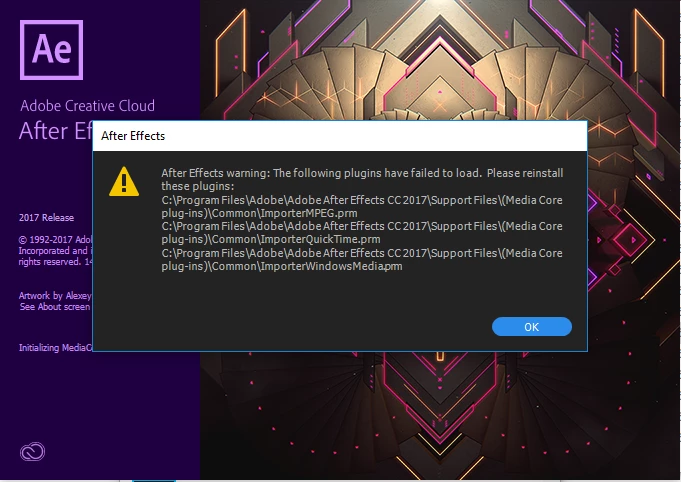
After Effects failed to load some plugins

  • April 25, 2017
  • 9 replies
  • 25880 views

Hello guys!

What i need to do to reinstall this plugins?

I already uninstalled with clean tool and rename media core folder with extension -old.

Error still occurs.

Thanks

This topic has been closed for replies.
Correct answer Tim Kurkoski

If you are running After Effects 14.2, Premiere Pro 11.1, or Adobe Media Encoder 11.1 on Windows Server 2012, you will need to install the Windows Server Essentials Media Pack:

https://www.microsoft.com/en-us/download/details.aspx?id=40837

Specifically, the Spring 2017 updates for After Effects, Premiere Pro, and AME include a new dependency on the Windows media components for certain audio codecs initialized by the ImporterMPEG, ImporterQuickTime, and ImporterWindowsMedia plug-ins.

Please note that Windows Server 2012 is not a tested or supported operating system for these applications. This information is provided as a courtesy. Use this solution and this operating system at your own risk.

For supported operating systems, such as Windows 10 Pro, the required media components should already be installed. If you have removed those media components, or if you are using an edition of Windows 10 that does not include these components by default (such Windows editions are not tested or supported operating systems), there is likely a similar download available from Microsoft or a component you can add through the Windows control component. I apologize, I don't have links for those cases at hand, but here's what a quick Google search gives me:

https://support.microsoft.com/en-us/help/3133719/

https://support.microsoft.com/en-us/help/3099229

https://www.microsoft.com/en-us/download/details.aspx?id=53356

https://www.microsoft.com/en-us/download/details.aspx?id=48231

https://www.microsoft.com/en-us/download/media-players.aspx

9 replies

Participant
March 8, 2021

In the latest versions of windows 10 to install the Media Feature Pack you have to go to Settings>Apps>Apps and Features>Optional Features.
Then click Add Features find and select Media Feature Pack and install it.

Pushvfx
Participant
October 31, 2017

For Windows 10 PRO N here is the link:

https://support.microsoft.com/en-us/help/3145500/media-feature-pack-list-for-windows-n-editions

Make sure you select the right version of your windows by going to computer system - windows specifications.

Participant
May 22, 2017
Tim Kurkoski
Adobe Employee
Tim KurkoskiCorrect answer
Adobe Employee
May 22, 2017

If you are running After Effects 14.2, Premiere Pro 11.1, or Adobe Media Encoder 11.1 on Windows Server 2012, you will need to install the Windows Server Essentials Media Pack:

https://www.microsoft.com/en-us/download/details.aspx?id=40837

Specifically, the Spring 2017 updates for After Effects, Premiere Pro, and AME include a new dependency on the Windows media components for certain audio codecs initialized by the ImporterMPEG, ImporterQuickTime, and ImporterWindowsMedia plug-ins.

Please note that Windows Server 2012 is not a tested or supported operating system for these applications. This information is provided as a courtesy. Use this solution and this operating system at your own risk.

For supported operating systems, such as Windows 10 Pro, the required media components should already be installed. If you have removed those media components, or if you are using an edition of Windows 10 that does not include these components by default (such Windows editions are not tested or supported operating systems), there is likely a similar download available from Microsoft or a component you can add through the Windows control component. I apologize, I don't have links for those cases at hand, but here's what a quick Google search gives me:

https://support.microsoft.com/en-us/help/3133719/

https://support.microsoft.com/en-us/help/3099229

https://www.microsoft.com/en-us/download/details.aspx?id=53356

https://www.microsoft.com/en-us/download/details.aspx?id=48231

https://www.microsoft.com/en-us/download/media-players.aspx

Kevin-Monahan
Community Manager
Community Manager
May 20, 2017

Hi Rafahur,
Can you try what worked for RenderH? Let us know how that turns out.

Thanks,
Kevin

Kevin Monahan - Sr. Community & Engagement Strategist – Pro Video and Audio
Participant
May 20, 2017

-- SOLVED --

Same issues. Searched everywhere to find such a simple solutions. It is likely you do NOT have Windows Media Player installed. (Well that was the case for me since I am rendering on Windows Server / virtual machine in the cloud)

SOLUTIONS:

Server Role > Add Features > User Interface and Infrastructure > Desktop Experience

Done. Everything work.

carissa_lyn
Participant
May 20, 2017

renderh83074432​ are you able to explain a little more as to the steps for the solutions? As I'm not sure is that the flow from inside after effects?

Participant
May 20, 2017

carissa_lyn​ In my case, I ran After Effect on Windows Server 2012. This specific installation of windows don't come with Windows Media Player. So when I launched after effect, 3 media core plug-ins were unable to load. (I needed importquicktime in my case)

When you go to your Server Roles, you can Add Features to your OS.

a-2013-02-06_01-54-05.png

You then have to go trough the wizard (default next next next....) until you reach Add Features. From there, choose: User Interface and Infrastructure > Desktop Experience.

Once Desktop Experience is installed, windows will let you load the plug-ins. For your specific OS, installing the windows media player framework may be different. Also, this apply only to Windows machine that ran into this specific issues.

RafahurAuthor
Participating Frequently
May 6, 2017

No answers yet! Any staff member please?

RafahurAuthor
Participating Frequently
May 6, 2017

They closed the ticket without solving it! OMG!!!!!

Rajashree Bhattacharya
Community Manager
Community Manager
May 11, 2017

Hi Rafahur,

I have looped in an expert to view the issue & respond back. It might take some time. Please excuse the delay.

Thanks

Rajashree

Note:  You can reach out to our designated customer care handle, @AdobeCare

carissa_lyn
Participant
May 3, 2017

I have had this same problem, done all of the mentioned things above and even spent 2.5hours on with Adobe support with a remote desktop tech and we still couldn't fix the problem. I'm going to try again later today with a diff tech support guy and see if I can get anywhere.

@Rafahur If you don't mind me asking what platform are you installing this on? I'm still running windows 7 enterprise and I'm starting to wonder if that has anything to do with it.

RafahurAuthor
Participating Frequently
May 3, 2017

Hello Carissa_lyn!

Thanks for sharing your problem too.

I'm running on Windows 10 Pro version and I already have 2 support tickets too spent 5 hours in a remote support tech and nothing was solved.

After you get first level of support and they don't solve anything they transfer this problem to a next level support or "product experts" and the communication is via email so any reply you need to wait 24-48 hours. So it takes forever.

Szalam
Community Expert
Community Expert
May 2, 2017

Have you tried updating to the latest version?

RafahurAuthor
Participating Frequently
May 2, 2017

Yes Szalam i tried this error still occuring for almost a month now.

Thanks for your reply!

Szalam
Community Expert
Community Expert
May 2, 2017

Does After Effects work alright other than firing this error at startup?