
Inspiring
March 24, 2017
Answered

After Effects Fill

  • March 24, 2017
  • 4 replies
  • 13351 views

HI there!

Sorry if this is something very obvious, I'm new to after effects.

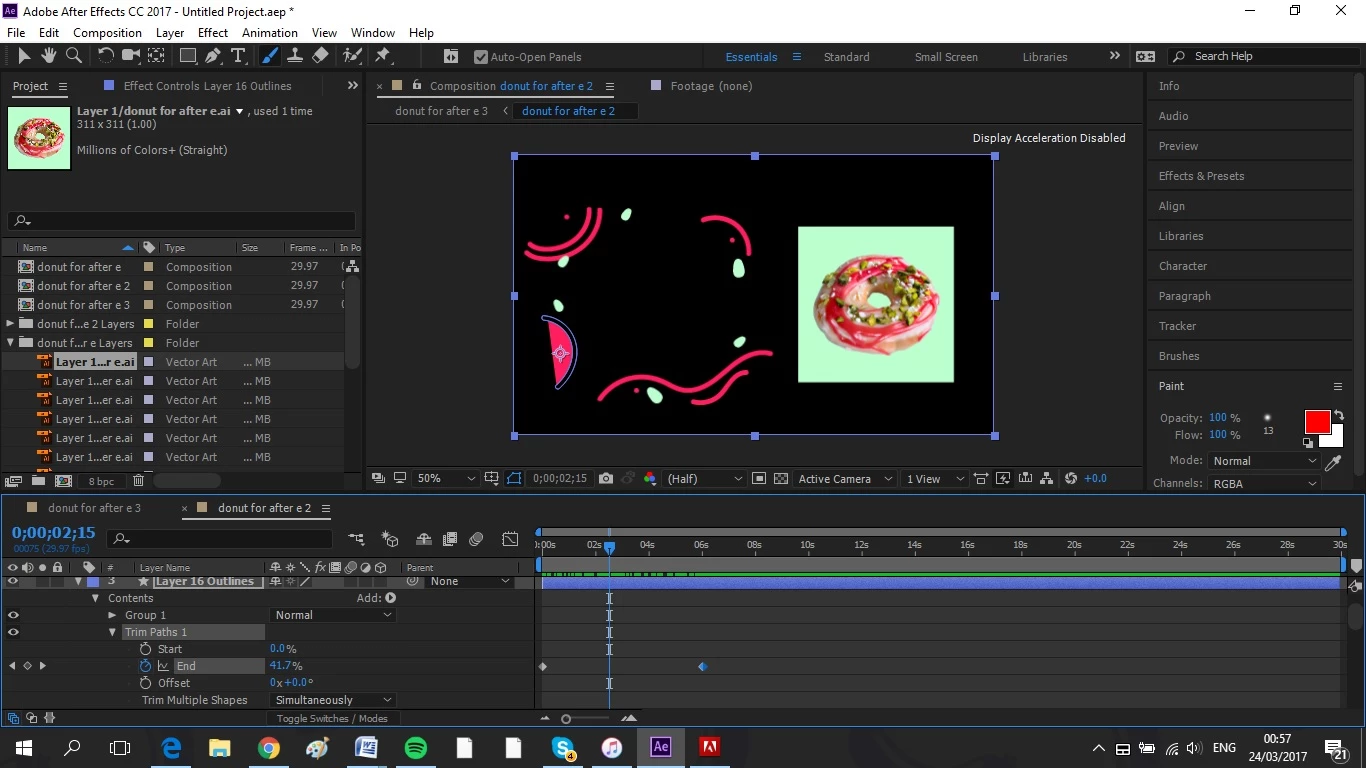
I just want to make this lines look like they're drawing themselves. I followed a tutorial that had me change the start and end times which works, but is filling the line on the bottom left as a half circle, and not just simply filling in the line. I imported these objects from Illustrator and made it a shape.

Can anyone help with this?

Thank you!
    This topic has been closed for replies.
    Correct answer maudequinn

    Thanks for your help, I figured out what it was. I drew the paths in illustrator with the paintbrush tool and not the pen tool. Redrew them and all fine. Thanks!

    4 replies

    maudequinnAuthorCorrect answer
    Inspiring
    March 30, 2017

    Thanks for your help, I figured out what it was. I drew the paths in illustrator with the paintbrush tool and not the pen tool. Redrew them and all fine. Thanks!

    Inspiring
    March 25, 2017

    Yeah I'm very familiar with lines and strokes from photoshop and illustrator. After effects is looking at my lines like they are fills and not strokes. I have followed the directions perfectly but the difference is I didn't draw the lines in after effects but brought them in from illustrator, nothing 'obvious' about it.

    Community Expert
    March 25, 2017

    If you was to use Trim Paths to draw a line around a shape that has a fill then the easiest way to do that is to duplicate the shape, set the bottom copy to fill only and the top copy to stroke. Then you apply trim paths to the top copy with only the stroke.

    If you want to use trim pats to fill a shape then you have to animate both the start and end and the rotation to get the fill to work the way you want it to. This technique is a bit dodgy, only really works with rectangles or very simple shapes, and is frankly a pain in the neck. I usually just animate a track matte or a mask over the shape layer to simulate filling a shape layer.

    I hope this makes sense. Maybe the screenshot will help

    \

    The workflow:

    1. Draw shape 1 with the pen tool using the fill and stroke I wanted
    2. Press the u key twice to reveal all modified properties of the shape layer
    3. Select Shape 1 and press Cmnd/Ctrl + d to duplicate the layer
    4. Press the U key twice again to reveal all of the properties of the shape layer that are modified
    5. Delete the fill from Shape 2
    6. Delete the stroke from Shape 1
    7. Select Shape 2 and add Trim Paths
    8. Animate the end point to draw the line around the shape

    EZ as Pie. Unfortunately trim paths works on the path not just the stroke so you have to make a duplicate

    Hope this helps.

    Inspiring
    March 24, 2017

    Thanks for your input, but that's still not working. What I'm trying to achieve is a 'self drawing line' so need the shape to be filled, its just filling in the wrong bits. I turned off fill to see, but just gave me an empty line. Any other suggestions? Thanks again

    P.M.B
    Legend
    March 25, 2017

    Hmmmm.  Do you know the difference between a fill and a stroke?  From the looks of your screen shot I'm a little confused about why you're playing with fills.  Fills don't make "lines", strokes do.   I guess Rick was right.   Start learning how to use the help.

    And just suggestion.  Watch the tutorial again....you're obviously mistaken in thinking you followed along correctly.

    ~Gutterfish
    P.M.B
    Legend
    March 24, 2017

    Just turn off the fill or turn down it's opacity.  Alt+Clicking the fill swatch on the tool bar will toggle through fill modes (Regular>gradient>radialGradient>off)

    ~Gutterfish
    Community Expert
    March 24, 2017

    A stroke can be revealed by adding a shape animator Called "Trim Path."  Use the search help field at the top right corner of AE to learn how to find and use it.

    Using Trim Paths on a fill produces some odd effects so if the shapes you want to draw on are or have fills you will probably have to use a different technique.

    P.M.B
    Legend
    March 24, 2017

    They've already got the trim paths applied.  The problem is that the fill is being drawn on as well. 

    ~Gutterfish