
Participating Frequently
August 5, 2019
Answered

After Effects Graph Editor Problem

  • August 5, 2019
  • 3 replies
  • 31251 views

Hi! I'v been looking for the an answer to my problem for hours and can't seam to figure it out. I would really appreciate your help!

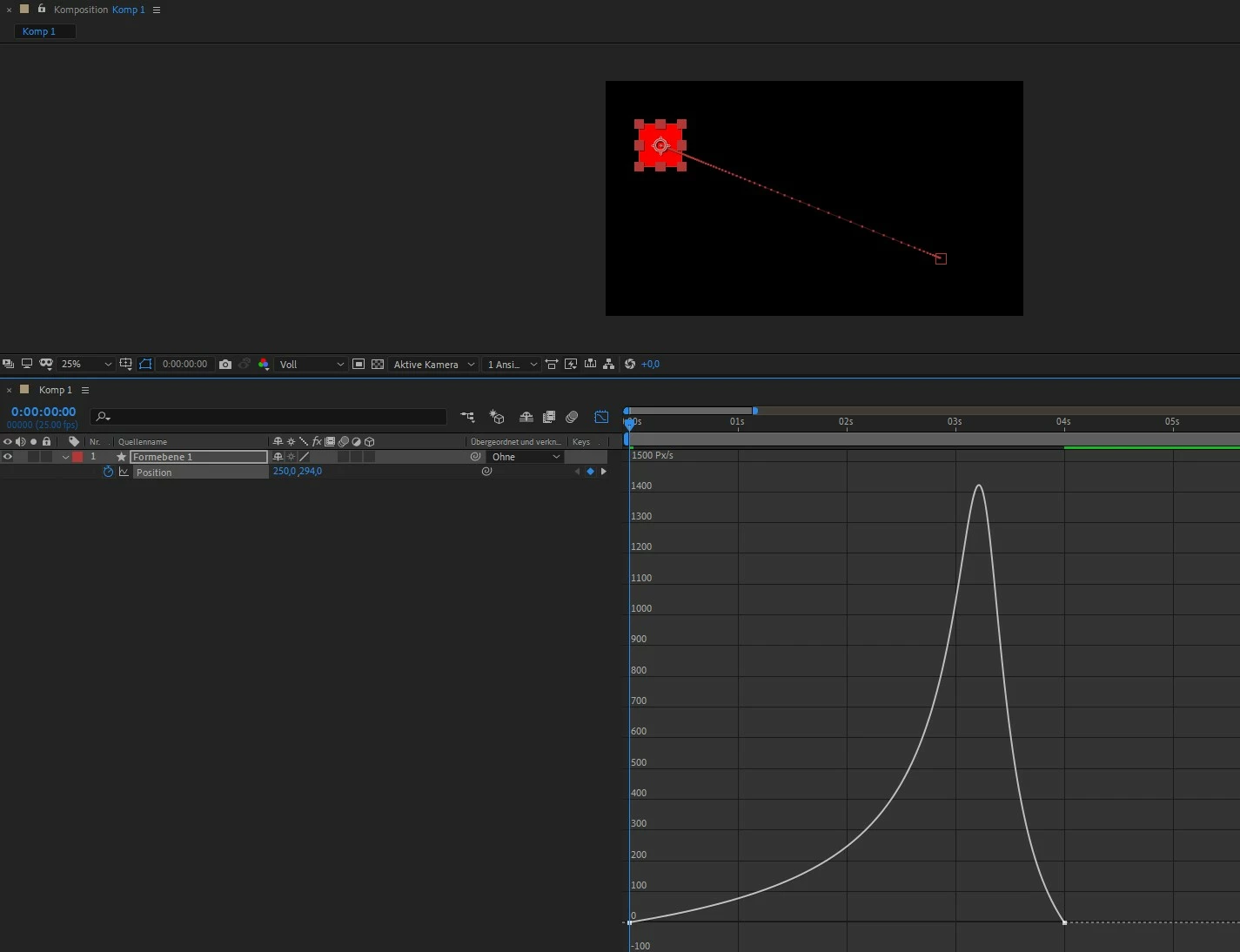
I want to tweak the easing speed in which a shape moves using graph editor but all i get it the curves for x and y position. If I add an easy ease to the shape, these two curves (green and red) transform into S shapes. But if i try to edit the handles of these curves, the position of the shape changes and not the speed in which the shape moves. I just want to affect the acceleration of the shape not the path in which it moves. Many tutorials show a grey curve which can be edited to change the acceleration but it won't show on my AE.

Thanks in advance!
This topic has been closed for replies.
Correct answer Martin_Ritter

Just don't separate the dimension and make sure, you selected the speed graph, not value graph.

*Martin

3 replies

Participant
October 4, 2020

where is the speed graph?

Community Expert
October 5, 2020

Maybe this tutorial will help you find and edit the graph editor. Any time you see colored lines you are looking at the Value Graph. The speed graph is always a light gray line. The choice is made using the icons at the bottom of the graph editor or by right clicking as demonstrated here:

This is the second time I have shared this video in the last 5 minutes.

Participating Frequently
August 5, 2019

To specify all tutorials I have watched and read have just one curve when pressing the graph editor, ether grey or red one and they are able to edit the handles of said curve and affect the ease, but I have two curves even before dividing the dimensions and when i edit these curves it only affects the positioning of the shape.

Martin_Ritter
Martin_RitterCorrect answer
Legend
August 5, 2019

Just don't separate the dimension and make sure, you selected the speed graph, not value graph.

*Martin

Participating Frequently
August 5, 2019

Thank you! I think I was too tired/frustrated to figure it out, this helped!

Martin_Ritter
Legend
August 5, 2019

There are two graphs in the editor. You are on the value graph, but you need the speed/velocity graph.

Klick on the eye and switch to the other one.

*Martin

Participating Frequently
August 5, 2019

Thanks for the replay! Still doesn't work tho. If i change the mode to speed graph the two curves just change to a slope but again if i pull on the handles to edit the curves, it only changes the shape of the path of the shape, not the acceleration in which the shape moves.

In this screen shot you can see that I'm in the speed graph and i moved the handle and instead of changing the acceleration, it just makes the path of the shape curved.

These two curves seam to only be for the position and not the speed..

Participating Frequently
August 5, 2019

It is doing the same because you need to move upwards the X axis too. What I would do is to deactivate separate dimensions and then change the speed.


I did this and still there are two curves, red and green but now i can't edit the handles of the keyframes. Again adding the easy ease makes these straight beziers S shaped and adds the intended ease to the motion of the path but I can't edit the ease of the motion. Again if i move the keyframes on the graph, the position of the shape just changes, not the acceleration/deceleration of the shape. I don't know if I'm being clear enough but I don't want to change the length of the time which the shape moves or the position in anyway. Only the ease since it's quite mild using just the default easy ease.