

Participant
December 13, 2018
Answered

After Effects has no space to store

  • December 13, 2018
  • 3 replies
  • 572 views

Hi

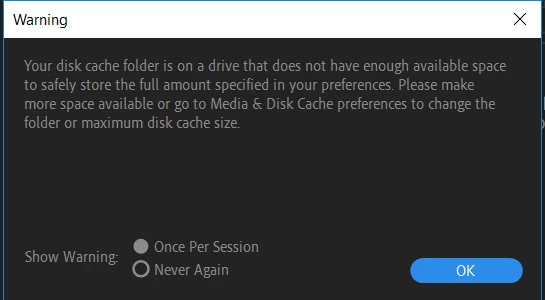
I attached an attachment below of a message that comes up every time i open after effects,

how can i safely delete old files or make more space without deleting any of my projects by mistake?

This topic has been closed for replies.
Correct answer ToolfarmJP

Hello,

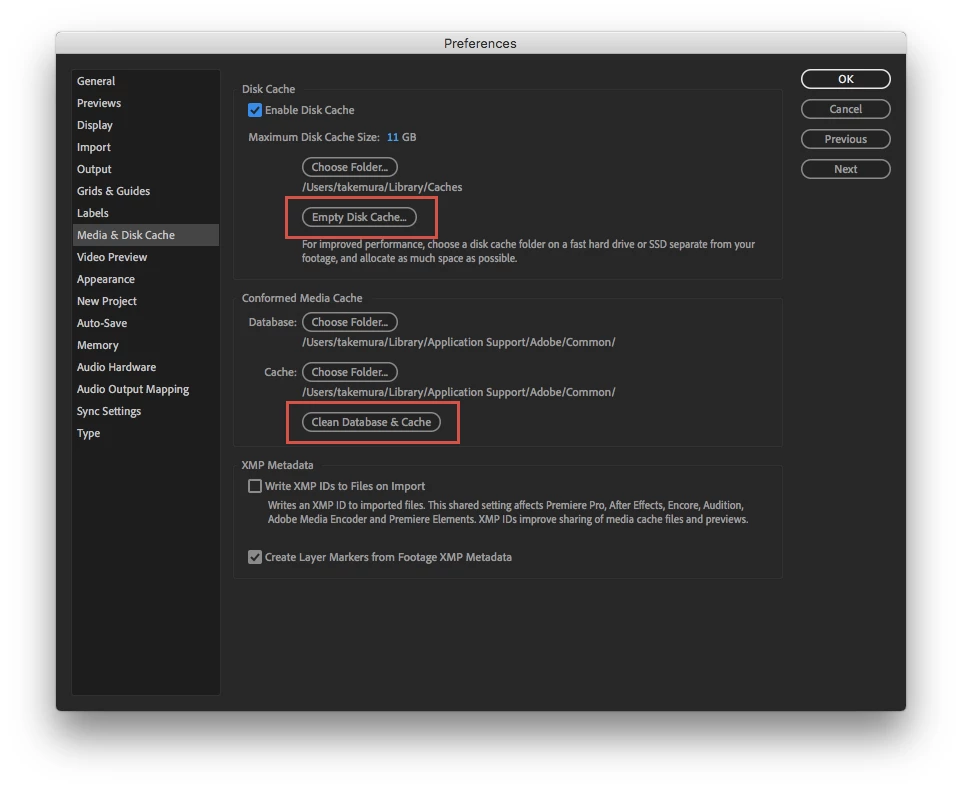
You move to Preferences from the menu and then try to clear the cache. Please see the attached file. I would not think it makes you in trouble.
3 replies

Mo Moolla
Legend
December 13, 2018

As per Toolfarms pic set the Maximum Cache size to something that your drive can accommodate

So as an example if you have a 250 gig drive with 100 gigs free set the Cache File Size to 80 gigs.

Your Disk Cache File Size may be too small currently

Mo

Inspiring
December 13, 2018

Clearing your disk cache will not affect your projects at all, other than clearing the blue render bar in your timeline, if you've ever seen that. What is your hardware setup like? After Effects operates best if your cache drive (the top section in the screenshot above) is on a fast solid state drive. Whatever drive your cache is currently set to is filling up, and is possibly going to cause other issues for you.

ToolfarmJP
Community Expert
ToolfarmJPCommunity ExpertCorrect answer
Community Expert
December 13, 2018

Hello,

You move to Preferences from the menu and then try to clear the cache. Please see the attached file. I would not think it makes you in trouble.

Participant
December 14, 2018

thanks!