

PaoloBuatti
Participant
November 21, 2021
Answered

After Effects HEVC / h265 problem

  • November 21, 2021
  • 3 replies
  • 3679 views

Hello everyone,

some weeks ago one project containing some HEVC footage started giving me troubles. 
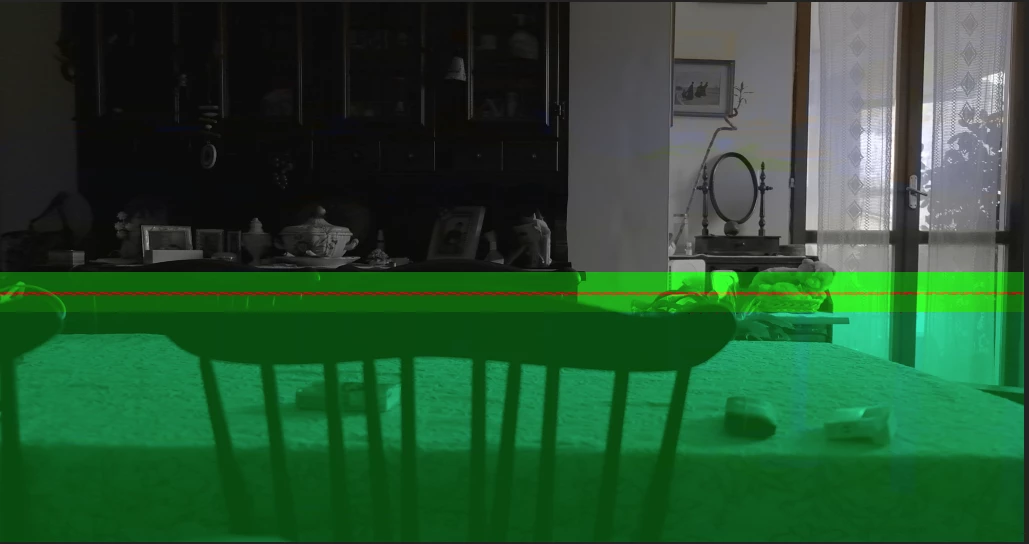
As you can see from the image above, half of the screen is green and seems to be a codec error. The files, when I play them with a regular player, have no visible problems. Also is strange that I worked with this project and with the same files some week before, without troubles. I don't know if this info can help but this footage was shooted witha fuji X-T4, I'm running After Effects 2022.

Thanks!


You need to ask program questions in the forum for the program you are using
To ask in the forum for your program please start at https://community.adobe.com/
Moving from Using the Community (which is about the forums) to the correct forum... Mod

This topic has been closed for replies.
Correct answer PaoloBuatti

Installing the old version of After Effect (2021) everything works fine, so nothing wrong with drivers or GPU or Win10. The problem is in After Effects 22, case solved. 

3 replies

PaoloBuatti
PaoloBuattiAuthorCorrect answer
Participant
November 23, 2021

Installing the old version of After Effect (2021) everything works fine, so nothing wrong with drivers or GPU or Win10. The problem is in After Effects 22, case solved. 

PaoloBuatti
Participant
March 18, 2022

Just to let you know that I upgraded to a new workstation and I still have problems with these codecs inside AE 2022. The RAM preview this time is jumping frames even after render and it's not smooth at all. No green areas on the frames but frames are dropping. AE 2021 works fine. This is incredible. 

Harold Silva
Community Expert
Community Expert
November 22, 2021

Eso me ha pasado algunas veces y por lo general es por problemas con el driver de la tarjeta de video. Te recomiendo que bajes el driver desde la misma pagina del fabricante no el driver or defecto de windows, (eso siempre trare algunos problemas).
esp deberia solucionar tu problema.

Saludos

Harold

Harold Silva B.
PaoloBuatti
Participant
November 22, 2021

Thank you for your answer, I'll investigate on windows drivers update, I didn't think about this!

Inspiring
November 22, 2021

Green inside AE often means GPU issues. Can you try updating or rolling back your GPU drivers?

PaoloBuatti
Participant
November 22, 2021

Thank you for your suggestion. Isn't it strange that it happended suddenly whitout any change to my GPU drivers? Some weeks before AE was working with these files without problems. 

Inspiring
November 22, 2021

Depending on your GPU, Windows Update has a bad habit of installing drivers that cause problems. Also, when you say AE was working some weeks before, were you on AE 2021 and now you're on AE 2022? There are lots of factors at play, so it's always challenging to find the culprit, and there are many different things that could have inadvertently triggered this issue.