

Answered
After Effects keep crashing on render
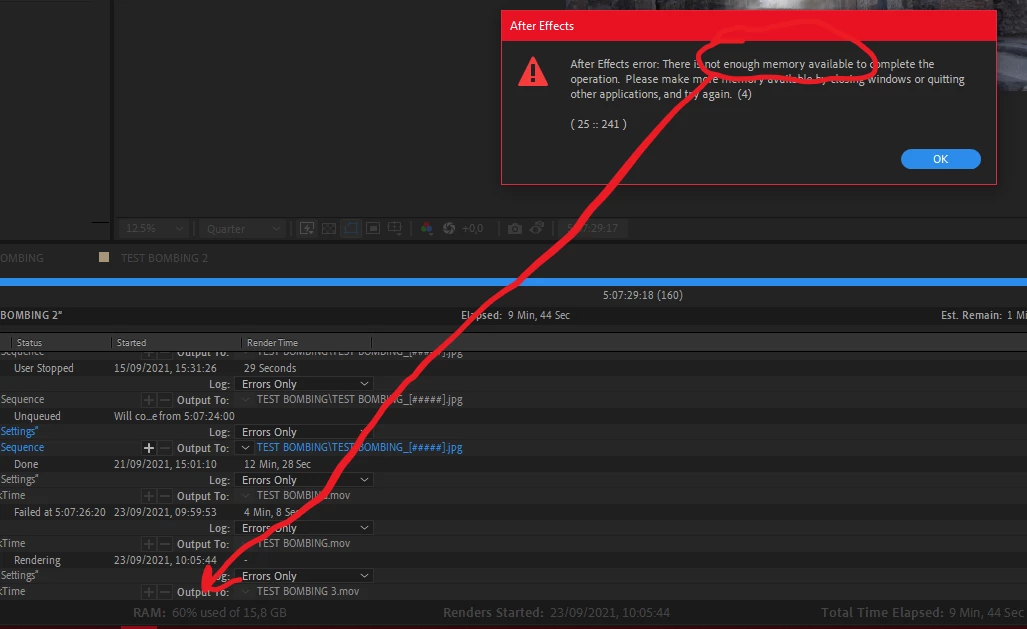
I keep getting this message of not enough memory available. I have plenty of Gb on the HDD and as you can see I'm using very few memory. Any ideas? Thanks

I keep getting this message of not enough memory available. I have plenty of Gb on the HDD and as you can see I'm using very few memory. Any ideas? Thanks
You should not go into preferences and just allocate all available ram to Adobe. Adobe likes even numbers of GB and so do the other apps. Pick 2 or 4 GB for other apps first and see if that solves the problem. It is completely possible to run out of system resources when rendering, especially if you have motion blur/ lights and shadows, or any kind of time-bending. The reported ram usage is just an average estimate. Come upon a frame that requires more ram than is available and AE will hand up and report the problem before the calculations of ram usage are displayed.
Already have an account? Login
Enter your E-mail address. We'll send you an e-mail with instructions to reset your password.
 AdChoices