
After Effects - Layer I'm working with is never ending??
Really stumped with this issue and hoping someone can help me! I literally don't even know what to Google to find an answer so I'm just going to explain step by step here - I'm brand new to After Effects and know next to nothing about it (much more well versed in PS and AI) and I'm trying to do a very simple logo animation following a tutorial on YouTube.
In the tutorial we're animating the LinkedIn logo.
- I import the logo image, add it to the timeline, and duplicate it to animate the text and icon separately.
- I put a rectangle mask over the text layer and then one over the icon layer.
- I then use the pan behind tool and set the anchor point in the center of the icon layer.
- I then set markers at 0, 1, and 2 seconds and move my playhead to 1 second
- Here's where I run into my issue:
- In the tutorial he simply selects the text layer and moves it to the right, holding shift so they beginning of the layer snaps into place at the 1 second marker where the playhead is
- In my file, when I try to move the text layer to the right it's literally never ending. It just keeps scrolling. There is no beginning of the layer for me to snap into place.
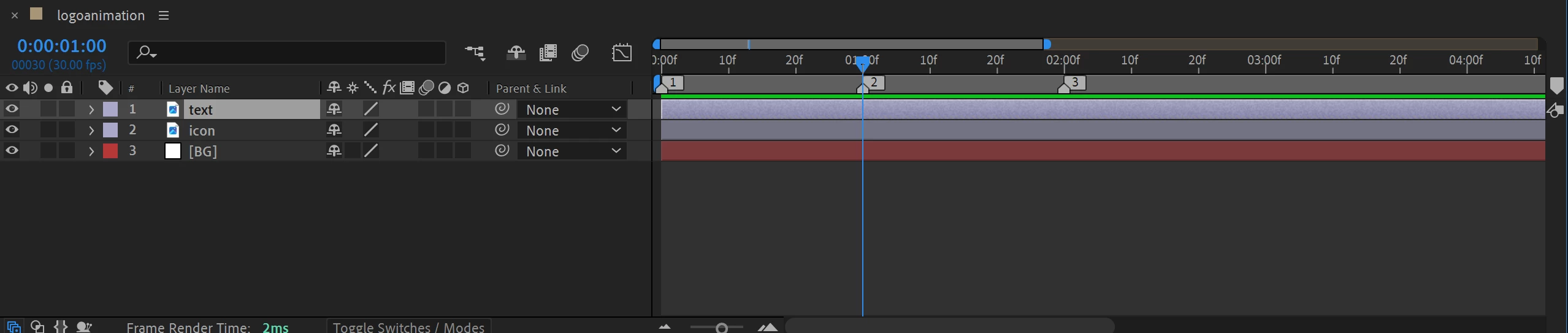
I've ulpoaded a video showcasing the never ending scrolling and screenshots showing the disparity between my timeline and the one in the tutorial - you'll see that there is empty space in front of his text layer and none in front of mine. This could very well be a simple settings issue or something super obvious that I'm doing wrong but I cannot for the life of me figure out where to even start to figure it out.
Does anyone know what is going wrong here in my file and how to fix this?? ANY suggestions would be so so appreciated!!
TUTORIAL TIMELINE

MY TIMELINE
 AdChoices