
Participating Frequently
January 13, 2024
Answered

After effects quits, crashes or makes a blue screen error during rendering on one specific machine

  • January 13, 2024
  • 10 replies
  • 11356 views

There is a problem which is driving me crazy for months now.

We have multiple computers running After Effects, and there is a brand new PC with no expense spared components in it which just crashes really often (Intel Core i9-13900K with 128 GB DDR5 RAM, RTX 3060 Ti and a MSI MAG Z790 TOMAHAWK WIFI) and a All other, much lower quality PC-s manage to continue working on the same comp, same AE version, same Windows, without problems. Its not a comp specific or effect specific thin, it can happen anywhere, even in  safe mode (both Windows and After Effects)

I have tried updating drivers, stress tested each hardware compoment separately including RAM, CPU and GPU, installed it clean, run in safe mode, deleted 3rd party plugins, uninstalled RAM modules one by one, ran without GPU, updated BIOS, checked Event Logs, analized dump files, used driver verifier, tried basically all solutions found online without a result. I am working on this with the support of ChatGPT for weeks without any solution.

Usually the blue screen messages are:

  1. SYSTEM_THREAD_EXCEPTION_NOT_HANDLED (7e)
  2. DRIVER_IRQL_NOT_LESS_OR_EQUAL (d1)
  3. SYSTEM_SERVICE_EXCEPTION (3b)
  4. IRQL_NOT_LESS_OR_EQUAL (a)
  5. APC_INDEX_MISMATCH
  6. ATTEMPTED_EXECUTE_OF_NOEXECUTE_MEMORY
  7. UNEXPECTED_STORE_EXCEPTION
  8. SYSTEM_THREAD_EXCEPTION_NOT_HANDLED
  9. IRQL_NOT_LESS_OR_EQUAL


This shows into the direction of RAM / Driver problems, including memory access violations, potential driver issues, and system thread exceptions. I ran all RAM tests on earth and they all said everything is fine. Driver-wise I updated everything manually and with software help too.

Dump file analysis shows that the  faulting module is still within the kernel (ntkrnlmp.exe), pointing to a system-level issue. 


I just ran out of options and I have no idea what to do besides selling the computer piece by piece. Any ideas?

Dump files:
https://drive.google.com/drive/folders/164krg2Fd0UEiJrE3puBuMZuET3Gcuc1F?usp=sharing
This topic has been closed for replies.
Correct answer onnpro87

I am extremely sorry 😞 If that is any consolation I know how you feel, I was plagued with this problem for more than a year, one night before a big deadline I was actually crying in front of the computer, begging it to finish rendering. Thats why I made this thread because I thought I can not be the only one out there.
Unfortunately nothing I wrote is official help, I am not a PC expert by any means, I am an animation director who has a bit bigger test pool than others because we have multiple PCs in our studio and I could try and switch out components. The only thing I know is that the turbo boost switchoff was the first time when I actually saw replicable and testable results. Switching RAM units and giving them all kinds of timings made very minimal progress, switching off the e-cores gave it some progress but it still crashed, the turbo was what could be repeated with the same result over and over. Yes, the BIOS settings here are quite extensive but most of them is mostly for safety and to disable some of the automatic boosting features of the Aorus board, I am pretty sure you dont need them all.  Anyway, tell us what happened and good luck!


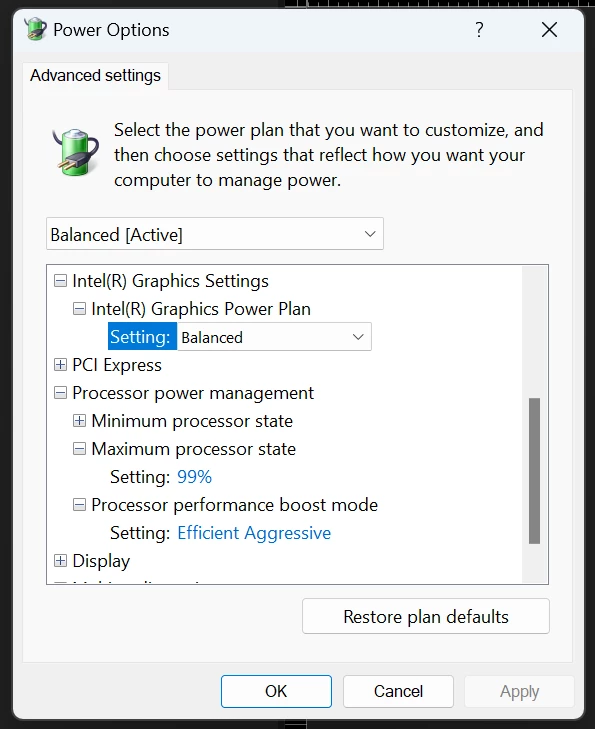
You will not beilieve! IT WORKS! I only changed the CPU maximum power to 99% and edit the regedit to open the performance boost mode, changed there to Efficient Aggerssive.. I guess it is doing a similar job to the limitation you did on BIOS.

Since yesterday the computer works just fine. unbelievable.

Intel have a serious fault on their 13th and 14th cpus.

10 replies

nikolayv32961369
Participant
April 22, 2024

This is the easiest fix that I could find

Right button on the task in task manager

Participant
May 28, 2024

Hi, thank you all for this info. I have had the same issue with AE. I am AE heavy on production along with many other creative apps like Autodesk Maya. AE is the only one consistanly crashing my PC in this way. I have other systems that are not running 14th gen E-core, and this is not an issue. I truly believe AE is running on some sort of older platorm/code that can not manage the e-cores at its default settings. And through all my months of test trying most of the solutions on this post nothing works. I am going to try the solution given by - nikolayv32961369


Hopefully this works. Thanks

Participating Frequently
May 28, 2024

I know that Intel has exposed the Mother Board manufacturers of using overclock settings that call for too much wattage by default (4000 watts in some cases!!!). I would check to see if your MB has a new driver available that addresses the issue, and set the MB to run at "Intel recomended" settings. It will underclock the CPU a bit, but will greatly increase the stability. 

vikasc76444864
Participant
April 22, 2024

try this.....


Participating Frequently
April 22, 2024

Unfortunately this problem is not because of the GPU, we have tested it with and without GPU units and with and without hardware acceleration, an it is the same. At this point with all the helps of others we pretty much pinpointed it being a Raptor Lake error caused by Turbo Boosting. But thanks, its a good tip to try it always!

vikasc76444864
Participant
April 22, 2024

tryi this..


nikolayv32961369
Participant
April 14, 2024

Hello,

I was having this issue for months now using i9 13900 and rtx 3080ti

I read all the posts here and I think I found a very simple fix which made me scream of joy.

Start AE than open Task manager, right click on the proces and click "Efficiency mode"

I have tested it on the current project I am working on, which was crashing as hell, no crashes after enableing "Efficiency mode"

I hope this fixes the issue for everyone. And I am thankful that I didn't have to go true all the parts testing and windows reinstalling.

nikolayv32961369
Participant
April 14, 2024

FIX

Just to summarize, the simple FIX is to Start AE than open Task manager, right click on the proces and click "Efficiency mode"

Inspiring
April 10, 2024

I have a brand new HP Z2G9.. very expensive. total garbage. 
13900k
128GB DDR5
RTX A5000
exactly same issues you described here..
HP replaced the MB (2 times!) RAM, GPU, SSD and CPU.. same problem.. I really can't work anymore on this machine..
i'm working for the last few months on a older laptop with no crashes at all..
I really don't know what to do.. I thinking about buying a new custom PC but afraid the issues will be the same

Participating Frequently
April 10, 2024

I am very sorry to hear this, welcome to the club! Since we arrived to a (kinda) solution in this thread I read multiple articles saying that the number of faulty i9-s is bigger than any returns before with Intel. This affects 13th and 14th gen (as they are basically the same) I would still press for CPU replacement is you can, or if you can not, try out Alex Balcomes solution because that is still the best fix we found. If not... I would sell it. I am waiting for my second RMA now, if they wont exchange it I will sell it, and then buy from a place where they accept returns, just buy 3, try them all and return the rest.

Inspiring
March 15, 2024

I'm also having similar problems, and made a post about it. I have a new PC and it crashes only with Premiere and After Effects quite frequently. Any 3D work in After Effects is basically a no-go.


I have a lot of crash dumps that usually hint to something memory related (code 0xc0000005 pops up a lot)


It must be Adobe's software not functioning with newer hardware because I have a laptop and desktop from 2019 which handles the project files I'm working on completely fine.


Similar to others here I just don't have the time to replace and return individual parts and figure out what's causing it. Have tried so many things to no avail.


- Reinstalled Windows completely fresh, with just 2 Adobe products installed, still crashes

- Replaced the RAM sticks, still crashes

- Switched to Software-only rendering, still crashes (so it's not the GPU? New games run fine)

- Have toggled a bunch of CPU settings off in the BIOS in an attempt to increase stability, but I'm no expert.


Windows 10 Pro

Premiere 24.1

i9-14900k

64GB DDR5 RAM 6400MHz CL32 (Corsair Vengeance)

RTX 4070 Ti 12GB (TUF Gaming OC)

Z790 AORUS MASTER X 1.1 Motherboard


Sorry I can't help much but if someone here figures it out I want to know asap.


jonathans94913674
Participating Frequently
March 15, 2024
Did you try turning off the e-cores? Not ideal but it works for me as a workaround for now.
Participating Frequently
March 15, 2024

Oh totally, when I read what you wrote I tried it out immediately, but I have a deadline now so I could not really experiment with any of the "crashing for sure" projects I have saved.  So far what I see that I still have the error message popping up sometime when I render in Media Encoder, but after I close it it just continues rendering. Strange. I will test it properly next week. I also have one last shot to buy an other CPU / mobo combo before it makes no more economic sense to buy more PCs (I had to buy an extra anyway), so I am thinking about completely switching to AMD, but I also heard horror stories about how that handles memory... I just dont know.

jonathans94913674
Participating Frequently
March 2, 2024

I'm dealing with the same issue. 14900k. So far the only thing I've found to work is to turn off multi-frame rendering. 

Participating Frequently
March 2, 2024

Yeah that also makes crashes less frequent to me, but not 100%, and also I can not use this all the time, I need to render 24/7. Can you tell me your specs please? I am looking for mobo + RAM combinations to see. 

jonathans94913674
Participating Frequently
March 3, 2024

Gigabyte Z790 UD AC

CORSAIR VENGEANCE DDR5 64GB (2x32GB) 5600MHz CL40

RTX 4070 12gb


I suspected disabling multi-frame rendering probably wouldn't 100% solve the problem, but I've been stable so far. I'll probably do some more testing after I'm done with this project. I've been rendering everything on my AMD rig with no issues. Considerably slower if multi-frame rendering is on than the i9, but way faster when single-frame rendering on the i9. 

Participant
February 22, 2024

Hi,

i experiment EXACTLY the same issues with same tests


Setup :

Intel Core i9-13900K

128 GB DDR5 RAM

RTX 4090Ti

ASUSTeK ProArt Z690-CREATOR WIFI


It's hopeless...

Participant
February 22, 2024

Hi!

First of all, thanks for coming here! i was beginning to think I am the only one.

So, now I know that this is a RAM handling issue, even though the RAM passes all the tests, OCCT, Memtest, Cinebench, After Effects will STILL manage to crash it. Since I posted here I bought a completely new CPU (14th gen i9, a completely new Mobo (Gigabyte Aorus Master X, which was expensive as crazy) and a set of new RAMs (192GB of GSkill Trident), and the problem STILL PREVAILS! With a completely new set of hardware the only culprit can be After Effects. Problem is I am an AE professional so I just NEED TO solve this problem or I can not work.
So far I figured that 14th Gen handles the issue a bit better, but as the IMC is the same, there is just marginal improvement there. I also figured that the MSI Tomahawk with the new BIOS update makes it a bit better too. However, the Aorus Master X, being such a flagship monster of a board, actually handles it much worse. Now i decided to just abuse the return policy on Alza and try out new parts until I find a combination which works, but it seriously causes big damage to my mental health. What is your finding? Also I wrote to Gigabyte support and they have no idea about it at all either.

ShiveringCactus
Community Expert
Community Expert
January 15, 2024

In my experience, my PC blue screens where there's a conflict with the Graphics Driver.  I was getting a regular issue with the preference for Hardware-accelerated Decoding in Preferences > Media checked. Unchecking this solved that issue.


You could also try rendering with software only and see if that causes a crash.  If it doesn't, then the issue is likely something to do with your graphics card.  If it still crashes, then it's not your GPU.


Does a network play any part of your set up or is everything local?

Participating Frequently
January 15, 2024

Hi!

Thank you for the reply!

Unfortunately its not that. I have tried Software only, in the past it helped me out in many situations, not now though. I also took out the GPU for a couple of weeks to see how it goes, still to no avail.

Now this Preferences - Hardwave accelerated thing was new to me, but now I checked it, crashes still. But thanks for that, I already learned something 🙂

Yes, everything is local. 

I am just worried that if i buy a new PC and sell this, the issue will come back / also because all individual hardware tests pass, I can not really RMA it because I dont really have any grounds. (still might try, just which part?)

ToolfarmJP
Community Expert
Community Expert
January 15, 2024

If you use an anti-virus application, you turn it off.


Participating Frequently
January 15, 2024

Thank you , thats a great idea, but unfortunately I only have Defender, nothing else.

Participating Frequently
January 15, 2024

So a very interesting thing happened. I was browsing Reddit and I came upon this thread:

https://www.reddit.com/r/buildapc/comments/11uftum/rtx_4090_i9_13900k_pc_build_crashing_with/?share_id=eoGrLNGtPILcuDlYxZtXg&utm_medium=ios_app&utm_name=iossmf&utm_source=share&utm_term=3


According to this, the i9 13900 K tends to crash in games using DirectX12 with memory access violations. Temporary workaround was to lower the P clock of the CPU to a certain level (someone writes 50, some 54) and the problem disappears. I have tried is myself and it WORKS! 

I have certain AE projects which are crashing for sure and I am using them as crash testers. Once lowering P Core frequency to 50 (I have not checked the others yet) the problem disappears. Now I would conclude immediately than this is a CPU issue, and all the people on Reddit are instantly blaming Intel, but at the same time Intel Processor Diagnostic Tool runs perfectly and shows no errors whatsoever.

The other problem that this is only a temporary workaround, as now the computer is artificially bottlenecked, but an interesting insight nonetheless.