
Participant
January 21, 2019
Answered

After Effects refuses to render full comp

  • January 21, 2019
  • 2 replies
  • 3644 views

Hi! Recently I've been working on an After Effects CC 2019 project. These are my composition settings:
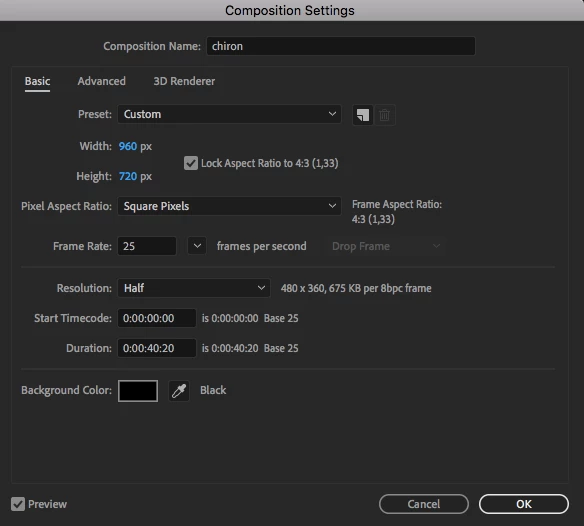
As there is no longer the H.264 codec embedded into the Render Queue in CC 2019 I have been using Adobe Media Encoder CC 2019 to attempt to render my composition. After trying about 4 times I continued to receive the same popup TextEdit message every time the rendering fails.
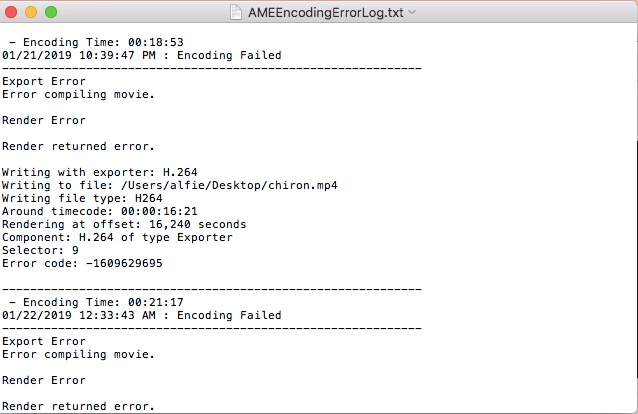
The full contents of the TextEdit message reads:

- Encoding Time: 00:18:53

01/21/2019 10:39:47 PM : Encoding Failed

------------------------------------------------------------

Export Error

Error compiling movie.

Render Error

Render returned error.

Writing with exporter: H.264

Writing to file: /Users/alfie/Desktop/chiron.mp4

Writing file type: H264

Around timecode: 00:00:16:21

Rendering at offset: 16,240 seconds

Component: H.264 of type Exporter

Selector: 9

Error code: -1609629695

------------------------------------------------------------

- Encoding Time: 00:21:17

01/22/2019 12:33:43 AM : Encoding Failed

------------------------------------------------------------

Export Error

Error compiling movie.

Render Error

Render returned error.

Writing with exporter: H.264

Writing to file: /Users/alfie/Documents/Adobe After Effects Auto-Save/CHIRON_1_1_AME/chiron_1.mp4

Writing file type: H264

Around timecode: 00:00:16:21

Rendering at offset: 16,240 seconds

Component: H.264 of type Exporter

Selector: 9

Error code: -1609629695

------------------------------------------------------------

- Encoding Time: 00:21:25

01/22/2019 01:22:05 AM : Encoding Failed

------------------------------------------------------------

Export Error

Error compiling movie.

Render Error

Render returned error.

Writing with exporter: H.264

Writing to file: /Users/alfie/Documents/Adobe After Effects Auto-Save/CHIRON_1_1_AME/chiron.mp4

Writing file type: H264

Around timecode: 00:00:16:21

Rendering at offset: 16,240 seconds

Component: H.264 of type Exporter

Selector: 9

Error code: -1609629695

------------------------------------------------------------

I am not sure what to do anymore. I have updated my After Effects program and tried to change a few effects just to make sure it wasn't too heavy to render but nothing seems to be working. The effects used in the specific time (16:21) is a squeeze warp effect and a camera lens blur effect.

If I could get an answer as soon as possible that would be amazing. Thank you for your time!
This topic has been closed for replies.
Correct answer imeilfx

Thank you for the suggestion, but didn't work :/

The TextEdit pop-up that comes with it is the exact same as the one from before... what should I do now?


I would suggest:
1. Render to different codec
if that does not work
2. Render to differen place on your hdd (preferably with shorter file path)
if that does not work try to:
- update your GPU drivers
- disable GPU acceleration
- turn off effects that you have and try to render withou them (only that short part where your previous rendering was failing) - if that will work - that will tell you that there is some issue with those effects and footage that you have
- if your input footage is in some non standard codec/format or even if it is in mp4 - try to convert them into some intermediate codec (prores, cineform, animation etc) and use that converted files in your project

You are not the first one with that error in AME so after short search here several topics on that - if what I adviced does not help - maby will be helpfull for you

Error when Exporting a 2.3 min animated video in Aftereffects - Error code: -1609629695

Encoder error -1609629695

Repeated Render Errors - Code -1609629695

Error compiling movie error code 1609629695

2 replies

Participant
September 19, 2019

Hey! I’m having the same problem and i don’t know what to do 

P.M.B
Legend
January 21, 2019

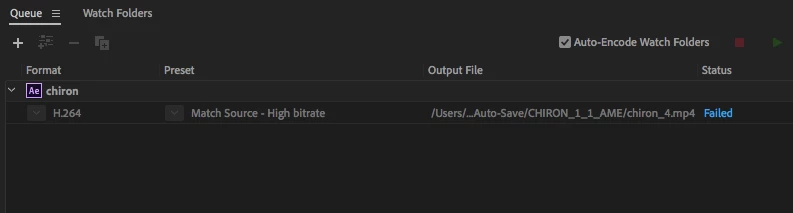
Thanks for showing your composition settings...However it might be more useful to see your actual render settings.

~Gutterfish
alf2eAuthor
Participant
January 21, 2019

Sure!

This is all in Adobe Media Encoder CC 2019.

imeilfx
imeilfxCorrect answer
Inspiring
January 22, 2019

Thank you for the suggestion, but didn't work :/

The TextEdit pop-up that comes with it is the exact same as the one from before... what should I do now?


I would suggest:
1. Render to different codec
if that does not work
2. Render to differen place on your hdd (preferably with shorter file path)
if that does not work try to:
- update your GPU drivers
- disable GPU acceleration
- turn off effects that you have and try to render withou them (only that short part where your previous rendering was failing) - if that will work - that will tell you that there is some issue with those effects and footage that you have
- if your input footage is in some non standard codec/format or even if it is in mp4 - try to convert them into some intermediate codec (prores, cineform, animation etc) and use that converted files in your project

You are not the first one with that error in AME so after short search here several topics on that - if what I adviced does not help - maby will be helpfull for you

Error when Exporting a 2.3 min animated video in Aftereffects - Error code: -1609629695

Encoder error -1609629695

Repeated Render Errors - Code -1609629695

Error compiling movie error code 1609629695