Exit
  • Global community
    • Language:
      • Deutsch
      • English
      • Español
      • Français
      • Português
  • 日本語コミュニティ
  • 한국 커뮤니티
0

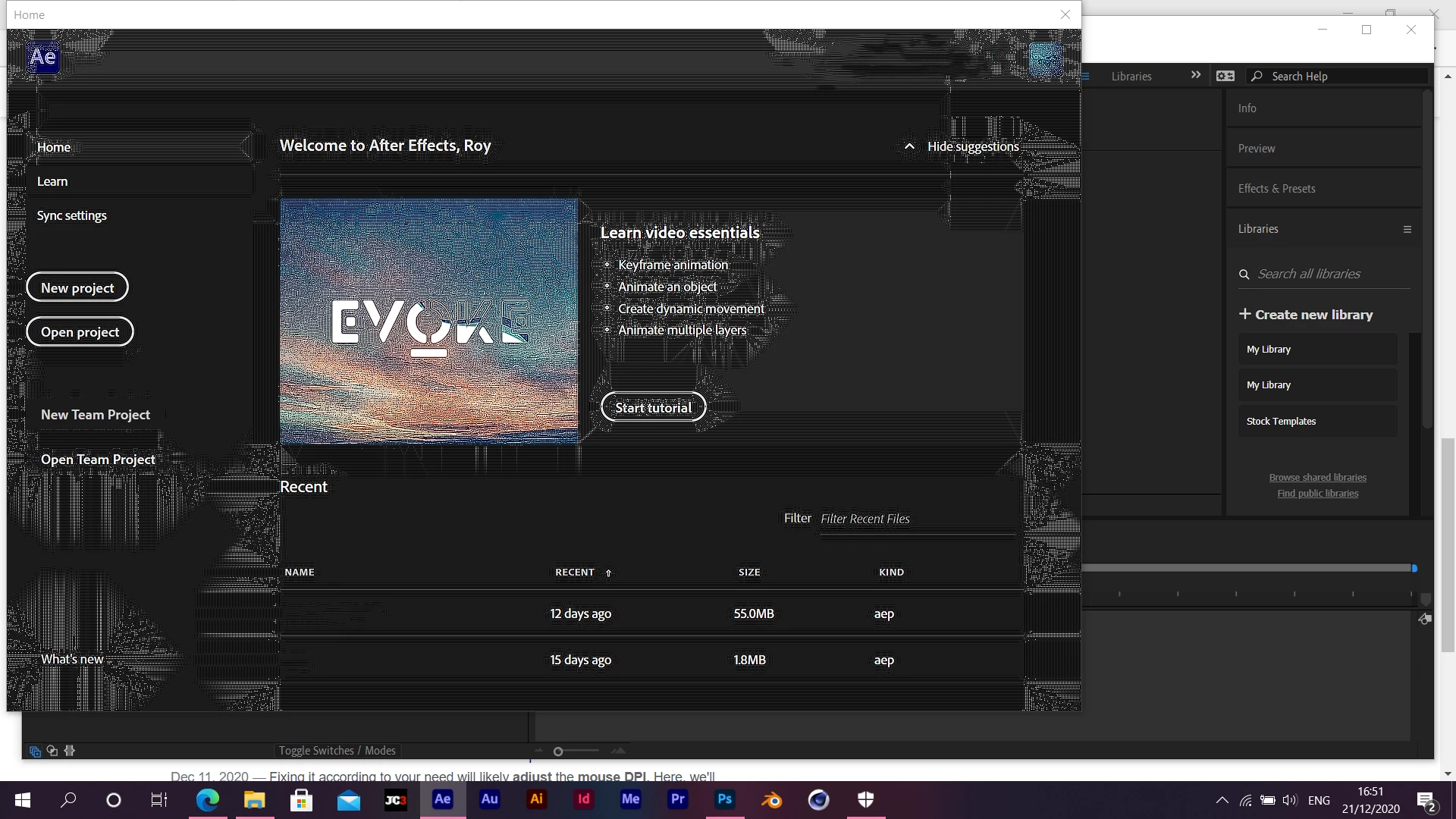
After effects UI glitchy

New Here ,
Dec 21, 2020 Dec 21, 2020

Screenshot (1).png

TOPICS
Error or problem , Freeze or hang , Performance , User interface or workspaces
302
Translate
Report
Community guidelines
Be kind and respectful, give credit to the original source of content, and search for duplicates before posting. Learn more
community guidelines
Community Expert ,
Dec 22, 2020 Dec 22, 2020

Have you tried resetting After Effects preferences?

Adobe Community Expert
Adobe Certified Professional
Translate
Report
Community guidelines
Be kind and respectful, give credit to the original source of content, and search for duplicates before posting. Learn more
community guidelines
New Here ,
Dec 22, 2020 Dec 22, 2020

I tried resseting After Effects prerences and still facing the same problem. I even tried uninstalling and reinstalling the software.

Translate
Report
Community guidelines
Be kind and respectful, give credit to the original source of content, and search for duplicates before posting. Learn more
community guidelines
Community Expert ,
Dec 22, 2020 Dec 22, 2020

Is it working fine otherwise?

Is it just the welcome screen that doesn't display properly?

Adobe Community Expert
Adobe Certified Professional
Translate
Report
Community guidelines
Be kind and respectful, give credit to the original source of content, and search for duplicates before posting. Learn more
community guidelines
New Here ,
Dec 22, 2020 Dec 22, 2020

The entire UI is glitchy. But its working fine.

Translate
Report
Community guidelines
Be kind and respectful, give credit to the original source of content, and search for duplicates before posting. Learn more
community guidelines
Community Expert ,
Dec 22, 2020 Dec 22, 2020

It seems to me like some kind of an issue with the way it's being rendered by gpu.

Is it just AE giving you these problems? What about Premiere or Photoshop?

Adobe Community Expert
Adobe Certified Professional
Translate
Report
Community guidelines
Be kind and respectful, give credit to the original source of content, and search for duplicates before posting. Learn more
community guidelines
New Here ,
Dec 22, 2020 Dec 22, 2020
LATEST

Photoshop UI is not glitchy but I did notice that images look too sharp and only look normal when I zoom in. This is without a sharpening filter added to them. Could it be my display with the problem?

Translate
Report
Community guidelines
Be kind and respectful, give credit to the original source of content, and search for duplicates before posting. Learn more
community guidelines