
Participant
December 5, 2023
Answered

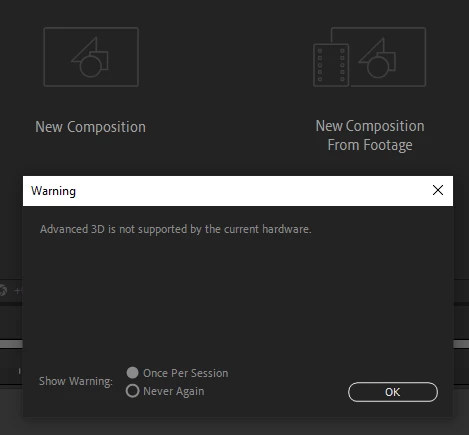
After Effects v24.1 Error Message "Advanced 3D is not supported by the current hardware"

  • December 5, 2023
  • 3 replies
  • 10598 views

Here is the screenshot of the error message.
Please tell us what kind of hardware we need to update
or where we can find the list with the necessary hardware.

Thank you
This topic has been closed for replies.
Correct answer nishu_kush

Welcome to the community, Sergio.

4GB of GPU memory is required to use Advanced 3D renderer. Check out the After Effects system requirements. If your computer already has 4GB GPU memory, try updating your GPU driver.

Hope it helps.


Thanks,

Nishu

3 replies

Participant
April 9, 2024

Hi,

I have the same problem currently in my laptop after recent updates of After Effects, memory was never a problem few days ago but this recent pop-up is annoying, this is my GPU Information:

Draft 3D: Not Available (inadequate VRAM or graphics driver)
Texture Memory: 0.00 MB

Vendor: Intel
Device: Intel(R) UHD Graphics
Version: 3.000000 (2.0 or later required)
Total Memory: 6.31 GB (2 GB or greater required)


So I can't figure out the actual problem, what needs to be done here?


Regards,

Haris Saeed

Participant
April 26, 2024

I started having the same issue today just out of nowhere. Even this morning I was working in AE and I didn't get the message. After I reopened AE it just appeared. I have 12 gb of GPU, the drivers are up to date and I followed both links to set the high performance graphic card as default for after effects. Still doesn't work.  Does someone know what to do?

Participant
February 27, 2024

Hello,


I make the driver update of my graphic card Nvidia 1060 GTX (the memory is 6Go)

And i also apply the tutorial to full-powered my GPU card. But it doens't work. There are again the message : Error Message "Advanced 3D is not supported by the current hardware". And i can't see the .gltf 3D object on after effect.


nishu_kush
Community Manager
Community Manager
February 28, 2024

Can you go to Edit > After Effects Preferences > Previews and click on GPU Information? It'll let you know which GPU After Effects is using? If it uses the integrated GPU, you might need to disable it from the BIOS setup so that After Effects can use the Nvidia GPU.

Let us know.


Thanks,

Nishu

Participant
March 12, 2024

Hello, I have the problem of "how to fix advanced 3d is not supported by the current hardware aftereffects" and I have read the forum and photoshop videos, but I still have the 3D problem, could you help me? i have a lapton and it have a nvidia gtx 3060


nishu_kush
Community Manager
nishu_kushCommunity ManagerCorrect answer
Community Manager
December 5, 2023

Welcome to the community, Sergio.

4GB of GPU memory is required to use Advanced 3D renderer. Check out the After Effects system requirements. If your computer already has 4GB GPU memory, try updating your GPU driver.

Hope it helps.


Thanks,

Nishu

Sergio@78Author
Participant
December 15, 2023

Sorry for the late reply, but I'm working on a laptop where I don't have the Admin permission

so I had to wait for them to solve the problem from the IT department.

Apparently with the driver update, I can now import, interact and visualise 3D objects correctly and work with Advanced 3D space, although I still get the driver error message when opening After Effect.


I will update you on the development of the situation.

For now, thank you all


Participant
February 11, 2024

Hi


How did you find this driver update? Having a similar issue myself