
Copy link to clipboard
Copied
Hello,
Iam trying to use an extension for After Effects I have installed properly (used aescripts for it).
However, When i Launch Affter Effects and i go to Windows and go for Extensions, it is greyed out and not clickable.
I tried to restart in debug mode, empty cache, check the versions, nothing seems to work, and I didn't find an exact answer on internet.
Thanks a lot !
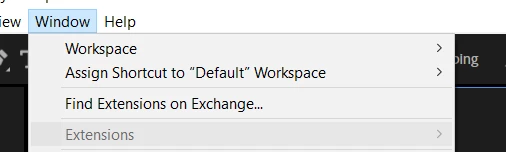
Hi, yeah I did eventually find the solution. In my case I installed after effects in another drive due to space issues. And I moved all my extensions and plugins to that drive also.
It turns out that the extesnsions work only from the C drive. So by placing all my extensions back to my C drive, I got em back!
I'm not sure If you've made the same mistake.
Copy link to clipboard
Copied
Is the extension compatible with your version of After Effects?
Copy link to clipboard
Copied
Here it says 2025, but I guess the version is 1.0 ? And my after effects version is 25.1
Or it's the extension version
Copy link to clipboard
Copied
Did you find any solution? My extensions tab also greyed out today.
Copy link to clipboard
Copied
Have you found a solution yet, I just upgraded to version 2025 and can't use the extension
Copy link to clipboard
Copied
Hi, yeah I did eventually find the solution. In my case I installed after effects in another drive due to space issues. And I moved all my extensions and plugins to that drive also.
It turns out that the extesnsions work only from the C drive. So by placing all my extensions back to my C drive, I got em back!
I'm not sure If you've made the same mistake.
Copy link to clipboard
Copied
Yes I did the same. due to space issue i installed me after effect to d drive but the extension work on c drive only. so how can i move my extension to c drive or I have to delete entire after effct and reinstall it on my c drive, Is there a way to just move my extension to c drive
Copy link to clipboard
Copied
A potential reason maybe that plugin and stock are not yet supported for the ARM proccessor (amd chipset)
Copy link to clipboard
Copied
how do i fix it then?
Copy link to clipboard
Copied
did you find a solution for that?
Copy link to clipboard
Copied
Hi vadym_4523,
Not all the extensions end up in the Extensions menu. Some create their own menu option under the Window menu. Which extension did you install that's not working?
Thanks,
Nishu
Copy link to clipboard
Copied
Hi, yeah I did eventually find the solution. In my case I installed after effects in another drive due to space issues. And I moved all my extensions and plugins to that drive also.
It turns out that the extesnsions work only from the C drive. So by placing all my extensions back to my C drive, I got em back!
I'm not sure If you've made the same mistake.
Get ready! An upgraded Adobe Community experience is coming in January.
Learn more