
Participant
November 20, 2017
Answered

After Effects won't render full

  • November 20, 2017
  • 3 replies
  • 28774 views

Hi there,

I'm having trouble exporting my After Effects file (File > Export > Render Queue)
Here is a screenshot of my composition settings.
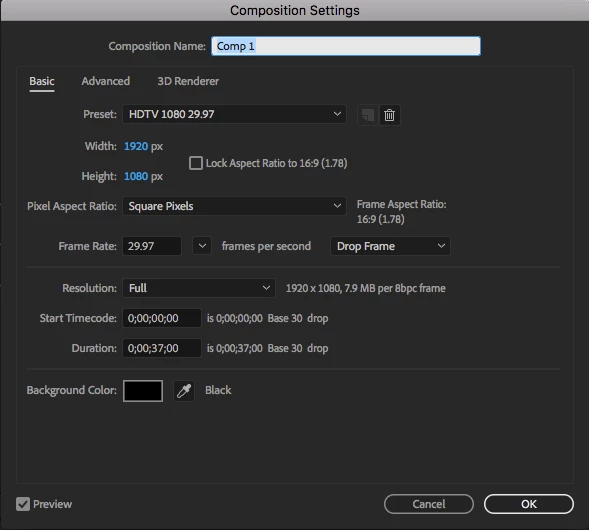
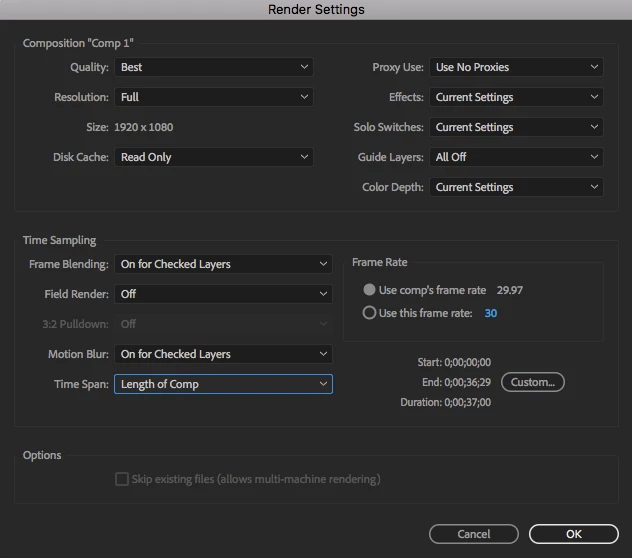
It doesn't render past the 5 second mark, with the constant message: "Failed at 0;00;05;17"

I tried looking to see if something at the frame is causing this but the only effect I have running is "typewriter"
I've also tried to clear my disk space and cache to see if storage was the problem.
I'm on After Effects CC and just updated it.


This is for a time sensitive work project so if you could help solve this problem, that would be great!

Sharon Kim

    This topic has been closed for replies.
    Correct answer Roei Tzoref

    I had this happen to me because one of the workstation I worked on had a GPU fail issue that failed a lumetri effect (that uses GPU acceleration). you can choose to render "software only" in the project setting and see if the render pulls through.

    3 replies

    katef95643382
    Participant
    June 15, 2022

    I use to have so many issues rendering after effects projects! I just came back on here to tell everyone WHAT I FIGURED OUT.  Let your video/project finish playing through in the timeline. Make sure it can run seamlessly through playback BEFORE you choose to export! I've been doing this ever since I've figured it out. Rendered plenty of videos without an issue.

    Roei Tzoref
    Roei TzorefCorrect answer
    Legend
    November 20, 2017

    I had this happen to me because one of the workstation I worked on had a GPU fail issue that failed a lumetri effect (that uses GPU acceleration). you can choose to render "software only" in the project setting and see if the render pulls through.

    Participant
    November 20, 2017

    Hi Roei, 

    Glad I'm not the only one here - where can I find "render software only" option?

    Sharon Kim

    Roei Tzoref
    Legend
    November 20, 2017

    File->project settings

    Community Expert
    November 20, 2017

    What are the output module settings? did you customize anything? Is your AE up do date?

    More importantly, what is going on in the comp. Select all layers, press the "u" key twice to reveal all modified properties and then look at 5:17 and see if anything is going on at that time.

    This could be a resource issue, a comp issue, a memory, and cache issue.  If you can't get it to render then render an image sequence and when it fails, flush the cache and restart the render after the last good frame. That will at least get you by.

    Participant
    November 20, 2017

    Hi Rick,

    Thanks for your reply. I have taken a screenshot of my output module settings. I haven't touched anything there so hopefully, that is not the issue.


    I have pressed the "u" key twice to reveal all the properties and everything seems to look fine. It's the transition from one frame to another. The frame has a lot of images on it with drop shadow properties, rotation and scale applied but other than that it has been saving out fine in my previous versions.

    I have cleared the cache and tried re-rendering but that didn't work out either.

    I appreciate your time here!

    Sharon Kim