I found that deleting the registry key group for AfterEffects cc 2019 (after uninstalling), then reinstalling aftereffects fixed the issue for me - it isn't for the fainthearted but if you are careful to not delete any other keys this should be fairly low risk.
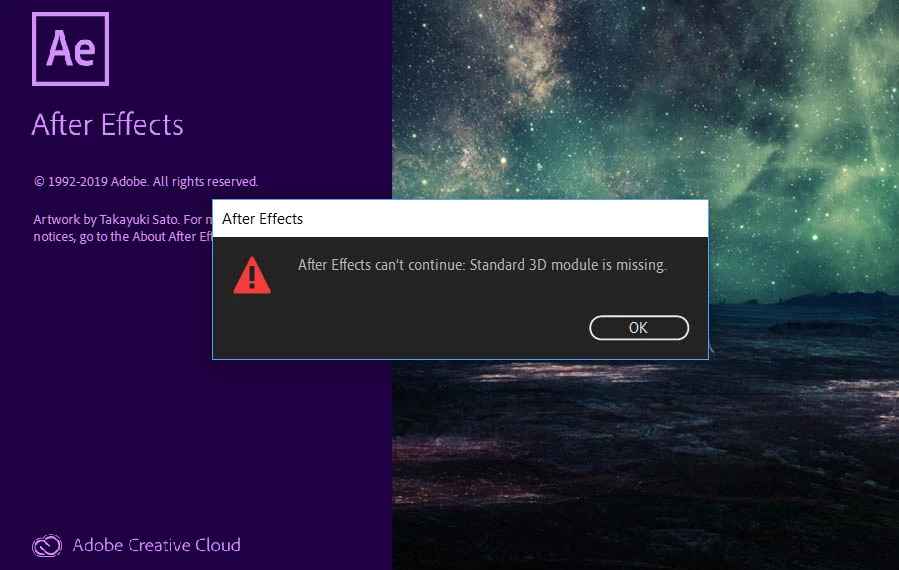
Sorry to hijack but I have exactly the same issue after installing a free plugin from video copilot website! That free plugin has cost me dearly! All other CC apps work fine. I have completely uninstalled Adobe CC, used their cleanup app and reinstalled it all and it still gives same error! Please can someone help us BOTH! I have even emailed video copilot and have asked them.. I’m awaiting a reply. I will post here if they reply and it helps! By the way the CTRL+ALT+SHIFT tip brought up no such box on my PC during application start but thanks for trying!
When doing an uninstall/reinstall, by default you'll be keeping your preferences and third-party installs. There is a checkbox sometime during the uninstall process that asks if you want to keep those - I'd try removing them to make sure you get all of this cleaned out.
I'd think the cleanup app would blow out all of that - which VC plugin are you using? I know Element has files it installs in a different directory than the rest of the Adobe files, so that would be worth investigating.
Yup! Tried that Checkbox to clean out all preferences but error remains. I think the plugin was VC Orb - Ultra 3D Earth. I installed a few but that is the last one I remember before it corrupted it. I have 2 user accounts on my PC and my girlfriends account runs After effects fine so i'm thinking it somehow corrupted my Windows 10 User profile. No reply from Video Copilot, funnily enough.
Have you changed anything about your system lately? Installed new hardware or updated A/V drivers?
Try resetting your AE preferences to see if that makes a difference: - Press Ctrl+Alt+Shift (Windows) or Command+Option+Shift (Mac OS) while the application is starting. - A dialog box launches asking you if you want todeleteyourpreferencesfile. Click OK.
Uninstall/reinstall is a bummer, but that might be worth a shot as well.

 AdChoices