
AEuser-script
Participant
February 12, 2017
Question

AfterEffects.exe always crash when script from command line

  • February 12, 2017
  • 1 reply
  • 4661 views

After Effects 14.1.0.57 on Windows 7

(same problem with AE 14.0)

Hi all,

This is a fresh AE install on a new Windows 7 (uptodate, 8GB Ram). The same problem occurs on 3 other PC.

When I run a script from the command line, After Effects hangs up with the following messages :
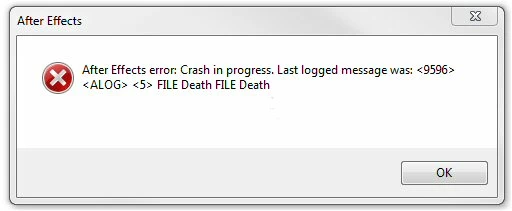
The problem is the same, wathever the script.

Exemple of script :

     AfterFX.exe -r "C:\myproject\script-render.jsx"

An example of the jsx file :


{

    var myProject = File("C:\myproject\modele_multi_1.aep");

    app.open(myProject);

    if (!app.project) {

        alert("bam");

    }

    if (app.project.renderQueue.canQueueInAME == true) {

        app.project.renderQueue.queueInAME(false);

    } else {

        alert("There are no queued item in the Render Queue.");

    }

    app.quit();

}

If I open the script from within After Effects via the "File-Script-Run Script File" command, it works great.

In File Preferences, "Allow script to Write File" is checked as "Enable Javascript Debugger".

Running from command line was working fine with the After Effect CS6 older version.

Any idea ?

Regards,

Eric

This topic has been closed for replies.

1 reply

Mathias Moehl
Community Expert
Community Expert
February 13, 2017

Does it make a difference whether Ae is already running when you execute the command line command?

Mathias Möhl - Developer of tools like BeatEdit and Automation Blocks for Premiere Pro and After Effects
AEuser-script
Participant
February 13, 2017

Thank you for your reply Mathias.

Indeed, AE doesn't crash if it was already running.

If AE is not running, AE crash in all the 3 cases :

AfterFX.exe -r d:\validFile.jsx

AfterFX.exe -r d:\doesnotexist.jsx

AfterFX.exe -r   <--- enough for crashing AE.

AEuser-script
Participant
February 15, 2017

The problem is still here and it's a VERY BLOCKING problem.

On 3 computers AfterFX.exe crash when executing from command line

If AfterFX.exe is already running in memory :

     On 1 computer the command line "AfterFX.exe -r d:\validFile.jsx" works and the job is OK (unfortunatly a light laptop computer)

     On 2 others computers the command line "AfterFX.exe -r d:\validFile.jsx" works but the script is not executed

Our project is a completly automated system for video creation which was working wery well with After Effect CS6.

The new After Effects CC 2017 does'nt not work.

We need to send orders to AE via script from command line.

Any solution/idea/workaround from Adobe ?