Legend
February 17, 2020
Answered

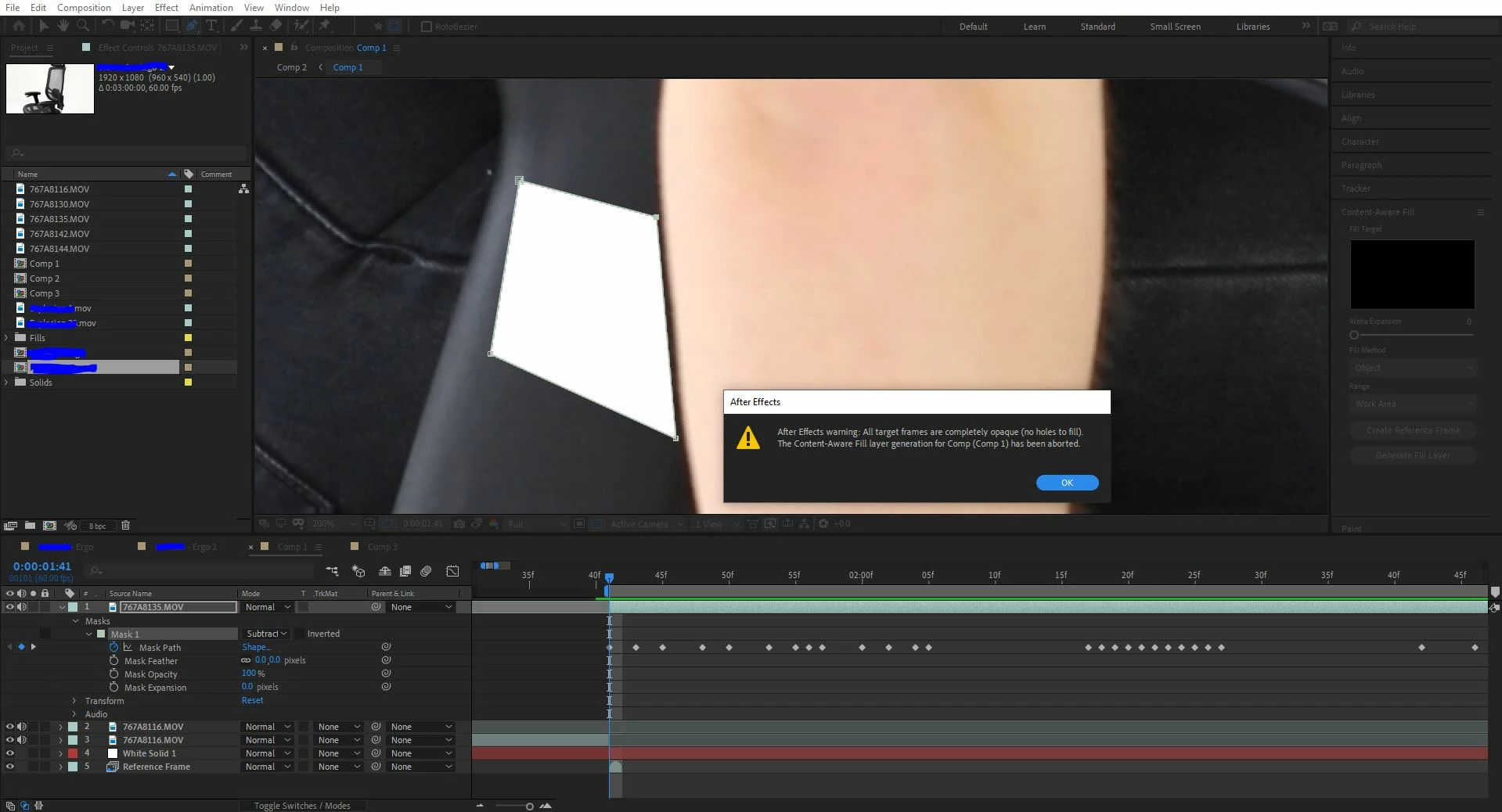
All target frames are completely opaque (Content-Aware Fill)

  • February 17, 2020
  • 7 replies
  • 21489 views

As titled suggests, can't figure it out - Please help! 


Correct answer default7b8tlafp91dd

This solve worked for me after several failures: set your work area to just your layer length, and solo it.  Make sure your mask(s) are set to subtract, and your range set to "work area."  Then run the content-aware fill process.  It should finally come out with an error-free result.  Using AE 2022.

7 replies

Participant
March 27, 2023

AE 2023: I`m building upon the solution by user "натальяв76680655":

Let`s say you generated your initial fill layer and then created reference frames to made further fixes, BEFORE hitting "generate fill layer" again, make sure to get rid of the layer AE created called "Fill[000-XXX].png"

faizank53375871
Participant
December 1, 2022

my issue got fixed when I selected "Subtract" option in the mask.

Participant
October 2, 2023

Thank you!

Participant
September 30, 2022

Hey everyone ! I know you all struggle with this mistake and I found solution that helped me - NO layers should be in the composition exept your video with mask. This helped for me!

default7b8tlafp91ddCorrect answer
Participating Frequently
March 30, 2022

This solve worked for me after several failures: set your work area to just your layer length, and solo it.  Make sure your mask(s) are set to subtract, and your range set to "work area."  Then run the content-aware fill process.  It should finally come out with an error-free result.  Using AE 2022.

Participant
May 23, 2022

Lovely, that worked!

Inspiring
June 25, 2020

I dont have a white background and still getting this. Should there be a layer under the layer with the mask?

Mr_Brains
Participant
August 13, 2020

I have this problem as well.  Did you ever find a solution?

I have 1 layer, two masks set to subtract.  Couldn't be simpler, I would have thought.

..but it just comes up with the message that All Target Frames Are Blank and it aborts the fill layer generation.

Participant
May 12, 2021

Hello, did you find the solution? I still get this message. I tried to change many parameters but can't figure out why it's not working...

Participant
March 4, 2020

This wasn't a waste of time at all! I was stuck and couldn't figure out why CAF wouldn't work. You posting this helped me figure out exactly what my issue was.


Cheers!

Legend
February 17, 2020

It's because i had a white background... silly me. sorry for wasting time.
