
Participant
August 30, 2016
Answered

Animation Codec options changed in AE/Premiere 2015.3

  • August 30, 2016
  • 2 replies
  • 12759 views

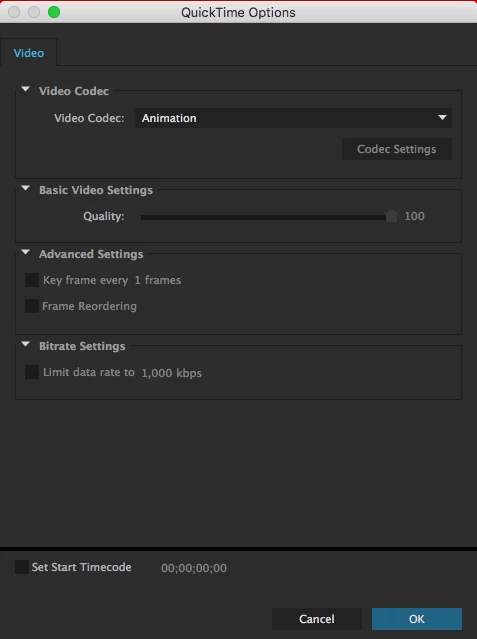
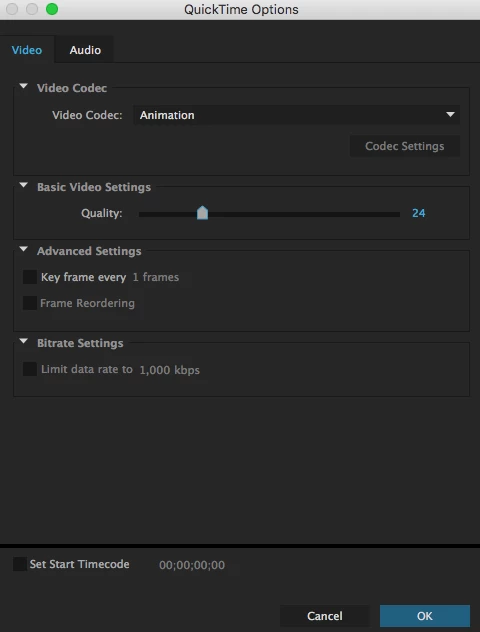
Looks like the export options have changed for the Animation codec in the latest version.When exporting, one used to be able to have the quality level slider available.

These look to have disappeared in the latest version.

What gives?

New 2015.3 (13.8.1)
Old 2015 (13.7.1)
    This topic has been closed for replies.
    Correct answer Szalam

    Since Apple suddenly announced that they are dropping support for QuickTime, Adobe has had to scramble a bit. They quickly adjusted things and After Effects no longer relies on QuickTime to encode or decode most of the commonly used QuickTime codecs anymore. Recent versions introduced native encoding for Animation (among others). However, the native codecs have some differences.

    2 replies

    Tim Kurkoski
    Adobe Employee
    Adobe Employee
    August 30, 2016

    This is correct.

    After Effects CC 2015.3 (13.8.1), Premiere Pro CC 2015.4 (10.4), Adobe Media Encoder CC 2015.4 (10.4), Audition CC 2015.2 (9.2.1), and Prelude CC 2015.4 (5.0.1) can now import and export QuickTime files that use the Animation codec without assistance from QuickTime 7 on Windows, or from the Adobe QT32 Server process on macOS.

    Native import of Animation currently only supports I-frame only movies (no compression key frames set).

    Native export of Animation currently only supports I-frame only movies (no compression key frames set, i.e. the "Key frame every" option is enabled) at 100% quality.

    Native export of Animation only supports the Uncompressed audio codec. Attempting to export a QuickTime file with the Animation codec and compressed audio codecs will fail with an error message, “Compressor format error”.

    We are monitoring feedback from users to understand if we should add support for compression keyframes or less-than 100% quality.

    Most of the above clipped from:

    After Effects CC 2015.3 (13.8.1) Bug-Fix Update Is Now Available | Creative Cloud blog by Adobe

    Inspiring
    July 24, 2019

    We would still love to have a keyframe-setting for the lossless animation codec.

    It saves a lot of space for graphics assets, such as animated logo's, or cartoonstyle graphics.

    Szalam
    Community Expert
    SzalamCommunity ExpertCorrect answer
    Community Expert
    August 30, 2016

    Since Apple suddenly announced that they are dropping support for QuickTime, Adobe has had to scramble a bit. They quickly adjusted things and After Effects no longer relies on QuickTime to encode or decode most of the commonly used QuickTime codecs anymore. Recent versions introduced native encoding for Animation (among others). However, the native codecs have some differences.