
Question
Apple keyboard with Snap Shot
M1 Mac Studio
macOS Monterey 12.6.3
Apple wide keyboard with Touch ID (Model A2520)
After Effects 23.1.0
New Apple keyboard with Touch ID is a pain. In After Effects I found the F-keys setting is ignored.
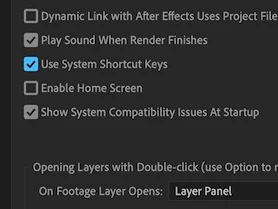
AE preferences - General - Use System Shortcut Keys “On”.
Take Screen Shot with the keyboard shortcut “Shift + F5”. No action or shutter sound.
Also Show Snapshot pressing F5, no action.
Viewer menu buttons work. Other system and modified keyboard shortcuts seem to work.
 AdChoices