
Exit
  • Global community
    • Language:
      • Deutsch
      • English
      • Español
      • Français
      • Português
  • 日本語コミュニティ
  • 한국 커뮤니티
0

apply 3D rotation on alpha matte masked layer
New Here ,
Aug 02, 2023 Aug 02, 2023

whyAE.jpg
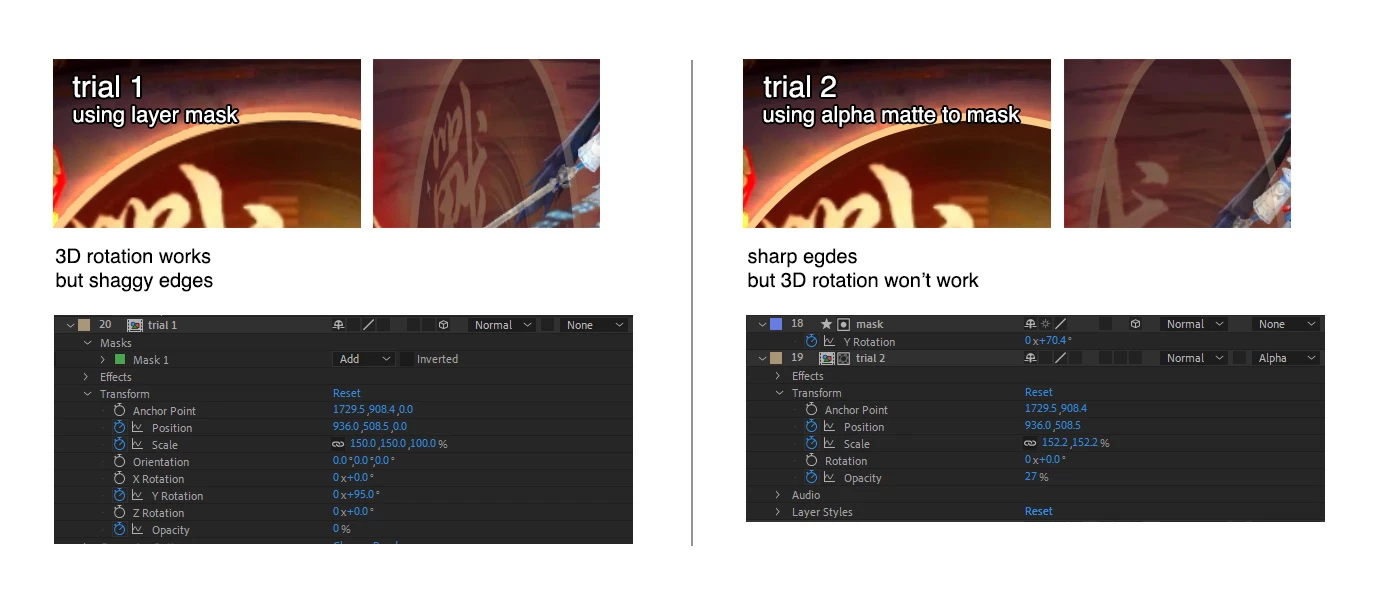
So I have this upscaled layer which needs a mask out and a 3D rotation.
3D rotation is easily achieved on the single masked out layer, but that mask gives it shaggy edges.
Using alpha matte to mask out can leave the edge sharp & clean, but 3D rotation won't apply. I've tried using null object to control the 3D rotation (got the both mask and layer parented), but then the layer won't do the alpha matte mask.

Is there a way to apply 3D rotation on alpha matte masked layer? 

Or is there solution to have a upscaled layer masked out sharply together with 3D rotation?

Thanks!


TOPICS
FAQ , How to
300
Translate
Report
Community guidelines
Be kind and respectful, give credit to the original source of content, and search for duplicates before posting. Learn more
community guidelines
LEGEND ,
Aug 03, 2023 Aug 03, 2023

Pre-compose the rotating layer, use the result as a matte.


Mylenium

Translate
Report
Community guidelines
Be kind and respectful, give credit to the original source of content, and search for duplicates before posting. Learn more
community guidelines
New Here ,
Aug 13, 2023 Aug 13, 2023

Seems like the only working way is to have the layer masked with sharp edge and together applying 3D rotation is to pre compose. Thanks

Translate
Report
Community guidelines
Be kind and respectful, give credit to the original source of content, and search for duplicates before posting. Learn more
community guidelines
Community Expert ,
Aug 03, 2023 Aug 03, 2023

Try applying Set Matte instead of using a track matte. 

RickGerard_0-1691047312016.gif


The other option would be to apply a mask directly to the layer.

Translate
Report
Community guidelines
Be kind and respectful, give credit to the original source of content, and search for duplicates before posting. Learn more
community guidelines
New Here ,
Aug 13, 2023 Aug 13, 2023

Thanks for the tip "Set Matte", I tried but it was unable to mask out the area I wanted (not center of comp), it only masked correctly with the "collapsed transformations" enabled, however that conflicts with the 3D layer. I used ramdon picture to show the process (see attached)

Applying mask directly results in shaggy edges (becoz of the scaled resolution), yet I want to keep the edge sharp.


Seems like the only working way is to pre compose and rotate. Thanks for the suggestion.

Translate
Report
Community guidelines
Be kind and respectful, give credit to the original source of content, and search for duplicates before posting. Learn more
community guidelines
Community Expert ,
Aug 13, 2023 Aug 13, 2023
LATEST

Put your set matte layer in the nested comp. (the pre-comp)

Translate
Report
Community guidelines
Be kind and respectful, give credit to the original source of content, and search for duplicates before posting. Learn more
community guidelines