
marklegault
Participant
April 20, 2017
Answered

Audio Spectrum, use path for custom shape
  • April 20, 2017
  • 1 reply
  • 2197 views

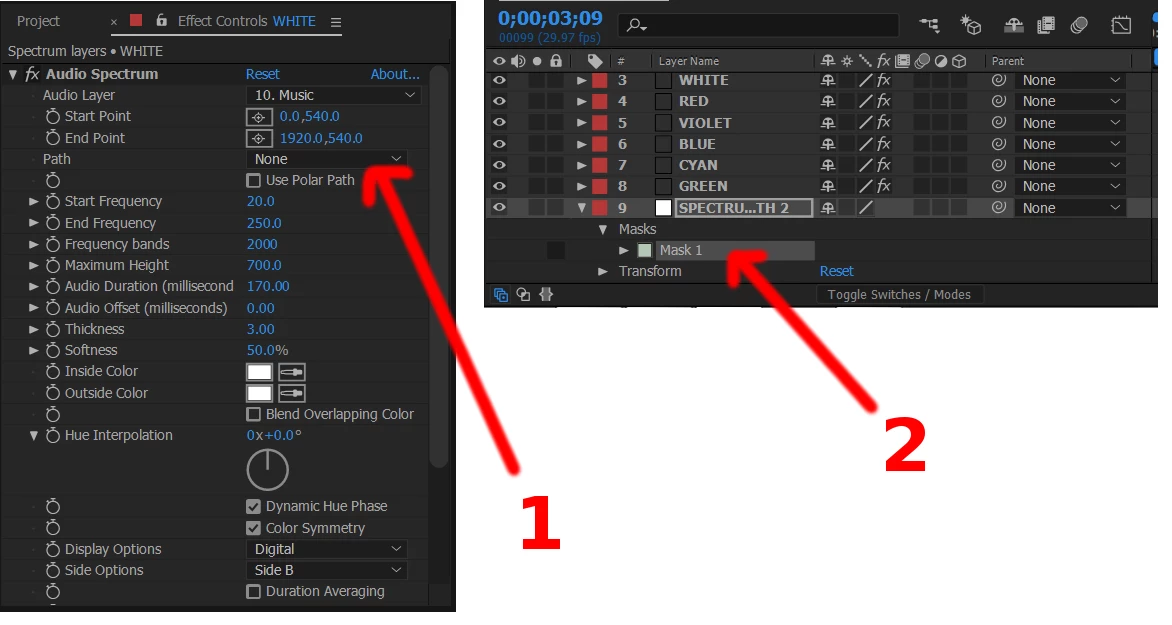
There's a place to choose a path in the Audio Spectrum effect menu (1) and I have created such a path (2), however when I try to choose it in (1) only "None" shows up. The Mask 1 is in a Null Object Layer. What am I doing wrong?

    This topic has been closed for replies.
    Correct answer Roei Tzoref

    you have set the spectrum effect to a layer named "white" (which is layer number 3 in the stacking order), but the mask you are showing belongs to another layer named "spetru-something" (layer number 9 in the stacking order). the path needs to be in the same layer as the spectrum effect. of course don't set an effect to null layer because you won't see it since null layer's transparency is always at 0%

    1 reply

    Roei Tzoref
    Roei TzorefCorrect answer
    Legend
    April 20, 2017

    you have set the spectrum effect to a layer named "white" (which is layer number 3 in the stacking order), but the mask you are showing belongs to another layer named "spetru-something" (layer number 9 in the stacking order). the path needs to be in the same layer as the spectrum effect. of course don't set an effect to null layer because you won't see it since null layer's transparency is always at 0%