



Automation Blocks - if "file exists" = true
I've got a weird one is not making any sense to me. I've tried all sort of combinations of "true/false", "checkboxes" and "null" logic blocks to solve the following, but nothing seems to work properly.
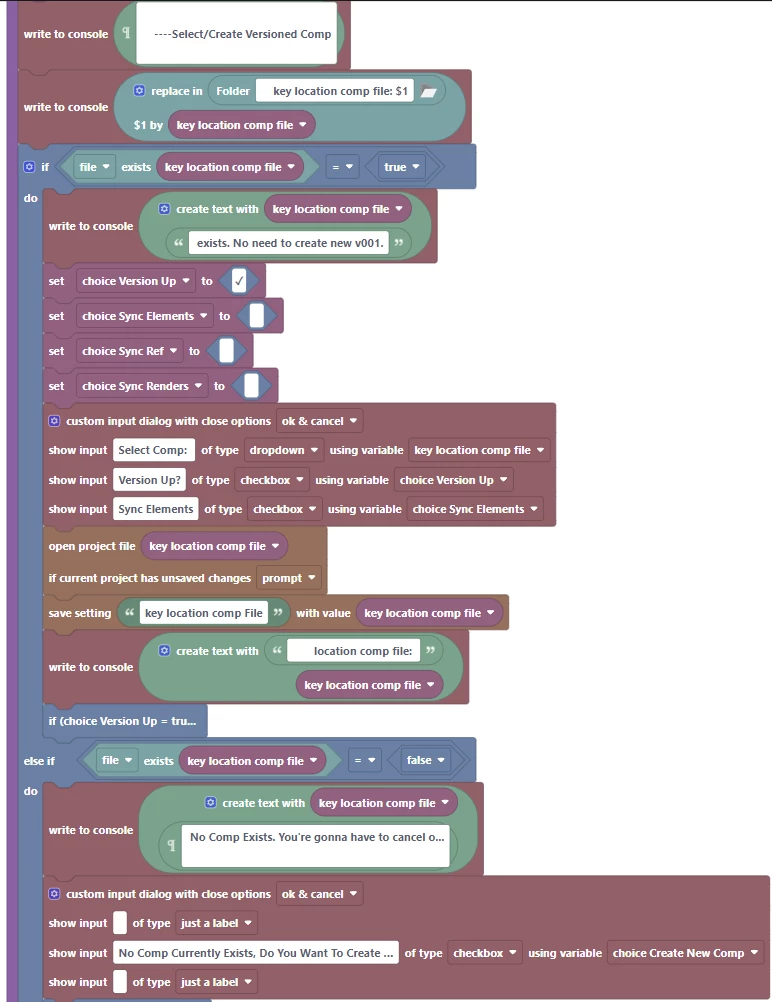
In the following section of blocks, I've got a variable (key location comp file) that is populated earlier in the script.
As you can see in the console when this script is run, there is a list of 2 files in the directory.

Which "should" mean that "key location comp file" = true, and the custom input dialog with "select comp" should execute.
But, the script seems to passover the "if/do" and moves down to the "else if/do" where the "No Comp Currently exists" dialog is launched.
What am I doing incorrectly? I've tried inversing the logic with "does not equals" false and that seems to work "sometimes", but not always.
As always, any input you can give is appreciated.
 AdChoices