
Participant
January 18, 2024
Answered

Automation Blocks : Is there a way to force stop a script?

  • January 18, 2024
  • 1 reply
  • 611 views

Hello,


I built a script that checks a variable. If the variable is OK, the script continues but if it's not, I would like to stop the script. Is it possible?


I noticed that some UI blocks could do it (open file dialog, save dialog, ...) but I'm looking for a simpler block (just the "stop script" function).
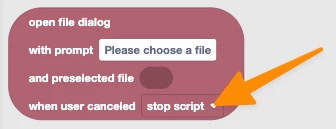
The only workaround I've found so far is to prompt an alert and intentionally provoke an error (but it's not the cleanest solution 😅)...

Correct answer Mathias Moehl

Hi Robin,

there is no "stop script execution" block, but instead you can

1) put your entire script code into a function block

2) return from that function whenever you want to stop script execution.


I just recorded this tutorial for you to explain it in full detail:


PS: If anybody reading this wonders what Automation Blocks is: It is a (paid) extension to create custom tools and automations for Adobe Premiere Pro and After Effects.


1 reply

Mathias Moehl
Community Expert
Mathias MoehlCommunity ExpertCorrect answer
Community Expert
January 18, 2024

Hi Robin,

there is no "stop script execution" block, but instead you can

1) put your entire script code into a function block

2) return from that function whenever you want to stop script execution.


I just recorded this tutorial for you to explain it in full detail:


PS: If anybody reading this wonders what Automation Blocks is: It is a (paid) extension to create custom tools and automations for Adobe Premiere Pro and After Effects.


Mathias Möhl - Developer of tools like BeatEdit and Automation Blocks for Premiere Pro and After Effects
Participant
January 18, 2024

Very interesting! Thank you so much for your help! 🙏


(I struggled a bit because I have a lot of functions and loops, but I finally managed to get it done!)