PFuerst
Inspiring
August 12, 2022
Answered

Automation Blocks Purge Memory & Disk Cache Script

  • August 12, 2022
  • 1 reply
  • 1451 views

Hey,

I've played around a bit more with Automation Blocks and created and simple scripts that displays all the Purge options and lets you execute them. I guess it is not the most elegant way to display all the options as well as create the flow but it does the job 🙂 I have attached it here. If you want to make it better or add something to it feel free to do so...

Best
This topic has been closed for replies.
Correct answer Mathias Moehl

Wow, that's amazing - thank you for sharing!

I added it to the Community Library now changed a few things in the tool.

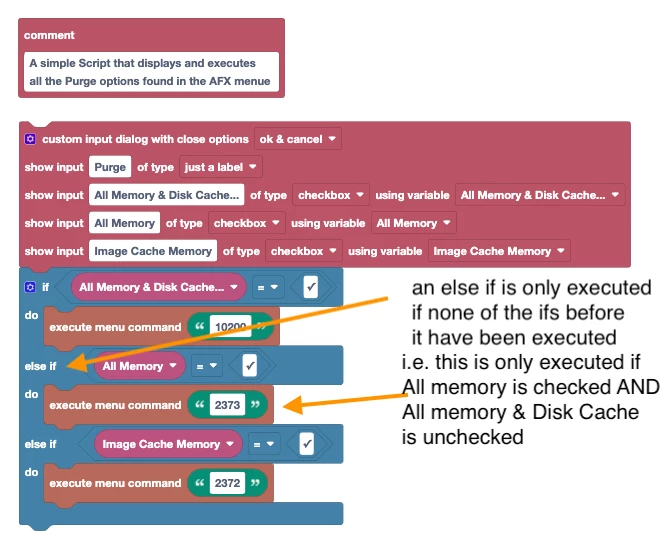
This is your original code (with some remarks about what I changed):


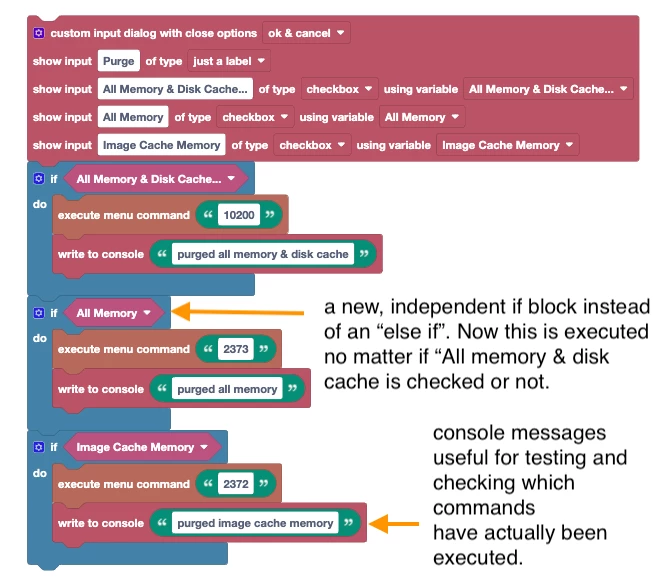
And this is my modified version:


This is what I changed in detail:
1) I replaced your else if conditions with independent if blocks. That way, if you enable several checkboxes, also all the corresponding menu commands are executed.
2) I added some "write to console" messages such that you can also see in the console, which purge operations actually have been performed.
3) I replaced the conditions  like "All Memory equals true" by just "All memory". This is probably a matter of taste. They mean exactly the same - my variant is a bit more compact, but yours is maybe even better to understand. So not sure if this change really improved the code, but I thought it does not hurt to show that you can save a few blocks here.


1 reply

Mathias Moehl
Community Expert
Mathias MoehlCommunity ExpertCorrect answer
Community Expert
August 13, 2022

Wow, that's amazing - thank you for sharing!

I added it to the Community Library now changed a few things in the tool.

This is your original code (with some remarks about what I changed):


And this is my modified version:


This is what I changed in detail:
1) I replaced your else if conditions with independent if blocks. That way, if you enable several checkboxes, also all the corresponding menu commands are executed.
2) I added some "write to console" messages such that you can also see in the console, which purge operations actually have been performed.
3) I replaced the conditions  like "All Memory equals true" by just "All memory". This is probably a matter of taste. They mean exactly the same - my variant is a bit more compact, but yours is maybe even better to understand. So not sure if this change really improved the code, but I thought it does not hurt to show that you can save a few blocks here.


Mathias Möhl - Developer of tools like BeatEdit and Automation Blocks for Premiere Pro and After Effects
PFuerst
PFuerstAuthor
Inspiring
August 15, 2022
quote

1) I replaced your else if conditions with independent if blocks. That way, if you enable several checkboxes, also all the corresponding menu commands are executed.
2) I added some "write to console" messages such that you can also see in the console, which purge operations actually have been performed.
3) I replaced the conditions  like "All Memory equals true" by just "All memory". This is probably a matter of taste. They mean exactly the same - my variant is a bit more compact, but yours is maybe even better to understand. So not sure if this change really improved the code, but I thought it does not hurt to show that you can save a few blocks here.

Cool thanks for taking the time to take a look at the code.

1) That is the better solution. I didn't know that the if else would limit it to just on entry. Good to know 🙂

2) That's a handy feature.

3) Good to know those shortcuts. I haven't done a lot of coding in the last years, tried it a few times but faild :-D, so Automation Blocks is amazing so that I can play around with the blocks without writing all the code myself.


Best