
Participant
January 11, 2022
Answered

Bad Tracked Memory ID 23::33

  • January 11, 2022
  • 19 replies
  • 19414 views

Hi guys,


I just upgraded to the 2022 versions of all the Adobe suite. I can't import a photoshop file into After Effect, I get the following error message : 
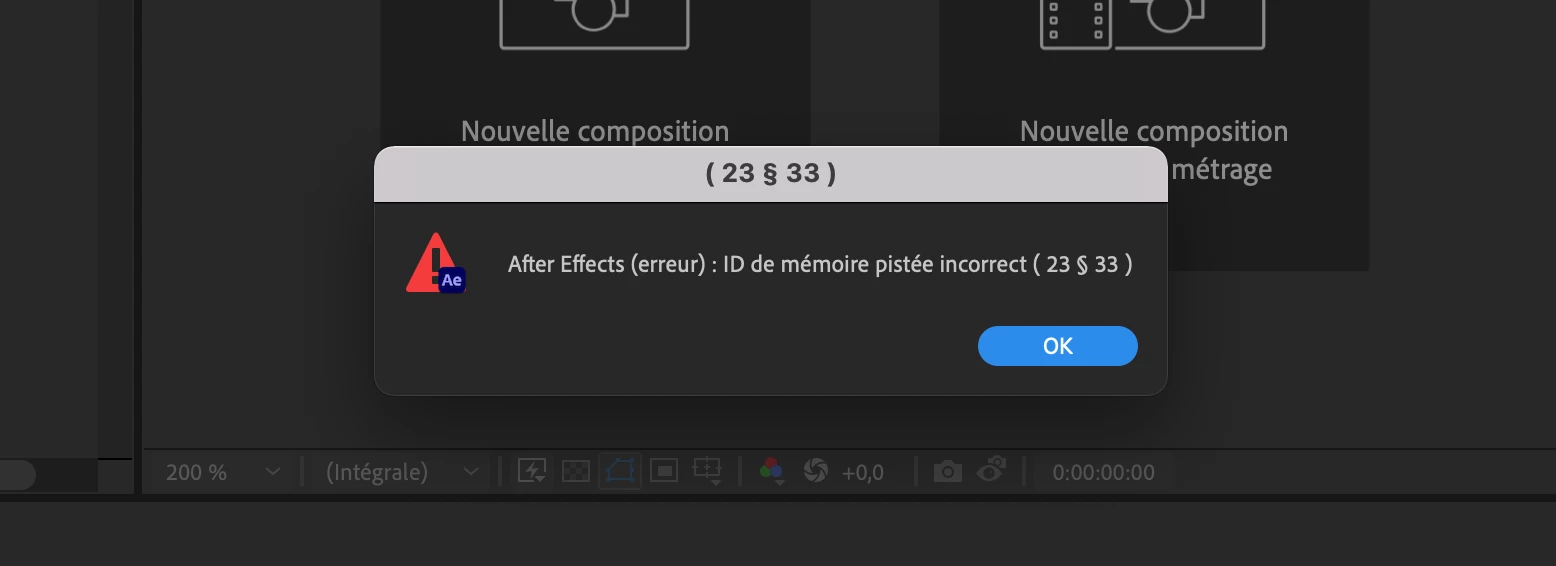
 

And then everything crashes, and an automatic save of the project is made, with the psd file but without the file's layers.

Does anyone know anything about this? Can you guys help me? Thanks

Correct answer simon tan

I did a reset on my preferences and it worked


To reset preferences and plug-in cache at the same time, hold down Control-Shift-Alt (Windows) or Command-Shift-Option (Mac OS) while the application is starting. Release the keys when the splash screen appears.


hope it helps

19 replies

León Animation
Known Participant
March 19, 2022

Really Adobe?! A problem from Jan 2022 and still today no resolve? 

I encountered this problem today and I'm annoyed as hell.

What are you waiting to fix it?

Participating Frequently
March 1, 2022

I just upgraded to AE 2022 and now I'm getting this error error message then the app crashes.  I'm running MacOS 10.15.7

Its a pretty simple layered photoshop file that won't import.  


February 23, 2022

Well... Another day and all of a sudden the problem is back. I have no clue why it worked again yesterday, but today the error message is back.


So let's definitely keep this thread alive!


What do you need to do to bring this to the attention of the Adobe Staff and potentially have this taken care of?

Gullwing Design
Participant
February 20, 2022

Having the exact same problem on my M1 mac mini. Any workaround pls?

February 22, 2022

This might not help you at all, because other than un- and reinstalling AE and PS (which did nothing) all I did was wait. 

And I did update my OS to BIG SUR 11.6.4, but that initially didn't fix the problem.


But as of today it is suddenly working again. So maybe somehow it was fixed within the Adobe Cloud?
Does it work for anyone else?

February 18, 2022

Hey everyone,


I just started getting the same error message here – it started today.

The PSD is super simple, only three layers and no layer styles or smart objects etc. 3000x3000 pixels large, but overall not super heavy. And for the same project I have been working with another PSD file of that same size with a lot more layers. So I feel like it cannot really be a problem of the PSD file. 

I recently updated AE and PS to the newest versions and can only import PSD files as footage, so I could work around the issue for this specific job. But for the future this is quite problematic. I am in the middle of a job, so I am not willing to re-install an older version of either AE or PS for trouble shooting – has anyone tried that by any chance?


Here's my set up:

2020 Retina 5K 27-inch iMac

currently running on BIG SUR

3.3 GHz 6-Core Intel Core i5

32 GB 2267 MHz DDR4


Any kind of info would be appreciated 🙂


Participant
February 18, 2022

It worked for me to uninstall AE and install it again - same version 🙂

February 18, 2022

Thanks, but I just tried that for both AE and PS – no success unfortunately.
Still getting the same error when I try to import my layered PSD as "Composition - Retain Layer Sizes".


Has anybody else tried a different approach?

Participant
January 18, 2022

I've been having the same issue after upgrading to the 2022 version. Commenting so I can keep up with this thread in case anyone finds a solution

Participant
January 18, 2022

I have had the same problem, The issue occurs when I try to import a psd file as layers, it does not occur when I choose footage. After Effects was able to import psd files fine and then suddenly stopped working.


What specific information is needed?

Participant
January 14, 2022

I'm new to After Effects and I got the exactly same problem - also if I just try to import a photoshop-file with only a background layer and a text layer. I'm using a Macbook Air 2020 M1 with 16 gb ram.
Please let me know if you find a solution. Thanks.

Mylenium
Legend
January 11, 2022

Without any specific info about your PSD file and other stuff such as your computer we can't really tell you much. Of course your error may in itself contain a clue as to what needs to be fixed: Open the file in PS and check for unsupported features liek complex groups, highly customized layer styles, smart objects of for argument#s sake simply stuff liek document color modes, bit depth and color profiles.


Mylenium

JabyerPrado
Participating Frequently
January 6, 2023

Hi, I'm getting the same notification but in my case is happening when I try to create a new composition for a new project. Nothing else is going on I mean, no other elements or odd conditions, comp is set to 1080x1350 24.9 fps. I'm running the latest version of AE on CI9 11900k, Radeon Pro w6800, 64gb Ram, and dedicated ssds for cache. I already uninstalled and re-installed first only AE then Creative Cloud and then the win11, but I am still getting the 23:33 error . Any Idea will be appreciated. Thanks for taking the time


Participant
July 1, 2025

Hi, the first thing you need to do is go into the dependencies menu and check one by one for missing fonts, footage or effects. Then check all the expressions in your project and rectify or delete them, if there is an error after effects will show you and can help you locate them. After that check all your comps one by one and fix the frame rate for all your comps the same, different frame rates for different comps can show you this error too. I hope this resolved your issue. ( It worked for me )