
Participant
September 28, 2020
Question

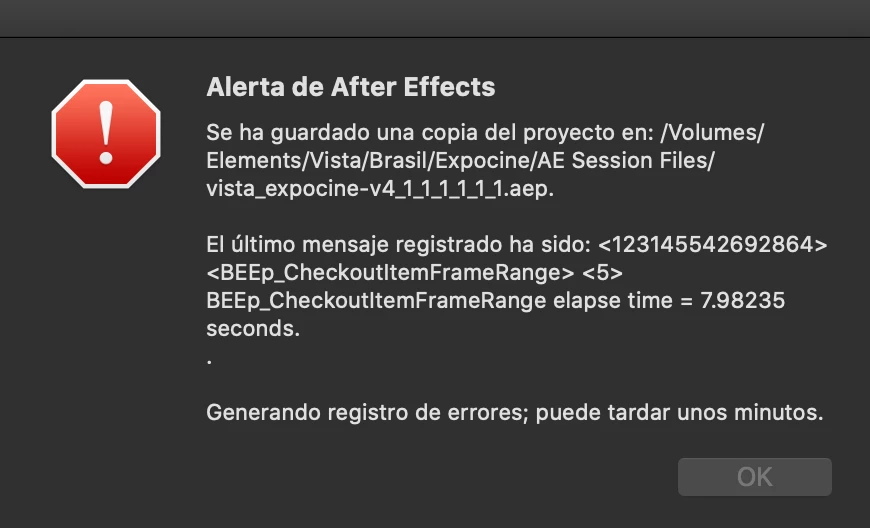
BEEp_CheckoutItemFrameRange Error

  • September 28, 2020
  • 9 replies
  • 4258 views

I've been going crazy traying to fix this issue. Please I need Help!. Everytime AE chashes and send me this error (at least it seves the project). I've trayed uninstalling, deleting the user preferences, removing the third party plugins... I don't know what else it could be. Please I hope some one has the same issue... =(
This topic has been closed for replies.

9 replies

Judge Wolf
Known Participant
October 21, 2020

Anyone upgraded to 17.1.5?

Any better?

Participant
December 18, 2020

definitely not :(((

Participant
October 19, 2020

Same issue. I'm on an iMac Pro and it crashes every 10 minutes intermittently!! It's driving me mad. I also have RG trapcode (as well as ease and whizz and duik). I still believe it's trapcode. Reverting back versions of AE -- thanks for the suggestion! Please finish testing before releasing these beta versions, Adobe. 

Participant
March 20, 2021

Anyone found a solution to this? I had to revert back to AE version from AUGUST 2020 (17.1.3) because AE 2021 is crashing at startup due to RG Trapcode - this is so annoying! Please FIX IT!

Judge Wolf
Known Participant
October 9, 2020

Temporary solution for me: downgrade to 17.1.3

Martín-Zurita Studio
Participant
October 9, 2020

I'm afraid of downgrading in middle of a project. Deadline on monday, after that i'll try your suggestion.

Judge Wolf
Known Participant
October 12, 2020

FWIW ... I was also in the middle of several projects, and they all opened fine after downgrading. YMMV.

Participant
October 8, 2020

Apparently we all agree that we have Trapcode or a Red Giant plugin installed, so it is most likely due to what ilyag2570661 says ... so who should give us support in this case? Red Giant or Adobe? ...

IVGu
Participating Frequently
October 9, 2020

Hi there, so I was able to remedy the situation by rolling back my AE version to 17.1.3, and i haven't had any crashes since then. Also I still have Trapcode installed....


Inspiring
October 9, 2020

I did the same thing yesterday and everything is back to running smoothly.

Judge Wolf
Known Participant
October 8, 2020

Same here. iMac Pro. Every 10 minutes!


WTF ADOBE?

Inspiring
October 8, 2020

I'm having the same issue since the update.

Martín-Zurita Studio
Participant
October 5, 2020

The same with me, the only script im using right now is FLOW, i have trapcode particular installed, but not using it.

Participant
October 7, 2020

I'm having the same problem. Anyone figure anything out?

kevinc94605330
Known Participant
September 29, 2020

I updated AE earlier this week and I've had this crash 5 times already today on a new project (made in AE 2020). It's driving me nuts.

The reason I'm replying is because I'm googling for a solution as well.
Maybe we can figure out on here. Are you using any third party plugins? For this project I've been using Overlord, Motion3, TextEvo, Boombox and Ease and Wizz. I know that's a ton of plugins but maybe it's one of them interfering with the latest AE version.

IVGu
Participating Frequently
October 1, 2020

I am also in the same boat... I would love to see any solutiuons to this! The plugins that I am using is DUIK and MarkerRemap... and a bunch of various expressions...


Mylenium
Legend
September 28, 2020

Without any actual info about your project and your Mac we cvan't really tell you anything. You have tzo be much more specific and provide those details.


Mylenium