
robbiejbutler
Participant
January 17, 2018
Answered

Bend image along a path?

  • January 17, 2018
  • 2 replies
  • 11365 views

hi all,

I'm new to this and I've hit a road block. I want to do a simple animation bending an image of a line. The effect that I want to create is exactly this:

TUTORIAL: Omino Snake Plugin - bending layers along a path - after effects - YouTube

however, the plugin seems to only partially work - the Kaleidoscope is fine but the snake effect doesn't do anything. This video is old so I was wondering this is outdated and if there are any updates or alternatives which will create this effect for me?

Thanks for your help!

Rx
    This topic has been closed for replies.
    Correct answer Rick Gerard

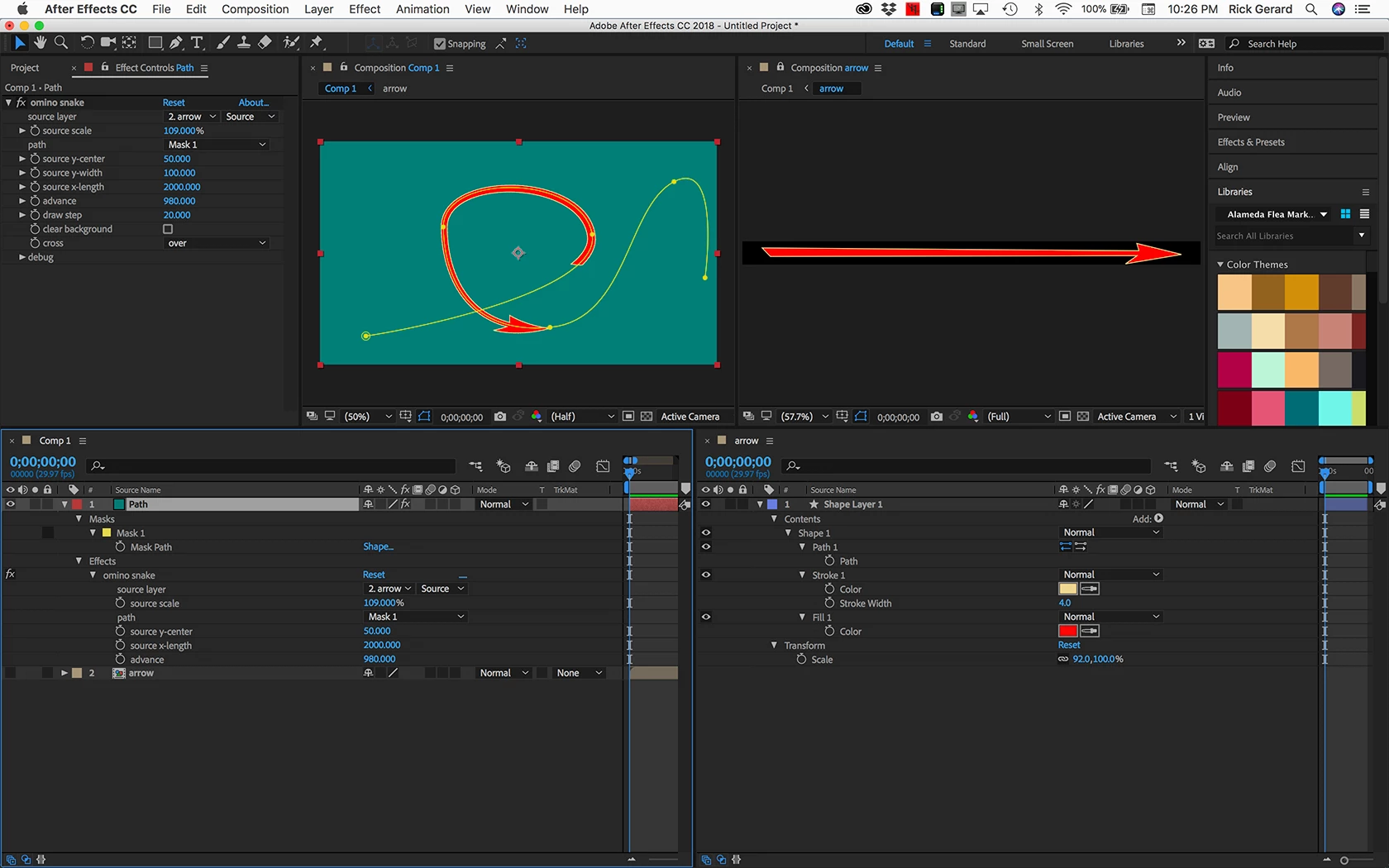
    I think that your setup is not correct. You need a comp that is almost the same size as your graphic, then you need a solid with a path. Then you choose the nested comp as the source and pick the path. Adjust the X length and Y width to match the nested comp dimensions, then adjust the scale to about 100% and animate the advance to get the nested comp to move along the path. Something like this: All of the modified properties of all layers are revealed.

    2 replies

    Roei Tzoref
    Legend
    January 17, 2018
    are any updates or alternatives which will create this effect for me?

    other ways you might consider on making arrows:

    BAO Boa - aescripts.com

    P.M.B
    Legend
    January 17, 2018

    That a great free preset.  Easy to use

    ~Gutterfish
    Rick GerardCommunity ExpertCorrect answer
    Community Expert
    January 18, 2018

    I think that your setup is not correct. You need a comp that is almost the same size as your graphic, then you need a solid with a path. Then you choose the nested comp as the source and pick the path. Adjust the X length and Y width to match the nested comp dimensions, then adjust the scale to about 100% and animate the advance to get the nested comp to move along the path. Something like this: All of the modified properties of all layers are revealed.

    Community Expert
    January 17, 2018

    It's working fine for me last time i used it. Without a screenshot of the entire UI with the modified properties of the layer giving you problems revealed it is very difficult to diagnose problems like this. Just PrintScreen and paste to the forum after selecting the layers and pressing the U key twice. (Windows) or drag a screenshot from the desktop to the forum (Mac).

    BTW, that's a horrible tutorial. I suggest you try the manufacturer and see if there are some better resources out there.

    robbiejbutler
    Participant
    January 17, 2018

    Thanks Rick,

    These are the settings that I have at the moment. I've been playing around with them but can't see and change. Have also tried it with auto-orient etc.