Phi.Def
Inspiring
February 26, 2020
Answered

Best render settings for graphics with alpha channel across both Windows AND Mac

  • February 26, 2020
  • 2 replies
  • 10130 views

Correct me if I'm wrong, but from what I understand:


Renders encoded using After Effects' default "Lossless with Alpha" settings can no longer be imported into Premiere (or any other program) on a Mac. That is, it uses the "Animation" codec which is a quicktime codec no longer supported by Apple.


I'm a motion graphics artist, but I'm not a technical guy. I create a lot of animations that I send to Premiere editors on both Windows and Mac. I'd love to see Adobe provide a new default "Lossless with Alpha" render setting, but while I'm waiting for that I need some new settings.


I've used TIFF sequences in the past, but they're not convenient because they're not user-friendly for novice editors, they don't include frame-rate information, and need to be zipped and unzipped for transfer (which is yet another area in which Macs and Windows need assistance in working together).


Is there a good codec and file format I can use that is virtually lossless, which produces a single file with alpha channel that can be imported and applied easily on all platforms?
This topic has been closed for replies.
Correct answer Rick Gerard

Thanks!


So to follow up, you've mentioned a few codecs there. Which one should I use for very high-quality (or even better, lossless compressed) video with alpha, that's the most universally usable (without having to download anything) for people who have Premiere Pro installed on both Windows and Mac?

For that best option, can you provide any more details or screenshots of the settings so I can create my own new preset? (That is, is it for a Quicktime MOV container, etc.?)


Thanks again.


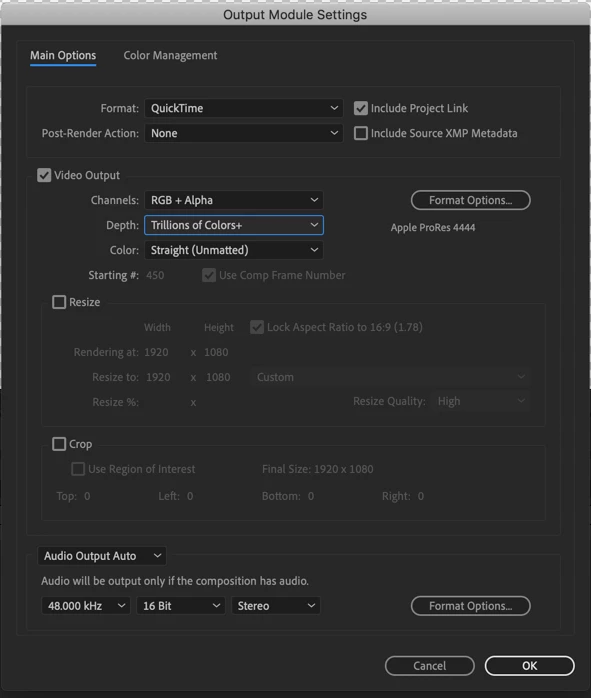
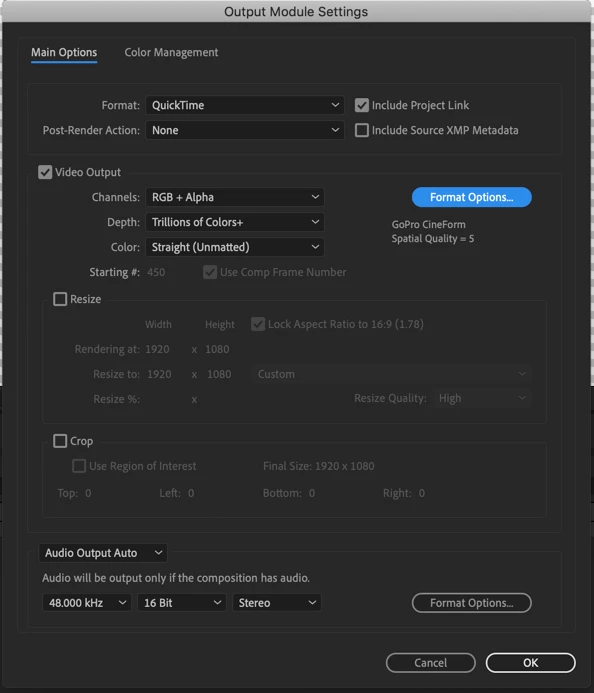
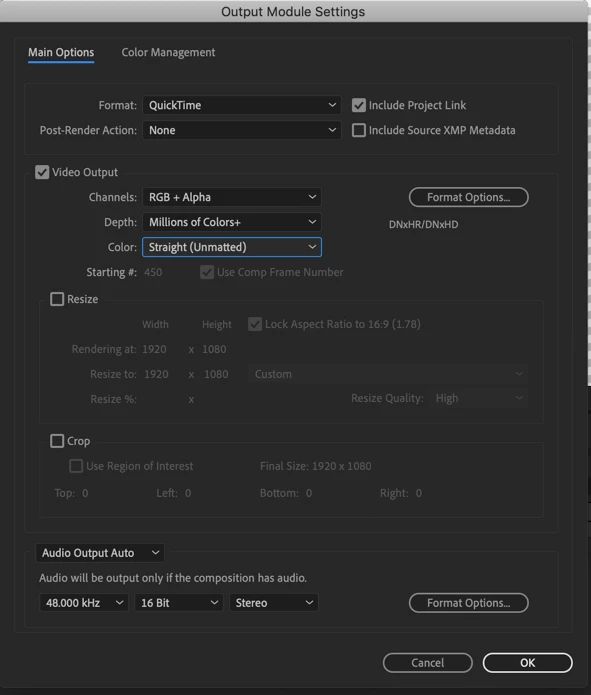
There are options in the Render Cue's Output Module that support Alphas. If you are rendering for maximum quality make sure your comp is set to at least 16-bit color. 

Sorry, I should have set the depth to trillions of colors. The option is available if you set the project to at least 16-bit color.

S

The color settings should be changed from pre-multiplied to straight.


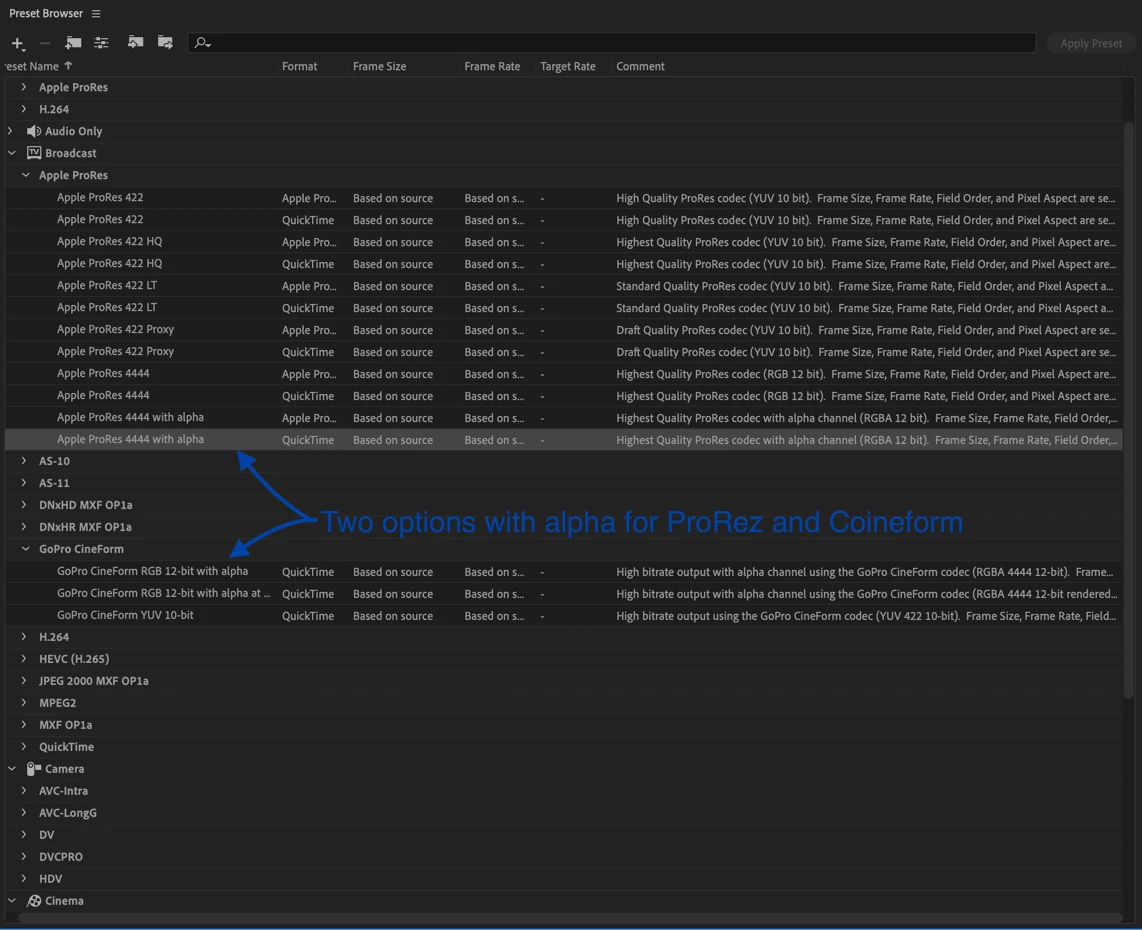
There are also pre-sets in the Adobe Media Encoder that can include Alpha Channels.

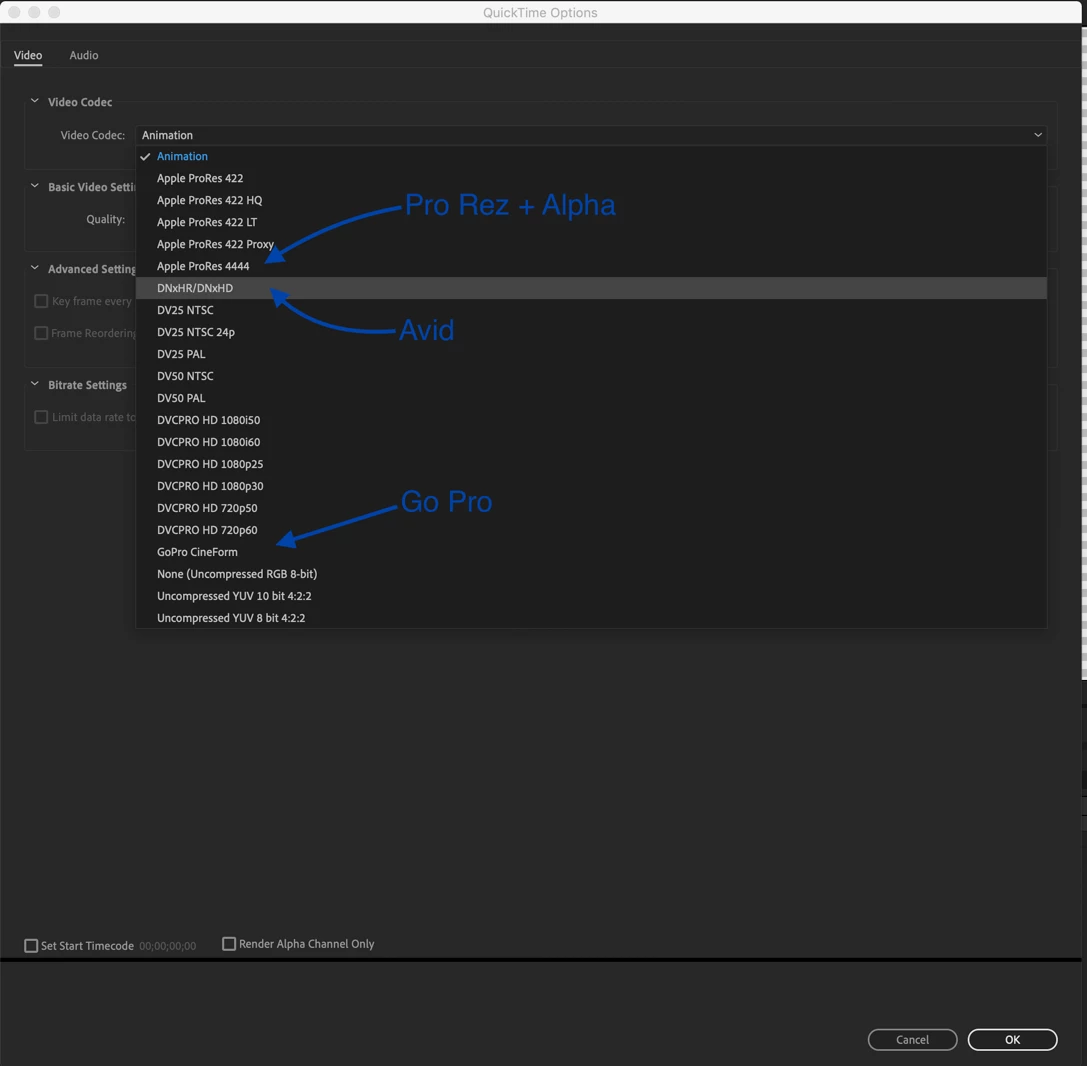
That is 4 more choices. All of them are visually lossless. The AME does not give you as much control and you'll end up with Pre-multiplied color but that usually doesn't cause problems if you have not changed the background color in the comp settings.  Since the DNxHR formats in the AME do not support rendering an alpha channel I suspect there may be a licensing issue with that traditional AVID format.


Everything there is free and usable on both platforms with no problems as long as the Windows users have installed the proper software.

2 replies

Mike_Abbott
Legend
February 26, 2020

As well as DNxHR and Cineform - which are both excellent; how about ProRes 444+Alpha which can now be read and written on both Mac and PC across After Effects and Premiere.

Mylenium
Legend
February 26, 2020

The only reliable method IMO would be the Blackmagic and RED enhanced/ bastardized (however you wanna see it) ProRes versions, but of course they are tied to their commercial products and are not readily available to everyone. Otherwise one could be sneaky and advise people to install a test version of Avid Media Composer. Funny enough a lot of the stuff that's broken in Adobe apps still works there and once you have their codecs on the system you could use them...


Mylenium

Phi.Def
Phi.DefAuthor
Inspiring
February 26, 2020

Thanks for your reply. It doesn't sound like any of those options will work for my situation. With a variety of constantly changing clients, I can't be asking them to install software simply in order to use my rendered graphics. That's just crazy.


So there's nothing that will work for me then? I'm stuck with TIFF sequences which, by default, always seem to import into premiere at the wrong frame rate? I find this so hard to believe.

Phi.Def
Phi.DefAuthor
Inspiring
October 15, 2020

There are options in the Render Cue's Output Module that support Alphas. If you are rendering for maximum quality make sure your comp is set to at least 16-bit color. 

Sorry, I should have set the depth to trillions of colors. The option is available if you set the project to at least 16-bit color.

S

The color settings should be changed from pre-multiplied to straight.


There are also pre-sets in the Adobe Media Encoder that can include Alpha Channels.

That is 4 more choices. All of them are visually lossless. The AME does not give you as much control and you'll end up with Pre-multiplied color but that usually doesn't cause problems if you have not changed the background color in the comp settings.  Since the DNxHR formats in the AME do not support rendering an alpha channel I suspect there may be a licensing issue with that traditional AVID format.


Everything there is free and usable on both platforms with no problems as long as the Windows users have installed the proper software.


This is really useful. Every time I install After Effects, I go in to change the default "Lossless with Alpha" settings to the Prores 4444 codec as you described above. I don't understand why Adobe keeps the default settings as ones that no longer work across all platforms when there are alternative settings available.